RUTX12 - 4G+ drops to 4G overnight and never recovers

I have a RUTX12 running firmware RUTX_R_00.07.24.3 and modem firmware EG06ELAR04A30M4G.

In the last few months the strong 4G+ connection has been dropping to 4G on the primary modem overnight. When the downgrade has happened carrier aggregation reports as “Inactive”. Clicking restart connection in the web gui then next morning does not fix the issue but changing the VOLTE setting and clicking save does fix it (So does issuing a modem reset from CLI).

I asked AI about this and it believes this is a modem firmware issue likely cause by the carrier tower introducing band power saving overnight but no sure how accurate this is. Can anyone help with troubleshooting / finding a solution.

Hello @Krobar,

Apologies for the delayed response.

Many mobile network operators use various power-saving measures to reduce energy consumption. Depending on the operator and network configuration, some frequency bands may be temporarily powered down or put into a lower-power state during periods of low network activity, such as overnight.

Basic services such as voice calls and SMS generally remain available, as operators typically keep their primary, wide-coverage low-frequency bands active. However, these practices can vary significantly depending on the mobile operator, country, and local network conditions.

Some operators may temporarily disable higher-capacity frequency layers during periods of low traffic, while others may keep all available bands active to maintain maximum network readiness. In some cases, users may notice changes in aggregate network performance or signal behavior during these periods.

Regarding why Carrier Aggregation (CA) is reported as inactive in the morning, we are currently investigating this behavior to determine the possible cause.

As a temporary workaround, you could try band locking. In the device WebUI, navigate to Network → Mobile → General and manually select the primary and secondary LTE bands supported by your local cell tower instead of leaving the band selection set to Auto.

Alternatively, you could try scheduling an automatic reboot of the device each morning. This can be configured in the WebUI under System → Maintenance → Auto Reboot → Reboot Scheduler, where you can specify a suitable time for the device to restart.

We hope this helps as a temporary workaround. Once we have more information regarding the Carrier Aggregation remaining inactive, we will get back to you as soon as possible.

We appreciate your patience and understanding.

Best regards,
P.
Hi

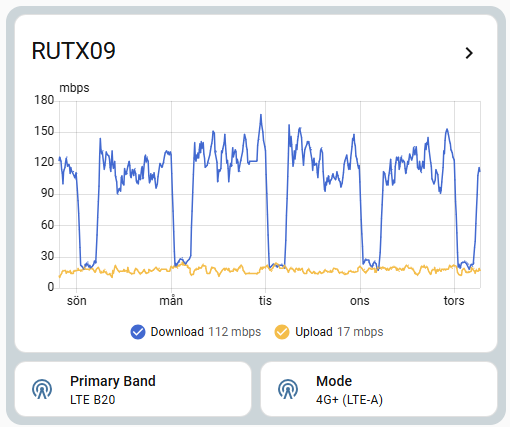
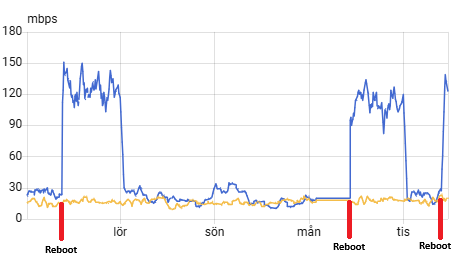
I experience the same with RUTX09 with the same modem and firmware. I have selected LTE B3 and B20 bands as they are the ones used in the cell. CA is activated daytime by the operator. I have to reboot the router every morning to get the B3 band and Carrier Aggregation.

Hello @Krobar and @thpo,

For Carrier Aggregation (CA) to activate, the modem needs to receive a sufficient amount of traffic/load. In some cases, simply running a ping command through the mobile interface is enough to activate Carrier Aggregation. However, in other cases, you may need to run a speed test to trigger this functionality.

Could you please check whether Carrier Aggregation activates when running a speed test on the router or when continuously pinging through the mobile interface?

To run a speed test on the router, navigate to System → Maintenance → Speed Test in the device’s WebUI.

To ping through the mobile interface, log in to the device’s CLI as root and run the following command:

ping -I <interface name> 8.8.8.8

If you are unsure which interface to use, run:

ip a

Then, look for the interface that has the same IP address as the one shown in the device’s WebUI under Network → WAN (for example eth1).

We hope this helps. Please let us know whether Carrier Aggregation activates while running the ping command or performing a speed test.

Best regards,
P.

I have a automated speedtest every 10 minutes from a Raspberry Pi with Ookla Speedtest software. I can see that the speed drops during the night.

The router is in a rural area in the middle of Finland so the operator probably shuts down the B3 band at midnight.

In the morning B20 stays active until i do a reboot and B3 activates. Carrier Aggregation works fine after that, I can see that the router switches from 4G to 4G+ LTE A when the speedtest runs.

Hi,

Speedtest does not bring back Carrier Aggregation
Clicking restart connection in the GUI does not bring back carrier aggregation
Rebooting the RUTX does bring back carrier aggregation / fixes it
Resetting the modem from the CLI does bring back carrier aggregation / fixes it

Rural Area in UK
EE Provider (Probably largest in the country)
Aggregation is B3 (20mhz) + B3 (20mhz) and a good signal (Typically 180-240Mbit on a multi connection speedtest)

Obviously my performance does not suffer as much as @thpo. The secondary modem gets offered B20 (5Mhz) + B3 (15Mhz) aggregation and I find it best to just block the B20 band and avoid aggregation for that one.

@thpo Try just changing the modem VOLTE setting in the modem config instead of rebooting, should be quicker and might help confirm if it is the same problem I have.

@Krobar I think we have the same problem. Clicking restart connection in the GUI does not activate B3 and 2CA. To enable/disable VoLTE is ofcourse a better solution vs. Reboot but as a solution to the problem not relevant.

My configuration is utilizing only SIM 1 and WAN (fiber). mob1s1a1 is configured as a failover connection. At the moment the fiber connection on the WAN port is down due to cable break.

I dont know if this has anything to do with this problem.

I think in theory we could set a modem reset on cron but that again is a bad solution. The fact a modem reset fixes it suggest the modem firmware is most likely at fault. My modem firmware is EG06ELAR04A30M4G, what modem firmware do you have installed?

The modem manufacturer wont help directly so we need help from Teltonika / @Povilas

I disabled VoLTE and then B3 + 2CA started so we definitely have the same problem.

Modem firmware EG06ELAR04A30M4G

band

Is there a planned fix for this issue? My temporary fix is to use the Reboot scheduler with Modem reboot every day at 06:00 am. This works fine.

Hello @thpo and @Krobar,

Apologies for the delayed response.

We have forwarded this issue to our R&D department, and it is currently under investigation.

In the meantime, as a temporary workaround, we recommend using the reboot scheduler.

We will keep you informed as soon as we have any updates or if we require any additional information from your end.

We apologize for any inconvenience this issue has caused and appreciate your patience while we investigate.

Best regards,
P.

@Povilas Any update?

Hello @Krobar,

At the moment, we are still investigating this and trying determine its exact cause.

For further troubleshooting, we will require some sensitive information from your side, such as the device’s Troubleshoot file. These files may contain information such as passwords, public IP addresses, serial numbers, and other potentially sensitive data.

To avoid sharing this information publicly, we have sent you a form to complete. You should receive it at the email address associated with your Community Forum account.

When completing the form, please enter 20967 in the Ticket ID field so that we can associate the submitted information with this thread.

Once you have completed the form, we will continue the communication through a private channel.

Thank you for your patience and cooperation.

Best regards,
P.

In the early years of having mobile broadband as my only internet access using a variety of devices not just my RUT, i was experiencing poor connectivity after prolonged periods of inactivity, such as overnight.

Now that i have a RUT that can be configured to reboot itself i have scheduled my RUT to do exactly that every morning and early evening.

Works for me.

I have noticed in my configuration that a modem reboot 06:00 every morning works to activate 2CA but RUTX09 choose B20 as primary band but if I schedule a complete device reboot RUTX09 choose B3 as primary band which ofcourse is better with higher upload speeds.

Hi,

I sent the requested details 2 weeks ago, any update?