RUTX11 WireGuard full-tunnel works on router, but LAN/VLAN clients lose Internet – policy routing & firewall guidance needed

Introduction – What I am trying to achieve (overall design)

I’m building a small lab network with a core switch doing L3 routing and an edge router (Teltonika RUTX11) providing Internet access through a WireGuard full tunnel.

My goals are:

  1. Keep inter-VLAN traffic local on the core switch (high throughput, no hair-pinning).

  2. Send only Internet-bound traffic toward the Teltonika.

  3. Have LAN/VLAN clients exit to the Internet exclusively via WireGuard.

  4. Keep router management reachable from LAN at all times.

The switching part works as expected. The difficulty is on the Teltonika side, specifically LAN → WireGuard policy routing and firewall/NAT behavior.

Network diagram (simplified)

                      Internet
                          |
                    [ ISP Router ]
                    192.168.1.254
                          |
                 VLAN 1 / WAN subnet
                   192.168.1.0/24
                          |
                +------------------+
                |  Teltonika RUTX11|
                |------------------|
                | WAN: 192.168.1.240
                | LAN: 192.168.240.1
                | WG : protonch     |
                +------------------+
                          |
                          | trunk / uplink
                          |
            +-----------------------------+
            |      Core L3 Switch         |
            |-----------------------------|
            | SVIs / Routing              |
            | VLAN 230 – 192.168.230.2    |
            | VLAN 240 – 192.168.240.2    |
            | VLAN 250 – 192.168.250.2    |
            +-----------------------------+
                          |
                    Access / Wi-Fi
                Clients in VLAN 240
                192.168.240.0/24

Switching side

VLANs & SVIs

  • Multiple VLANs (230 / 240 / 250).

  • Each VLAN has an SVI on the core switch.

  • Inter-VLAN routing happens locally on the switch (this works perfectly).

Policy-Based Routing (PBR) on the switch

  • I initially tested PBR on VLAN 240 to force Internet traffic toward the Teltonika.

  • PBR was removed later to simplify troubleshooting.

  • At this stage, I am not relying on switch PBR anymore.

Switching is stable and not the problem.

Teltonika design intent

  • Teltonika RUTX11 is the Internet gateway.

  • Internet access should go only via WireGuard (full tunnel).

  • WAN is used only to establish the tunnel.

  • LAN clients must:

    • Access the router (SSH / GUI) normally.

    • Reach the Internet through WireGuard

Firewall zones (summary)

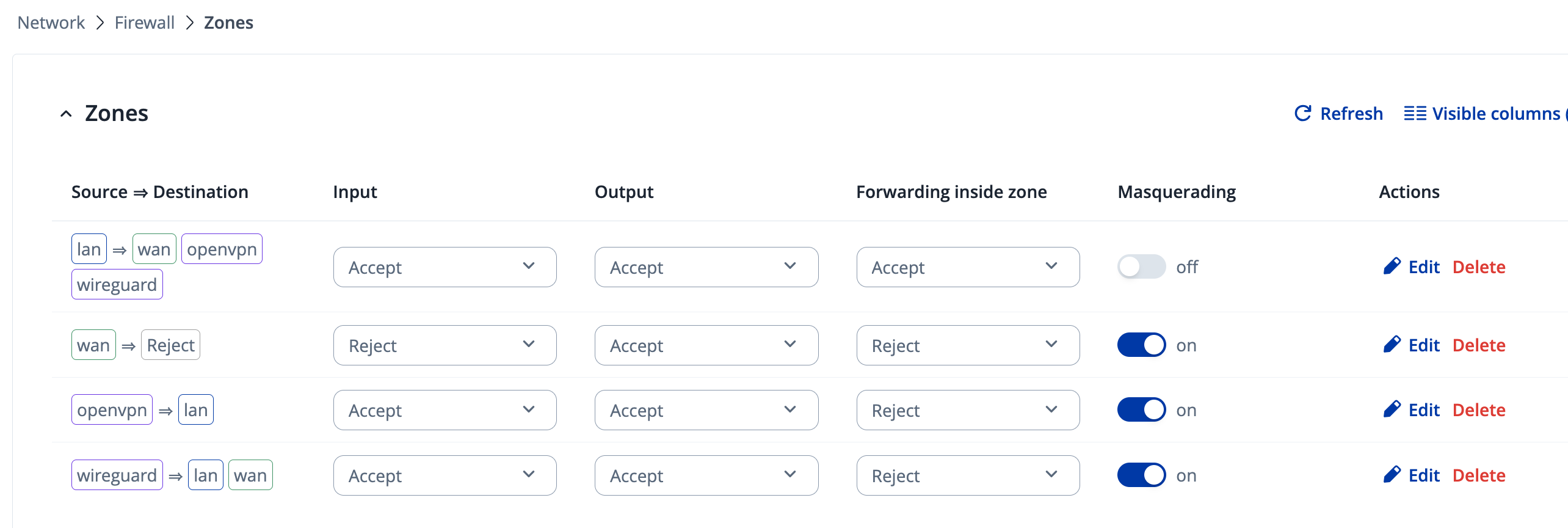
Zones present:

  • lan

  • wan

  • wireguard (covers protonch)

  • openvpn

  • another unused zone

Firewall configuration:

  • wireguard zone: ACCEPT / ACCEPT / ACCEPT, masquerading enabled

  • Forwarding exists: lan → wireguard

  • NAT exists on WireGuard zone

Example verification:

uci show firewall | grep forwarding
iptables -t nat -L POSTROUTING -v -n

The problem

Symptoms

  • Router itself can access Internet via WireGuard.

  • LAN / Wi-Fi clients cannot access Internet.

  • When I tried policy routing for LAN, LAN clients lost access to the router itself (SSH/GUI), although WAN SSH still worked.

ip route add default dev protonch table 100
ip rule add from 192.168.240.0/24 lookup 100 priority 100

Result:

  • LAN traffic routed into WireGuard

  • Router replies to LAN clients also routed into WireGuard

  • SSH/GUI from LAN to 192.168.240.1 stops working

I tried mitigating with:

ip rule add from 192.168.240.1 lookup main priority 50

…but LAN access remained unreliable.

What I need help with (Teltonika side)

  1. Correct way to route LAN clients via WireGuard full tunnel

    • Without breaking LAN access to the router itself.
  2. Best practice on Teltonika for this use case:

    • Pure ip rule based routing?

    • fwmark + policy routing?

    • Built-in Teltonika VPN policy routing feature?

  3. Minimal and correct firewall + NAT setup for:

    • LAN → WireGuard → Internet

    • While keeping router management local.


Expected final behavior

  • LAN clients:

    • Gateway: Teltonika LAN IP

    • Internet exit IP = WireGuard provider

    • Can SSH / manage router normally

  • Router:

    • Managed from LAN and WAN

    • WAN used only to maintain tunnel

  • Switching:

    • Inter-VLAN stays local

    • Internet traffic exits via Teltonika only

Just to highlight its the goal to keep the internal vlan traffic thru my core switch and just the internet access goes thru the wireguard tunnel. somehow the firewall its not allowing that.

Hello,

We’re currently looking into your issue and will get back to you as soon as we have more information or further questions.

Regards,
M.

1 Like

Hello,

We tried doing a setup as close as possible to yours and this is what we came up with:

  1. Instead of using the static routes / policy based routing, we simply added 0.0.0.0/0 to the Allowed IPs list under the Peer Configuration on the WireGuard Client device.
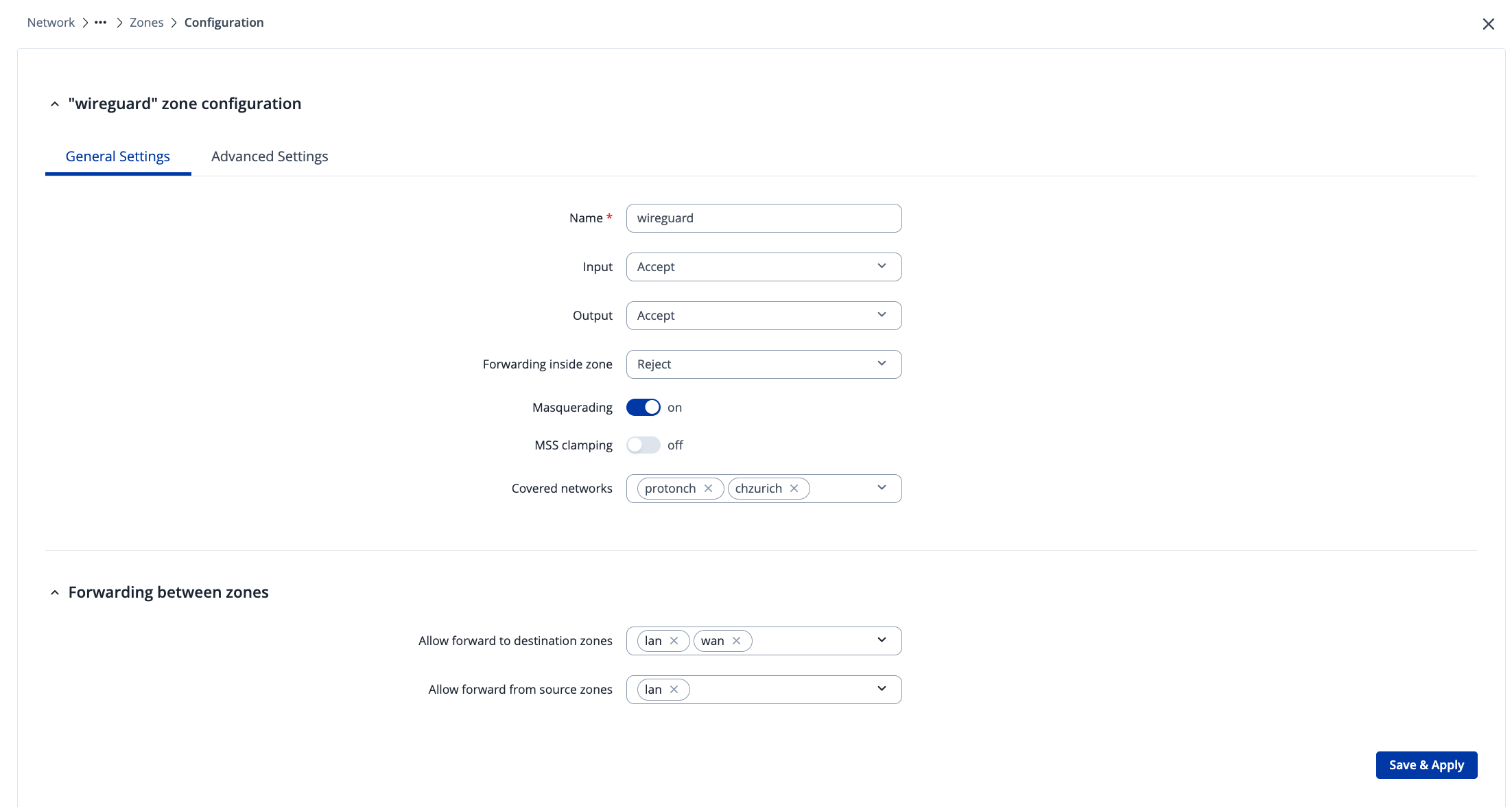
  2. We then went to Network → Firewall → Zones and we edited the firewall zone that is Wireguard => LAN:

    And added the WAN zone to the Allow Forward to destination zones:

This ended up:

  1. Routing ALL the traffic through the tunnel
  2. Providing the clients internet without any issues
  3. We tested this with VLANs included and saw the same results

Regards,
M.

Dear Matas and Support, ive tried the guidance but still not working. i did some troubleshooting here and maybe we can find out the solution.

As you know my setup is like that:

Internet
|
[ ISP Router ]
192.168.1.254
|
VLAN 1 / WAN subnet
192.168.1.0/24
|
±-----------------+

Teltonika RUTX11
WAN: 192.168.1.240
LAN: 192.168.240.1
WG : protonch
±-----------------+
trunk / uplink
±----------------------------+
Core L3 Switch
-----------------------------
SVIs / Routing
VLAN 230 – 192.168.230.2
VLAN 240 – 192.168.240.2
VLAN 250 – 192.168.250.2
±----------------------------+
Access / Wi-Fi
Clients in VLAN 240
192.168.240.0/24

So, the traffic from L3 vlan 240, its reaching me teltonika but from there is not going anywhere else.

I’ve also disable the wireguard tunnel just to test without this “complexity”, but the failure as the same.

From the teltonika router i can ping the internet without any issues with or without wireguard tunnel.

From the client-device its where resides the issue, but, im reaching teltonika router.

Device: RUTX11

Kernel: 6.6.108

Firmware: RUTX_R_00.07.19.4

Build: 505a89e18df

Build date: 2025-12-02 11:57:29

------------------------------------

root@Teltonika-RUTX11:~# ip route

default via 192.168.1.254 dev eth1 proto static src 192.168.1.240 metric 2

192.168.1.0/24 dev eth1 proto static scope link src 192.168.1.240 metric 2

192.168.1.0/24 via 192.168.240.2 dev br-lan proto static metric 10

192.168.230.0/24 via 192.168.240.2 dev br-lan proto static metric 10

192.168.240.0/24 dev br-lan proto static scope link src 192.168.240.1 metric 1

192.168.250.0/24 via 192.168.240.2 dev br-lan proto static metric 10

root@Teltonika-RUTX11:~# tcpdump -ni eth1 icmp

tcpdump: verbose output suppressed, use -v[v]… for full protocol decode

listening on eth1, link-type EN10MB (Ethernet), snapshot length 262144 bytes

14:45:39.615138 IP 192.168.240.206 > 8.8.8.8: ICMP echo request, id 23270, seq 0, length 64

14:45:40.619558 IP 192.168.240.206 > 8.8.8.8: ICMP echo request, id 23270, seq 1, length 64

14:45:41.619755 IP 192.168.240.206 > 8.8.8.8: ICMP echo request, id 23270, seq 2, length 64

^C

root@Teltonika-RUTX11:~# ping -c 3 -I eth1 1.1.1.1

PING 1.1.1.1 (1.1.1.1): 56 data bytes

64 bytes from 1.1.1.1: seq=0 ttl=57 time=12.520 ms

64 bytes from 1.1.1.1: seq=1 ttl=57 time=12.183 ms

64 bytes from 1.1.1.1: seq=2 ttl=57 time=11.754 ms

-– 1.1.1.1 ping statistics —

3 packets transmitted, 3 packets received, 0% packet loss

round-trip min/avg/max = 11.754/12.152/12.520 ms

root@Teltonika-RUTX11:~# ^C

root@Teltonika-RUTX11:~# nslookup 8.8.8.8

Server: 127.0.0.1

Address: 127.0.0.1#53

Non-authoritative answer:

8.8.8.8.in-addr.arpa name = dns.google

root@Teltonika-RUTX11:~# ip -br addr

lo UNKNOWN 127.0.0.1/8 ::1/128

eth0 UP

eth1 UP 192.168.1.240/24 2a01:e0a:dee:8cf0:21e:42ff:fe32:3e5f/64 fe80::21e:42ff:fe32:3e5f/64

ip6tnl0@NONE DOWN

gre0@NONE DOWN

gretap0@NONE DOWN

erspan0@NONE DOWN

ip6gre0@NONE DOWN

br-lan UP 192.168.240.1/24 fd63:7cb8:2b68::1/60 fe80::21e:42ff:fe32:3e5e/64

wlan0-1 UP fe80::21e:42ff:fe32:3e60/64

wwan0 DOWN

root@Teltonika-RUTX11:~# ip route

default via 192.168.1.254 dev eth1 proto static src 192.168.1.240 metric 2

192.168.1.0/24 dev eth1 proto static scope link src 192.168.1.240 metric 2

192.168.1.0/24 via 192.168.240.2 dev br-lan proto static metric 10

192.168.230.0/24 via 192.168.240.2 dev br-lan proto static metric 10

192.168.240.0/24 dev br-lan proto static scope link src 192.168.240.1 metric 1

192.168.250.0/24 via 192.168.240.2 dev br-lan proto static metric 10

root@Teltonika-RUTX11:~# iptables -t nat -L POSTROUTING -v -n

Chain POSTROUTING (policy ACCEPT 3655 packets, 151K bytes)

pkts bytes target prot opt in out source destination

5474 294K postrouting_rule all – * * 0.0.0.0/0 0.0.0.0/0 /* !fw3: Custom postrouting rule chain */

3618 148K zone_lan_postrouting all – * br-lan 0.0.0.0/0 0.0.0.0/0 /* !fw3 */

1819 143K zone_wan_postrouting all – * eth1 0.0.0.0/0 0.0.0.0/0 /* !fw3 */

0     0 zone_openvpn_postrouting  all  --  \*      tun\_+   0.0.0.0/0            0.0.0.0/0            /\* !fw3 \*/

0     0 zone_openvpn_postrouting  all  --  \*      tun+    0.0.0.0/0            0.0.0.0/0            /\* !fw3 \*/

0     0 zone_openvpn_postrouting  all  --  \*      tap\_+   0.0.0.0/0            0.0.0.0/0            /\* !fw3 \*/

root@Teltonika-RUTX11:~# iptables -t nat -I POSTROUTING 1 -s 102.168.240.0/14 -o eth1 -j MASQUERADE

root@Teltonika-RUTX11:~# tcpdump -ni eth1 icmp

tcpdump: verbose output suppressed, use -v[v]… for full protocol decode

listening on eth1, link-type EN10MB (Ethernet), snapshot length 262144 bytes

14:59:08.587791 IP 192.168.240.206 > 8.8.8.8: ICMP echo request, id 61158, seq 0, length 64

14:59:09.591878 IP 192.168.240.206 > 8.8.8.8: ICMP echo request, id 61158, seq 1, length 64

14:59:10.593730 IP 192.168.240.206 > 8.8.8.8: ICMP echo request, id 61158, seq 2, length 64

14:59:11.593989 IP 192.168.240.206 > 8.8.8.8: ICMP echo request, id 61158, seq 3, length 64

14:59:12.596410 IP 192.168.240.206 > 8.8.8.8: ICMP echo request, id 61158, seq 4, length 64

14:59:13.601025 IP 192.168.240.206 > 8.8.8.8: ICMP echo request, id 61158, seq 5, length 64

14:59:14.605408 IP 192.168.240.206 > 8.8.8.8: ICMP echo request, id 61158, seq 6, length 64

Also i can see on my switch l3, the pbr working without issues.

I appreciate your help here.

This doesn’t seem correct. Delete this route and retry.

Hi there,

If vogon’s suggestion of deleting the route does not help your situation, I’ve sent you a form to fill out - fill it out with your contact details, and for the ticket ID, please use 17538

Regards,
M.

Hello Mantas,

Thank you for the clarification.

I would like to explain why I believe the static route suggestion (specifically 192.168.1.0/24 via 192.168.240.2) does not address the issue I am facing, and to ensure we are aligned on where the problem occurs.

Routing vs forwarding/NAT

From a pure routing perspective, the Teltonika already has:

  • a connected route for 192.168.1.0/24 via eth1

  • connected 192.168.240.0/24 via br-lan

  • static routes for other internal VLANs behind the switch

So routing reachability is correct and return paths exist. I also confirmed that packets are forwarded out of eth1, which means routing decisions are being made correctly.

Where the failure occurs

The failure happens before routing selection, at the firewall/NAT stage.

I verified this with packet captures:

  • On br-lan, I see traffic from 192.168.240.206 → 8.8.8.8

  • On eth1, I also see traffic leaving the router, but with source IP still 192.168.240.206

  • The traffic is therefore forwarded but not NATed/masqueraded, and the upstream gateway drops it

When I manually add:

iptables -t nat -A POSTROUTING -s 192.168.240.0/24 -o eth1 -j MASQUERADE

traffic immediately works, which strongly indicates a NAT / firewall zone classification issue rather than a routing issue.

Why the static route does not help here

The route: 192.168.1.0/24 via 192.168.240.2

is ignored due to a lower-metric connected route via eth1, and even if it were used, it would not affect NAT or firewall forwarding decisions.

Since NAT and forwarding are zone/interface-based, and this traffic enters the router via eth1 (WAN zone), it is not treated as LAN-originated traffic and therefore does not hit the expected masquerade rules.

I want to keep local inter-VLAN traffic on the switch and use the Teltonika purely for edge NAT/VPN, which is why I’m trying to avoid moving all routing onto the router.

I can fill out the form that you sent me , however my local traffic I want to keep on the switch as I’ve mentioned above .

Many thanks again for the help and I accept the join tshoot

Thank you for the clarification, once the form appears, I’ll reach out to you!

Regards,
M.