saentis
December 22, 2025, 7:40am
1
Hello,
I have configured RUTX11 Site-to-Site VPN to AWS as described at
Hello,
Yes, it is possible. You can create a VPN gateway and a site-to-site instance on AWS, then configure your RUT device for IPSec.
However, some changes will need to be made via the CLI/SSH. You can find instructions on how to access the CLI here: RutOS Command Line Interface (login using the username: root).
First, make sure that you are using the latest firmware available on your RUT device.
Then, configure IPSec. Here’s an example:
Tunnel1:
[image]
[image]
Advanced settings (tab…
The CLI Command in the Link above
Firmware version RUTX_R_00.07.20
RUTX Local Network 192.16.1.0/24
AWS VPC 172.16.0.0/16
Subnet 172.16.1.0/24
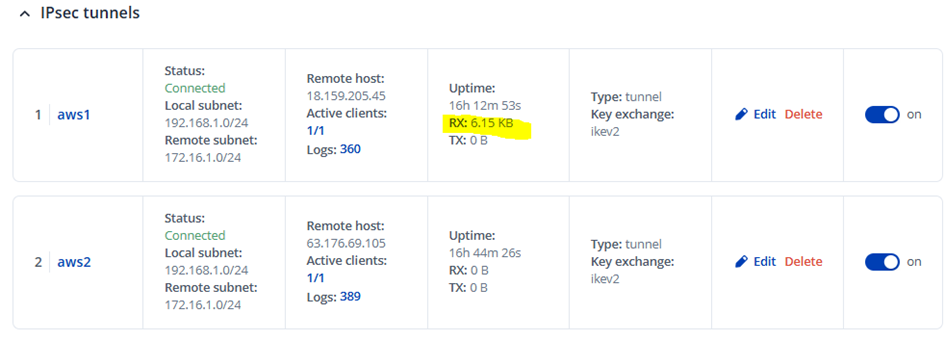
The IPsec Tunnel state are up and running.
But communication Ping or ssh between RUTX11 and the Linux VM in AWS (and vice versa) is not possible.
Ping from AWS Linux 172.16.1.x VM to RUTX11 192.168.1.1
Packets are arriving (RX 6.15 KB) on the RUTX11 Router, but no TX to AWS VM.
Routing from Network 192.168.1.0/24 to VPN Gateway on the AWS Site is configured.
Security Group on AWS allows ICMP and ssh.
I also configured passthrough
Hi there,
I am in the process of setting up an IPSec Tunnel from a RUTX50 to our PA-820.
The tunnel-connection itself works good but for some reason the RUTX50 has issues with routing the traffic correctly.
Scenario:
Internal IP-Range: 10.0.0.0/8
Local IP Range for the LAN behind the RUTX50: 10.1.237.240/28
I created an additional LAN(lanipsec), which is connected to eth0 for that local LAN, the Wifi-Clients should still be routed directly out the WAN-Port without going in the tunnel, so I…
but, there is no communication between on-prem RUTX11 and Cloud AWS VPC.
It seems that RUTX11 is not sending packets to AWS via the IPsec Tunnel connection.
Does anyone have a working AWS S2S connection and can help?
Thank you
Greetings,
For troubleshooting purposes, we will require more sensitive information from your end, such as the troubleshoot file, which may contain passwords, public IP addresses, serial numbers, and such. To avoid leaking this information, we have sent you a form to fill out, which you will receive in your e-mail inbox that you have registered your account with in the forums. In the Ticket ID field of the form, please enter the ID of this thread, which is 17038 .
Best Regards,
saentis
December 23, 2025, 10:57am
4
Hi Justinas