I’ve got a RUTX11, running the latest firmware (RUTX_R_00.07.18), but DDNS doesn’t seem to be updating correctly. I’m configured for afraid.org using the v2 token method (auto-populated), and it seems to be able to log in correctly, but it’s not sending/updating my new public IP address correctly. I’ve tried two auto-detection URLs (the default, and http://myip.dnsomatic.com), and when I browse to either of those from a PC behind my RUTX11, I get my new public IP address, however the RUTX11 doesn’t seem to be picking it up correctly even though I have the IP address source set to public.
Is there a known issue with DDNS in the latest firmware, and/or are there any logs I can look at that might tell me what’s going on? I’ve tried disabling/re-enabling the configuration, removing and re-adding it completely, and rebooting the router, and none of these steps have helped either.
Could you please clarify a couple of details, is the problem that DDNS doesn’t work at all or is it just that the new IP address isn’t shown on the DDNS overview in the WebUI?
I tested it on my end with the 7.18 firmware and a RUTX device, and everything works properly. I used noip.com as the DDNS provider.
The configuration shows as ‘Up’ in the Teltonika UI, but with the wrong IP address - see below (I’ve redacted part of the data, but my current IP is not in the 62.x range, it’s in the 88.x range instead).
Thank you for the reply. Do I understand correctly that the issue is that the IP address doesn’t update only visually in the overview section, but the IP update requests are being sent to the DNS provider correctly?
Further on, you can try to change the Force interval to a shorter time instead of 10 hours, because this is the setting that regulates how often the device sends the IP updates to your DNS provider.
I have tried configuring the DDNS with afraid.org and found out that for the IP address to update an update key is used, but it isn’t possible to add it into our router’s configuration.
However, you can use crontab to run a curl command periodically to update the IP address.
Use the command crontab -e, then edit the file, press Insert or i and add this line
*/5 * * * * /usr/bin/curl -k "https://freedns.afraid.org/dynamic/update.php?<update_key>
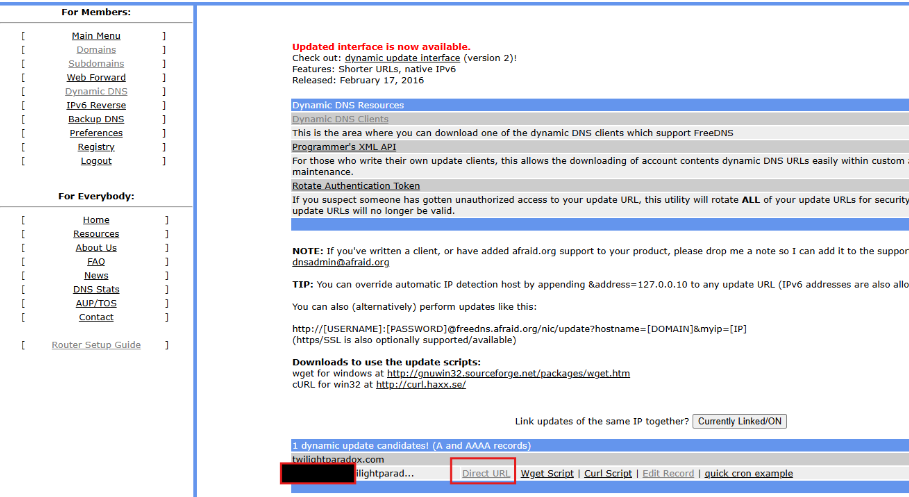
To get the link with the update_key you have to Navigate to FreeDNS → Dynamic DNS and copy the ‘Direct URL’ link at the bottom of the page.
The number 5 in the crontab indicates how often the command should be executed, in this case it is set to every 5 minutes.
Here is some more information about crontab - [OpenWrt Wiki] Scheduling tasks with cron
Then press ESC, write :wq and press Enter
3. Then use the command service cron restart
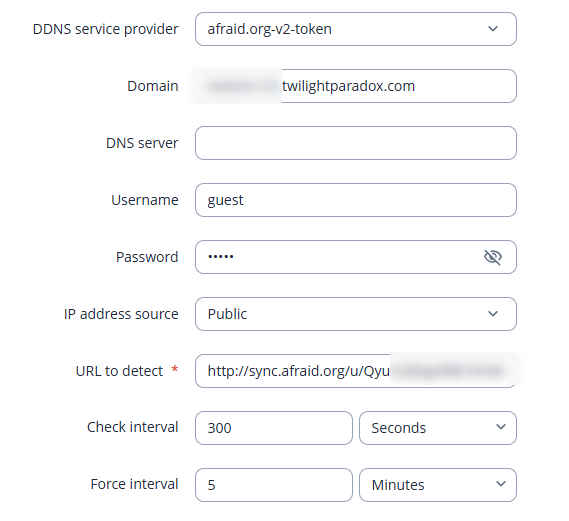
Now the IP address should be correctly updated. If it still doesn’t work, please send me the current configuration for the DDNS on the router’s WebUI. Please don’t include any sensitive information, such as the hostname and your public IP.
I’ve added the crontab entry, and it’s updated on its first attempt, so thank-you for that workaround!
As an aside, in your screenshot from afraid, there’s a link at the top for ‘version 2’ updating. That’s what I was using (with the v2 token based profile in RUTOS), and the v2 links work perfectly with curl too. Might be worth checking whether there’s an easier way to fix the profile using those, rather than the v1 options.
I have had a look at the version 2 of the afraid.org dynamic update interface and there seems to be no easier way to implement the IP updates with it.
Regarding the support of token-based updates, I will reach out to our R&D team with this suggestion and get back to you once I get an answer from them.
I’ve done some more research myself too, mostly out of curiosity…
It turns out that the ‘token’ function simply replaces the requirement for a username and password in the URL string. I was able to set up a ‘custom’ DDNS configuration via the UI, where the “Custom update-URL” is the tokenised link (http://sync.afraid.org/u/), the domain and lookup hostname are the hostname I want it to check validity on, and the IP source is ‘Public’, using any of the normal IP checkers (currently the default checkip.dyndns.com). Seems to work fine that way, so perhaps the tokenised update URLs actually make it easier for your profile? Assuming the prefix (including the /u/) remains the same, you could just ask for the token, or alternatively just ask for the full update URL anyway. No username or password required, and it ‘just works’!
Sorry for the late reply, thank you for the update. I have tried out the “custom” option, it does work well that way, and I have found out that another way you can set this up is by selecting afraid.org and putting the update URL into the URL to detect section, and it updates the IP successfully.