My RUTX11 failed to come online after a power failure. When I checked, I saw the 5 signal-strength LEDs blinking approximately once per second.
I tried power off, power on (even with a week inbetween), tried the various RESET options documented in the manual, tried with the SIM card in slot 1, slot 2, completely removed. Always the same. After about 10-20 seconds of normal boot behavior, the five signal-strength LEDs start to blink at ~1Hz, and that’s it.
The behavior you described - all five signal LEDs blinking at roughly 1 Hz after the initial boot - is a documented “fatal boot error” on the RUTX11. This indicates the router is unable to complete its boot process, usually due to one of the following causes:
Corrupted firmware – it might have occurred due to a sudden power loss.
Failed NAND/flash memory – preventing the bootloader from loading the OS.
Hardware failure on the board – less common, but possible if a component was damaged.
Before considering hardware replacement, you can try the following steps:
Use a different power supply (PSU) to rule out power issues.
Flash a fresh firmware image via the bootloader menu.
You can download the latest RUTX11 firmware here:
Step-by-step instructions for flashing the firmware using the bootloader can be found here:
If these steps do not resolve the issue, it likely points to a hardware failure, and I recommend contacting your reseller to initiate the RMA process.
Thanks Vilius for the quick and comprehensive help!
I may have found an interesting aspect of the issue. I can successfully flash the firmware, the device reboots and runs normally. However, it only works as long as it stays powered. As soon as I remove power, the boot problem returns.
It looks as though the firmware is not permanently stored in device memory.
Is there a power source (button cell?) in the device, that’s responsible for maintaining non-volatile memory? Similar to PC mainboards?
And yes, I can reach the Web UI while the five signal-strength LEDs are blinking. I did not try that before flashing the firmware (only via WiFi, which obviously didn’t work), so I cannot judge if this is new or not.
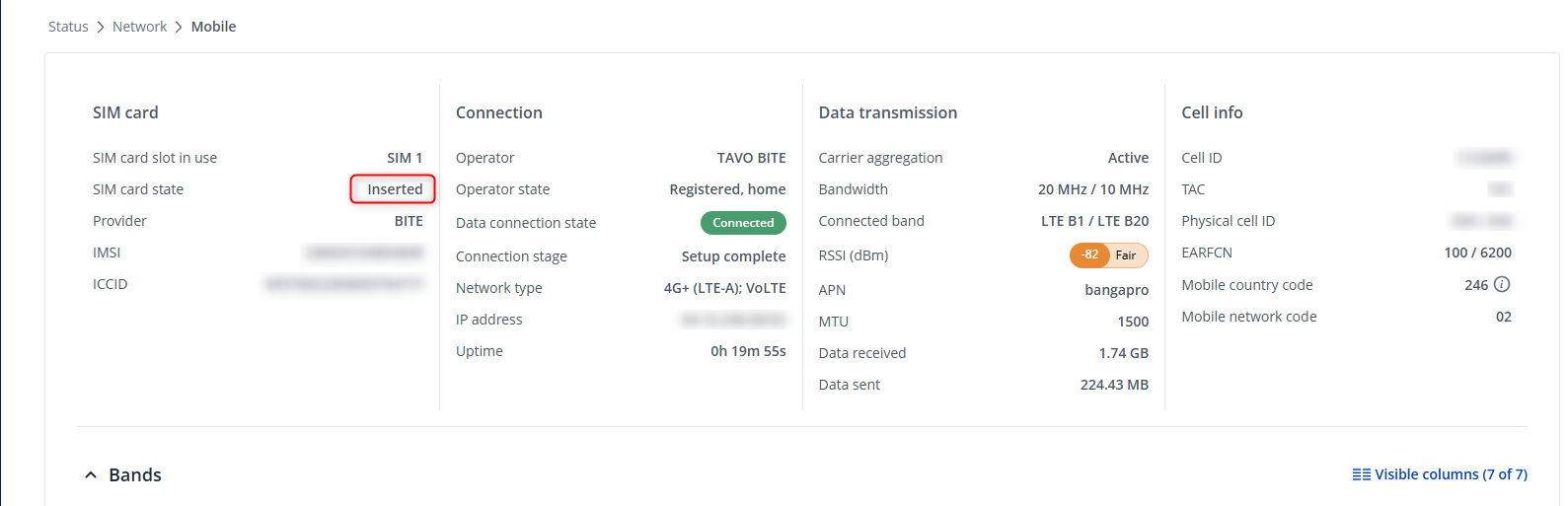
If the SIM card state is not inserted, could you please check if the SIM card works in a different device? e.g. Smartphone / tablet?
If the SIM card is inserted, but you’re unable to connect to the internet, check the APN settings in Network → Mobile → General.
Additionally, to rule out any firmware related issues, follow this procedure and flash the firmware using bootloader menu. I would recommend downloading and flashing the latest Stable firmware.
Sorry for not making myself perfectly clear. I have already flashed the latest stable firmware via the bootloader. I have done this three times now:
At the end of the firmware update process, the device reboots, and comes up normally.
As soon as I remove power, and plug it back in, I get the five blinking LEDs again
I am currently unable to test properly with a SIM card (it is required for use in a backup device until end of December). I will get back once I have had a chance!
If no SIM card is inserted, this is expected behavior. In this state, the device continuously searches for a SIM card and attempts to connect to the network. As a result, the LEDs will blink as described.
Additionally, could you please let me know if you are experiencing any other issues with the device?
I can confirm that re-flashing the firmware has fixed the problem! After re-inserting the SIM card, the device now boots and comes online just fine.
So it seems that the power failure somehow corrupted the flash memory, and installing the latest firmware via bootloader fixed it.
Thank you very much for your help!
I find it a bit confusing/misleading that with the new firmware, the sequence of LEDs lighting up during boot is totally different, nut now that I know this, won’t be an issue.