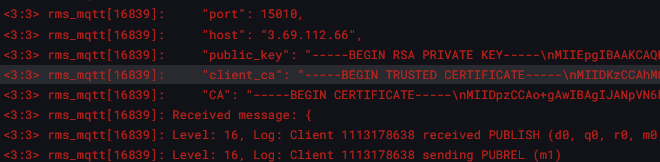
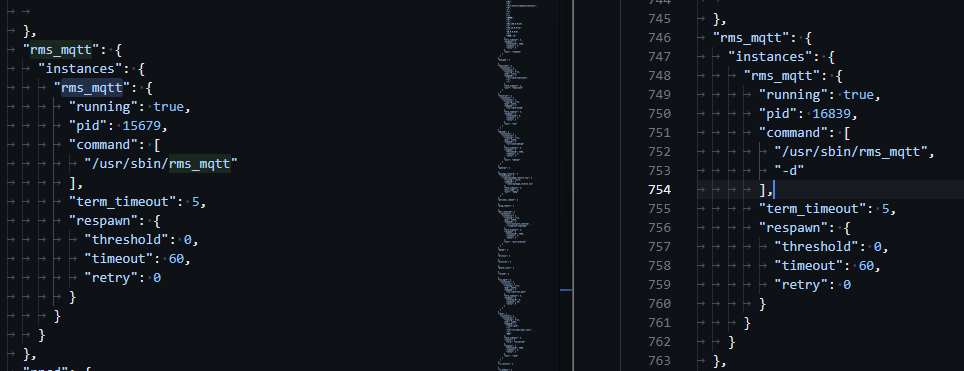
I recently updated a RUTX11 from 7.17.5 to 7.18.3 and have a syslog server set up. Since the update, there is a wild amount of logging spewing out of facility 3 (system daemons) severity 3 (errors) that just looks like ultra verbose logging. You can see full scripts, certificates/private keys, etc.
For troubleshooting purposes, we will require more sensitive information from your end, such as the troubleshoot file, which may contain passwords, public IP addresses, serial numbers, and such. To avoid leaking this information, we have sent you a form to fill out, which you will receive in your e-mail inbox that you have registered your account with in the forums. In the Ticket ID field of the form, please enter the ID of this thread, which is 16419.
Also - I am going to assume ‘support’ coming from “support@26113579.eu1.r.hubspot-inbox.com” is not legit, even if the email has an easily faked teltonika signature.
Were the issues resolved after removing the debug flag, or do you still need assistance?
The email you received requesting a troubleshoot file was from our team, we wanted to confirm whether debugging was enabled or if there was any other option responsible for the excessive logging.
Yes - it seems fine now. Any idea how the debug flag could get set? I ended up using a “uci delete” command to get rid of it. I don’t know if it had already been set prior to the update from 7.17.5 to 7.18.3, but I know the crazy logging started after the upgrade.
I wasn’t able to reproduce the issue where the debug flag appears after a firmware update. It’s possible the flag was enabled beforehand. If the issue occurs again, please don’t hesitate to contact us.