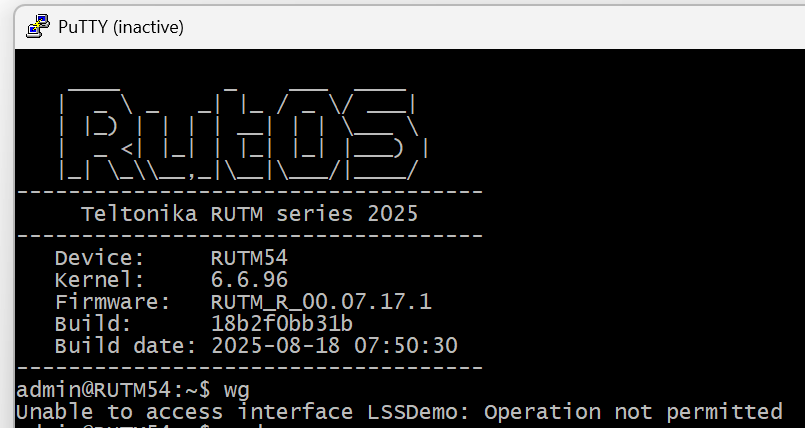
I am trying to get my RUTM54 to connect to a PfSense firewall with Wireguard. When I follow the guide at Wireguard Peer To Peer Configuration example - Teltonika Networks Wiki it says at the end I should check the config in the CLI with the wg command. When I do that I get an error:
Unable to access interface LSSDemo: Operation not permitted
LSSDemo is my Wireguard tunnel on the RUTM54.
I do not see any connection attempts on the PfSens-box.
Could you clarify the firmware version that is currently installed on your RUTM54?
If not the latest, could you please upgrade to the latest and re-test the configuration to see if it works properly? There have been wireguard fixes that came out with the 7.17.x firmware.
Other than that, could you also please provide a topology in case the above doesn’t resolve your issue?
Local site:
RUTM54 connected to 5G metwork and serving local clients via WiFi.
No static public IP on WAN side.
Remote site:
PfSense Firewall with WireGuard server.
Static public IP
Wireguard works from android phones and windows laptops to this site from different networks.
I want to create a wireguard tunnel from the RUTM54 to the pfsense to allow all WiFi-clients to access the remote network without each having a separate tunnel.
 . It works now.