RUTM30/31 Operating Temperature

The wiki pages for these new routers (QSG RUTM31 - Teltonika Networks Wiki) shows an operating temperature of -40° to +40° but the marketing page for the same (RUTM31 COST-EFFICIENT 5G ROUTER) shows an operating temperature of -40° to +75°.

Could someone confirm that -40º/+75º is the actual working temperature?

Thanks,
Gav

Hello,

Sorry for the confusion, we’ll have this fixed. The operating temperature is -40 °C to 75 °C

Regards,
M.

Hello,

In SMS utilities is there a command to get the temperature of the modem via SMS TXT.

There is not one in the drop down of codes in the parameters list .

Here my example

Time stamp - %ts Data Connection state - %cs; Network type - %ct; Signal Strength - %ss; CELLID - %ci RSRP - %rp RSRQ - %rq SINR - %sr GPS info - %gs Get Temp - % -C

Temperature on the message doesn’t come back on SMS text.

I’ve tried all these suggestions

Use the command: `gsmctl -c

gsm.modem0 get_temperature`

No luck whatsoever .

Need help! could you add to the list in a firmware update?

Text message parameter list: on RUTM30

  • %nl - New line

  • %ts - Time stamp

  • %ut - UNIX time

  • %it - UTC time in ISO

  • %pc - Product code

  • %rn - Router name

  • %sn - Serial number

  • %fc - Current FW version

  • %fs - Firmware on server

  • %li - LAN IP address

  • %lm - LAN MAC address

  • %wi - WAN IP address

  • %wm - WAN MAC address

  • %er - RMS error message

  • %ms - Monitoring status

  • %gs - GPS info

  • %mi - Mobile IP addresses

  • %ss - Signal strength

  • %on - Operator name

  • %ct - Network type

  • %cs - Data connection state

  • %ns - Network state

  • %im - IMSI

  • %ie - IMEI

  • %md - Modem model

  • %is - Modem serial number

  • %ps - SIM pin state

  • %st - SIM state

  • %cp - RSCP

  • %ec - ECIO

  • %ic - ICCID

  • %ci - CELLID

  • %sv - Network serving

  • %su - SIM slot in use

  • %rp - RSRP

  • %sr - SINR

  • %rq - RSRQ

  • %nb - Neighbour cells

  • %ni - Network info

  • %g0 - Input (3)

  • %g1 - Output (4)

hello, refer to this wiki: RUTM30 Mobile Utilities - Teltonika Networks Wiki

from what I can see, no command to check the temperature whatsoever.. refer to this as well: RUTOS gsmctl Commands - Teltonika Networks Wiki

Alternatively, you can use the Ubus command: ubus call gsm.modem0 get_temperature
Or, you can use the RUTOS API with the following command: api get /modems/status | jsonfilter -e '@["http_body"]["data"][0]["temperature"]'

btw api commands can be sent through SMSes as well, can’t remember if ubus commands can be sent as well, uci commands can be sent 100%, you just need to figure out the correct syntax, you can find these in the mobile utilities page i linked previously

Hello, @Teknology,

Did the answers provided by @minecraft_creeperis answer your questions?

Regards,
M.

Hello,

No success,tried numerous commands via SMS in utilities ,they needs to be an option in the drop down to preset it ,i tried one it came back in chinese.

Could this be added as a firmware update in further updates?

Hello,

I can most definitely register this as a suggestion.

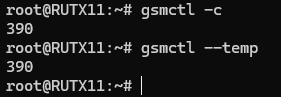
Regarding the previous reply by @minecraft_creeperis , ubus commands cannot be sent via SMS messages. In your case, utilizing API commands or using the gsmctl -c or gsmctl --temp in the SSH are the only options here.

I tried using both of the gsmtcl commands and was successful in receiving the temperatures:
image

The API command that was suggested won’t work due to the fact that jsonfilter is being used, if you were to send <device_password> api get /modems/status then you would get a bunch of information, with the temperature included. The other API command will only work in SSH.
image

Regards,
M.

This topic was automatically closed after 60 days. New replies are no longer allowed.
