Now I need to disable Wifi radio on RUTM10 and use TAP400 for wifi. I tried myself, but i there is always something not working properly. I am stuck. I think it is smarter to start from scratch than search for setup mistakes I have already made. I would like to get a step by step guide to achieve same or VLAN based functionality with new hardware setup.
Rutm10 built in Wifi capabilities currently serving Lan and Guestlan both on 2.4g. Rutm10 5g is disabled. Guest network set up according to link mentined above.
I want to disable rudm10 built in wifi, and enable tap400 5g for lan and 2.4 for guest lan.
Tap400 is connected and linked using device manager feature. I can connect to tap400 wifi, but cannot receive dhcp address. I think it is related to two dhcp servers configured on rutm10.
Your diagnosis is correct - the DHCP issue is caused by a conflict between the RUTM10’s two DHCP servers and the TAP400 attempting to receive an address on the same interface. Here is a clean step-by-step guide to achieve the desired setup from scratch.
Disable RUTM10’s built-in Wi-Fi
Navigate to Network → Wireless → SSIDs and disable both the 2.4 GHz and 5 GHz interfaces. This eliminates SSID conflicts.
Configure VLAN tagging on RUTM10 (LAN3)
The TAP400 uplink port (LAN3) must carry both networks simultaneously:
Keep the main LAN as the untagged (native) VLAN on LAN3.
Add Guest LAN as a tagged VLAN (e.g., VLAN ID 10) on LAN3.
This ensures that traffic from both SSIDs travels over the single cable while remaining logically separated.
Verify RUTM10 DHCP servers
Confirm that both DHCP servers remain active and are scoped correctly:
Main LAN interface: e.g., 192.168.1.0/24
Guest LAN interface (GuestLan, created per the guest WiFi wiki guide): e.g., 10.10.10.0/24
No changes are needed here as long as the interfaces are correctly bridged to the VLAN configuration from Step 2.
Set TAP400 IP settings to DHCP
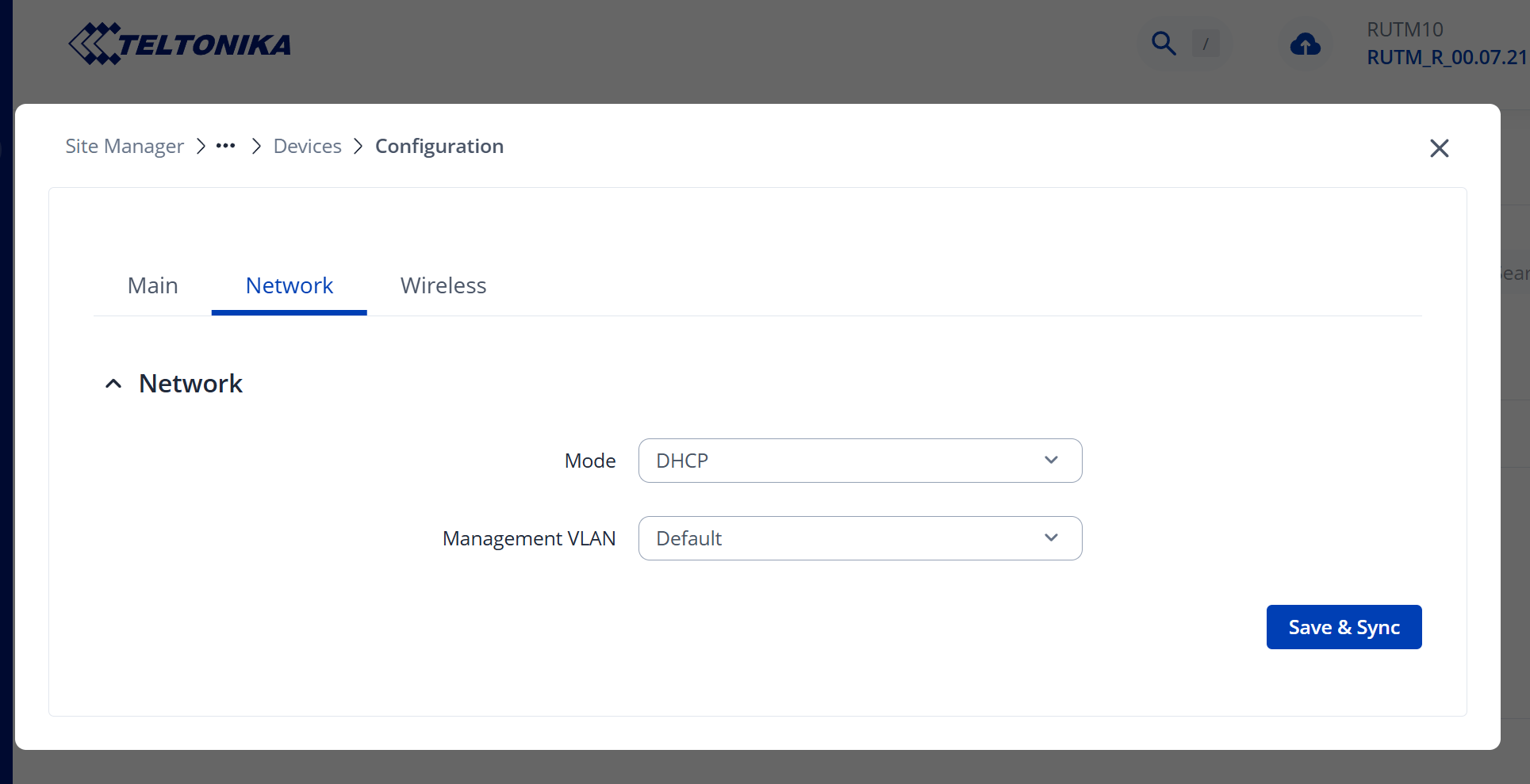
In the TAP400 WebUI, navigate to Network → IP Settings and set the mode to DHCP. The TAP400 will obtain its management IP automatically from the RUTM10’s main LAN DHCP pool. No static IP or gateway needs to be set manually.
Configure TAP400 SSIDs with VLAN IDs
Navigate to Network → Wireless → SSIDs on the TAP400 and configure two access points:
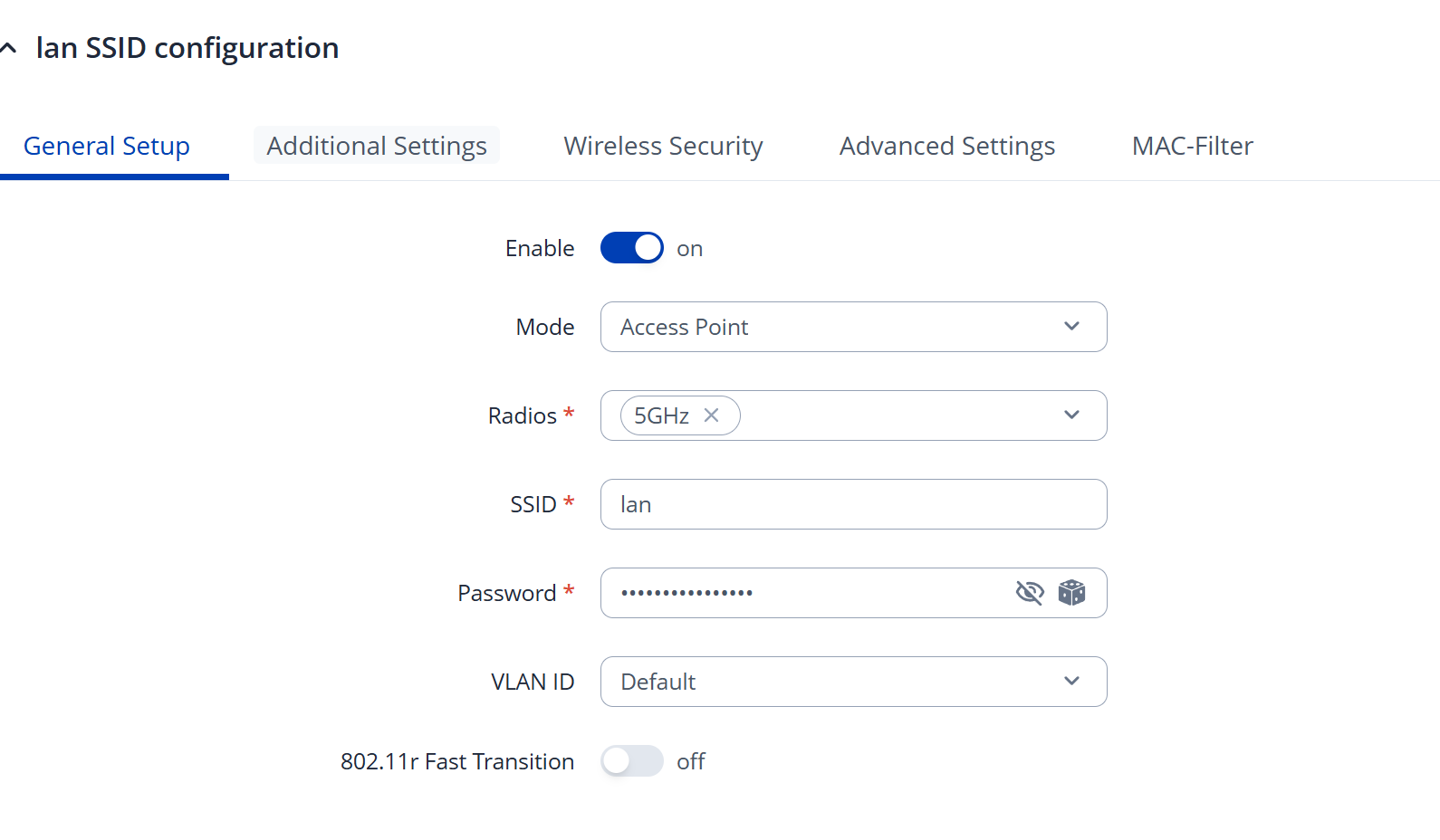
SSID 1 (Main LAN — 5 GHz):
Mode: Access Point
Radio: 5 GHz
VLAN ID: default (untagged — bridges to main LAN)
Set your SSID name and password
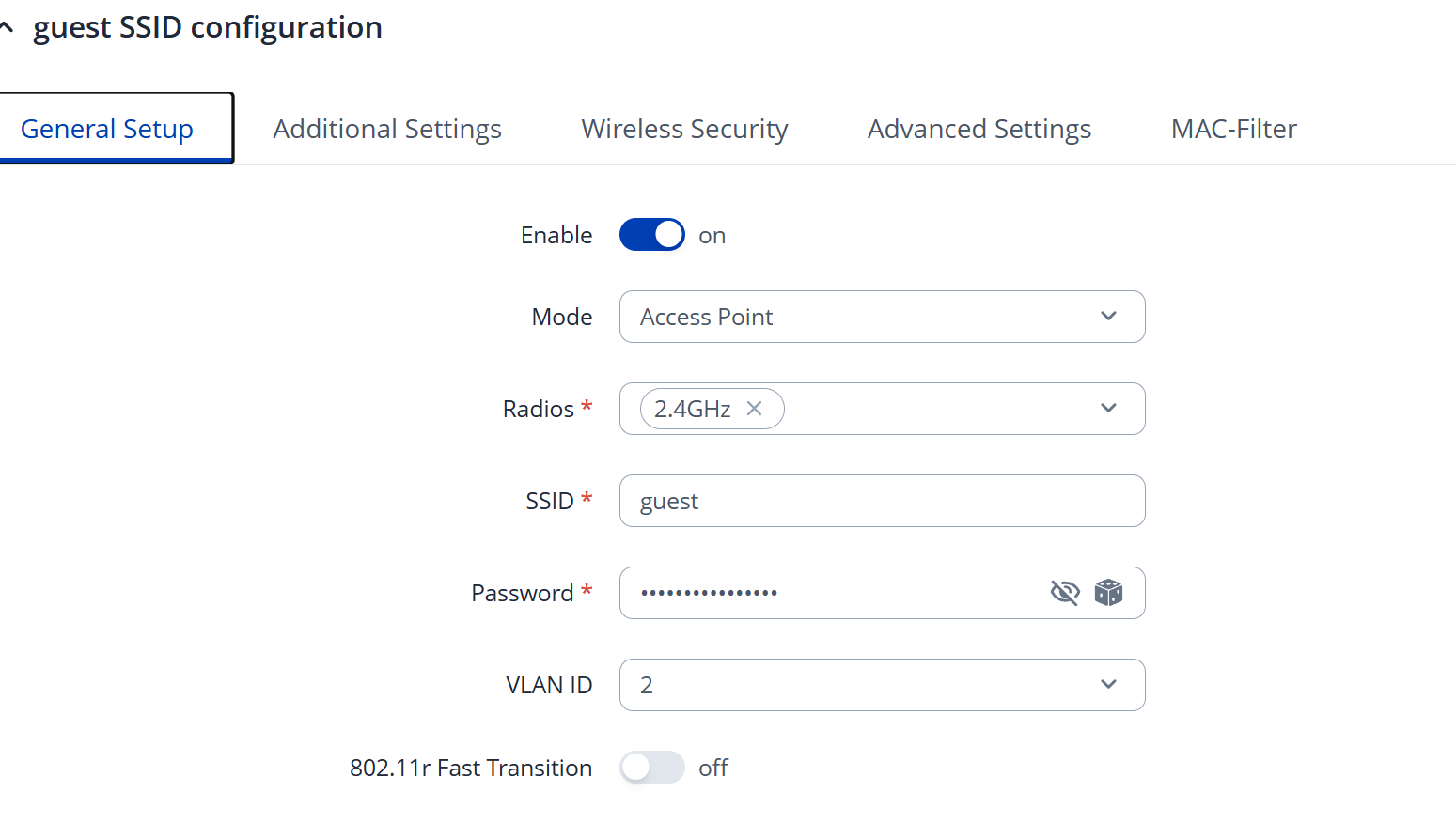
SSID 2 (Guest LAN — 2.4 GHz):
Mode: Access Point
Radio: 2.4 GHz
VLAN ID: 10 (or whichever VLAN ID matches the Guest LAN tagged VLAN set in Step 2)
Set your Guest SSID name and password
The VLAN ID field in the TAP400 SSID configuration (Network → Wireless → SSIDs → Edit → General Setup) maps each SSID directly to the corresponding VLAN tag, so client traffic is forwarded to the correct RUTM10 interface and DHCP pool.
Verify firewall rules on RUTM10
Ensure the existing Guest LAN firewall zone is still correctly configured per the wiki guide:
Guest zone: Input Accept, forward allowed only to WAN
Traffic rule dropping ports 22, 80, 443 from Guest zone to Device (input) remains in place
No firewall changes are needed on the TAP400 itself.
If you continue to experience issues after following these steps, please share screenshots of the TAP400 SSID configuration and RUTM10 VLAN/interface settings so we can investigate further.
Apologies for the missing step in the guide, it was due to editing error. The router port connected to the TAP400 must be configured as a tagged (trunk) port for the VLANs used by the wireless networks.
To achieve that you can try to:
Configure VLAN tagging on RUTM10 (LAN3)
The TAP400 uplink port (LAN3) must carry both networks simultaneously:
Keep the main LAN as the untagged (native) VLAN on LAN3.
Add Guest LAN as a tagged VLAN (e.g., VLAN ID 10) on LAN3.
Once the router port is set to tagged for the required VLANs, DHCP requests from clients connected to the TAP400 networks should be received and IP addresses should be assigned correctly.
Thanks for an answer!
I appreciate your time and effort to help. But I still need some guidance.
I think there is still something missing. Just before you wrote your last reply I did exactly as you suggest, except disabling native wireless. What I encountered is that TAP wifi networks (they have different ssids) were not serving IP address.
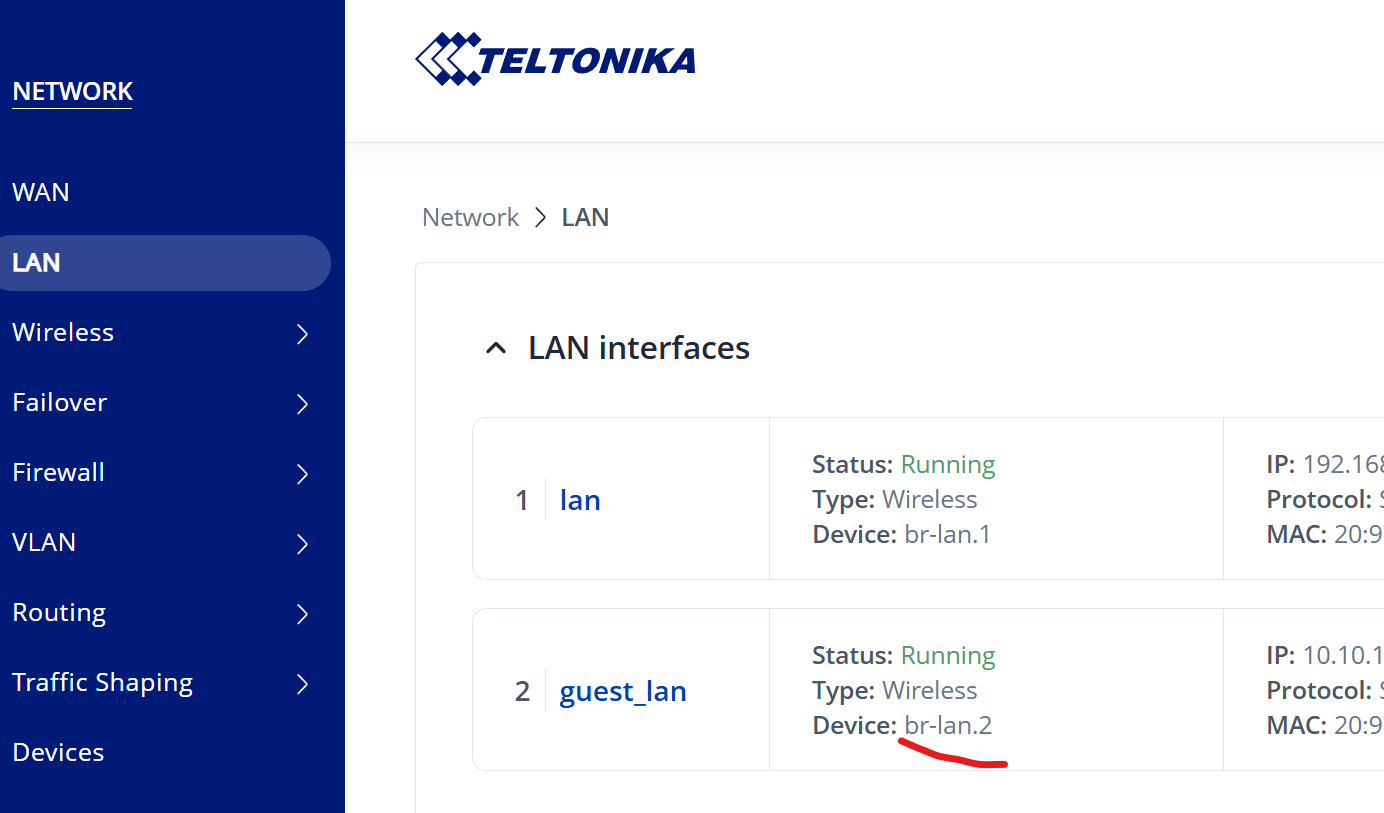
So I went to “guest_lan” interface configuration - Physical Settings, and there under interface i put smthing like br.lan_02 ot something similar. Then I received IP from TAP400 Guest SSID.
TAP400 LAN SSID wasn´t serving IP still. So I decided that there must be something similar in main lan interface. So I wen to lan interface configuratin physical settings. My next step is unclear, because I tryed to figure out what could help and, eventually, clicked something wrong and lost lan connection completely without being able to fix anything as rutos interface is only available in lan.
Fortunately I had backup. So I restored the initial state.
What I noticed in your last message, is that it is copying step nr 3 from your initial guide.
As I tryed interface phisical settings on guest lan and received IP, I guess it was correct suggestion. Therefore there imust be some kind of step to get IP form lan interface SSID of TAP400. And I repeat, that all settings are done being connected to RUTM10 lan SSID. It is working perfectly.
Thank you for the details. Before we proceed, could you please clarify:
In the TAP400 WebUI (Network → Wireless), what VLAN ID is assigned to each SSID? (The field may show “default” or a number.)
Is LAN3 on the RUTM10 configured as a tagged (trunk) or untagged (access) port?
In the meantime, please try the following steps:
Note your VLAN IDs on the RUTM10
Navigate to Network → VLAN and note the VLAN IDs assigned to the main LAN and Guest LAN interfaces. You will need these for the TAP400 configuration.
Disable the RUTM10 built-in WiFi
Navigate to Network → Wireless and disable both the 2.4 GHz and 5 GHz radios. Save and apply.
Reset the TAP400 (recommended)
To avoid leftover misconfigurations, reset the TAP400 to factory defaults via System → Backup → Reset to defaults, or use the physical reset button.
Configure the TAP400 SSIDs
In the TAP400 WebUI, navigate to Network → Wireless and configure two SSIDs:
a) Main LAN SSID
• Radio: 5 GHz
• VLAN ID: match the main LAN VLAN ID from the RUTM10 (or leave as “default” if main LAN traffic on LAN3 is untagged)
• Security: WPA2-PSK
b) Guest LAN SSID
• Radio: 2.4 GHz
• VLAN ID: match the Guest LAN VLAN ID from the RUTM10
• Security: WPA2-PSK (or OWE for open guest access)
Save and apply.
Verify TAP400 IP Settings
Navigate to Network → IP Settings on the TAP400. Set the mode to DHCP so the TAP400 obtains its management IP from the RUTM10 via LAN3. Ensure the Management VLAN matches your main LAN VLAN (or is set to “default”).
Test
Connect a client to each SSID and confirm it receives an IP address from the correct RUTM10 DHCP pool (main LAN or Guest LAN respectively).
If the issue persists after completing these steps, please share screenshots of:
• Network → Wireless on the TAP400 (showing SSID VLAN ID settings)
• Network → VLAN on the RUTM10 (showing LAN and Guest LAN assignments)
After making everything you suggest again from the scratch I could not still receive ip adress from guest_lan wifi on TAP400 (lan was now working fine). So I did excactly same thing that I tried myself: in lan interfaces under physical settings of guest_lan I disabled “Bridge interface” and under “interface” I chose br-lan.2. Now Wifi seems to be working fine. I just seemed odd to me that there was “br-lan1” on Guest_lan while LAN was “br-lan.1” (exactly with/without decimal as typed).
I guess current setup have to be correct in terms of Wifi.
I still cannot receive IP from guest_lan on physical port LAN1. If I check vlan ID1-OFF and ID2 untagged, device does not receive guest lan ip. But it is receiving ip on lan with current config.