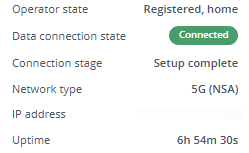
I’ve got a RUTC50 which I recently updated to firmware RUTC_R_00.07.21.3 and modem firmware RG520NEBDCR03A05M4G. Straight after the update, it took around 5 minutes for the modem to connect to the network, and then every 1-2 hours the modem disconnects. Sometimes it reconnects again, other times it needs to be restarted.
In the event log, the message shows ‘Mobile data disconnected (internal modem), and in the Status window, Data connection is ‘disconnected’, State is ‘N/A No Service’.
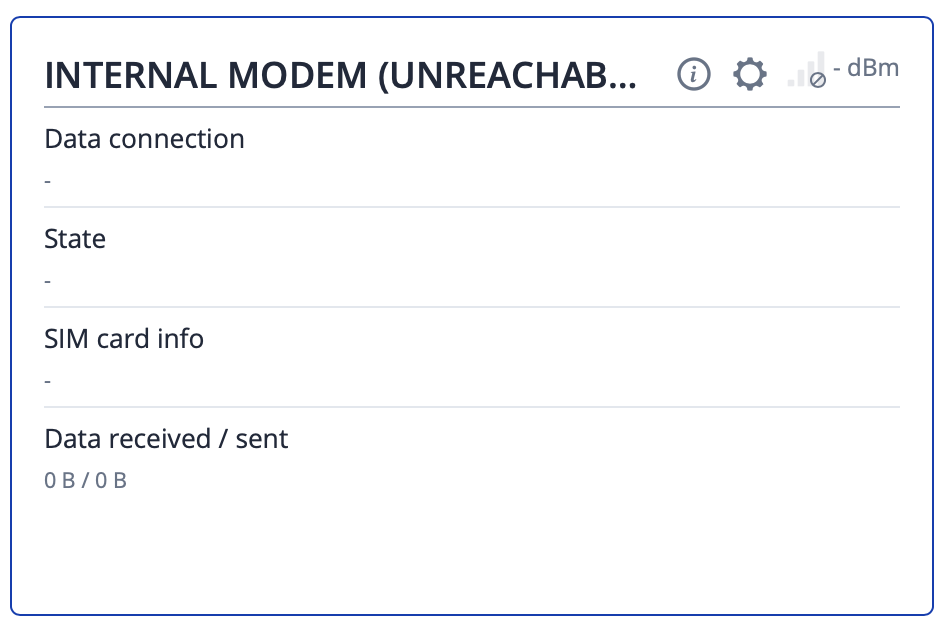
This keeps on happening again and again. Sometimes if I try and restart the connection, I get the red ‘internal modem is unreachable (shut down unexpectedly) and the router needs to be unplugged from the power supply and then plugged in again.
It has two SIMs inserted, the same behaviour happens on both
I’ve done a full factory reset and not changed any settings apart from admin password.
Updated to firmware RUTC_R_00.07.22.
Router is under minimal load, 1 wired Ethernet device, 5 wireless.
Sadly I think this will be the last Teltonika product I’ll buy, they’re great for functionality but this and my last RUTX12 both had serious modem issues after a couple of years. The RUTX12 couldn’t be fixed, hopefully this can be!
For troubleshooting purposes, we will require more sensitive information from your end, such as the troubleshoot file, which may contain passwords, public IP addresses, serial numbers, and such. To avoid leaking this information, we have sent you a form to fill out, which you will receive in your e-mail inbox that you have registered your account with in the forums. In the Ticket ID field of the form, please enter the ID of this thread, which is 18624.
Thanks, just tried that but no change other than I’m now getting the ‘failed to load system log’ message on login to the web UI - which might be coincidence though.
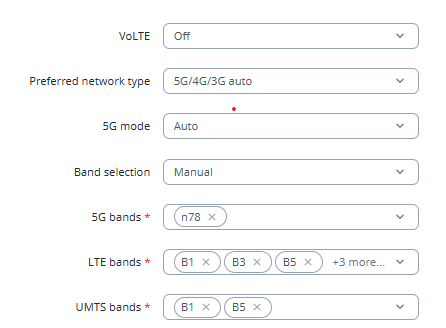
Oddly, setting the Band Selection to Manual and entering the bands for the operator manually with the 5G mode set to NSA, it introduces a new problem - it will connect and disconnect repeatedly like before for about 10 minutes.
The modem will then be completely unreachable until the router is hard power cycled - see screenshot. It’s not possible to change any settings under Network>Mobile>Connection as the page is blank.
We still have not received the form. I have sent you the form once more, could you please let me know once the form is filled out? Make sure that in the Ticket ID you enter 18624
Hi, I have just submitted it. I think there may be a problem with your system - I’ve read a couple of other threads on here where people have submitted the form and the logs multiple times but it hasn’t been received?
I can confirm that I have received the file, thank you for your cooperation. I have forwarded it to our R&D team for further investigation and I will inform you once I have an update on the matter.
One additional step you might try is changing the PDP type from IPv4/IPv6 to IPv4.
You can update this setting by navigating to Network → WAN, locating the mobile interface (by default mob1s1a1), and selecting Edit. Then find the PDP Type setting and change it to IPv4.
As I can see your SIM provider is EE which is famous for not supporting IPv6 and causing issues once any IPv6 clue is indicated to it.
I am experiencing severe issues with my RUTC50 after updating to RutOS 07.21.3 and the internal modem firmware to RG520NEBDCR03A05M4G.
Besides the connection drops mentioned by others, I’m seeing some very specific and alarming behavior that points to a deep integration bug with the eSIM and the internal modem module:
Broken SIM Overview: In the WebUI (Network > Mobile > General), the SIM slot overview is completely broken. Instead of showing SIM1, SIM2, and eSIM, the interface displays SIM1, SIM1, and SIM1. It seems the router has lost its internal mapping of the physical slots versus the eSIM.
Total Modem Shutdown/Freeze: When 5G is enabled (Auto 5G/4G/3G), the modem repeatedly triggers errors like “5GMM reject cause: N1 mode not allowed” and “UE identity cannot be derived by the network”. This doesn’t just drop the connection; it causes the entire modem module to become “Blocked” or “Disabled” in the UI, requiring a full power cycle to recover.
UI Latency: While the modem is in this “error loop,” the entire WebUI becomes extremely sluggish and unresponsive. It feels like the modem-service (gsmd) is hanging the entire system’s bus communication.
Limited Stability: The only way to get a stable system is to force the router into “4G/3G Auto” mode. As soon as 5G is re-enabled, the identity errors return, the modem crashes the interface, and the system becomes unusable.
I am using a Telekom eSIM. It appears this firmware version has critical issues with eSIM identity handshakes and N1-mode negotiation on the 5G stack.
Is there any way to downgrade the modem firmware to the previous stable version (A04)? The current state makes this 5G flagship product unusable for its intended 5G purpose.
Our R&D team is currently investigation the issue. I will forward this information to them as well.
For troubleshooting purposes, we will require more sensitive information from your end, such as the troubleshoot file, which may contain passwords, public IP addresses, serial numbers, and such. To avoid leaking this information, we have sent you a form to fill out, which you will receive in your e-mail inbox that you have registered your account with in the forums. In the Ticket ID field of the form, please enter the ID of this thread, which is 18624-1.