Hello,
I would like to ask for some help:
I’m using RUT966 with latest FW.
My setting are that it connects to openVPN server where it’s configured that devices are on 10.102.104.56/29 address, RUT has LAN set to 192.168.1.0/24. My question is on what do i need to change so that when i want to connect to device (example): 192.168.1.22 via address 10.102.104.60?
I have tried in firewall/nat (SNAT) but nothing happens.
Please for help.
Regards
R
Hello,
Thank you for contacting us.
To help us understand the current situation, please enter the OpenVPN server’s public IP address in the Remote host/IP address field. In the Remote network field, enter the LAN subnet behind the OpenVPN server, including its subnet prefix.
After saving and applying the settings, please check that the OpenVPN client instance is connected to the server. If it is not connected, please verify the configuration and review the instance’s Logs for further details about the connection issue.

For additional configuration guidance, please refer to our Wiki:
Once the connection is established, please go to System → Maintenance → Troubleshoot → Diagnostics. Using the ping tool, first try reaching the OpenVPN server’s VPN IP address from the RUT966. Then try pinging the LAN IP addresses of the devices behind the server.
Please get back to us with the results. If the issue persists, we will be happy to continue troubleshooting with you.
Kind regards,
T.
Hello,
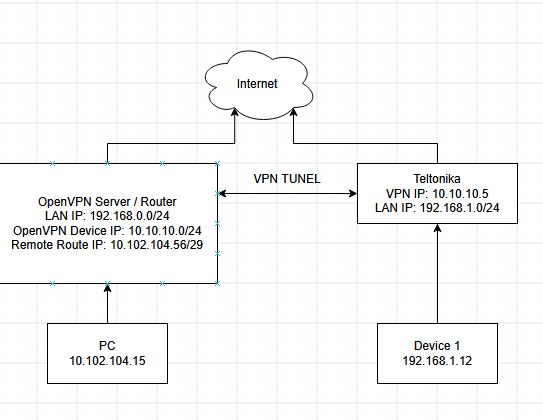
Teltonika recives IP from OpenVPN server (10.10.10.65). Server has set remote IP 10.102.108.56/29. Teltonika LAN is set to 192.168.1.0/24. I would need to make translation from destination Ip:10.102.108.60 to (example) LAN IP: 192.168.1.25.
So when i input 10.102.108.60 on my PC it needs to go to 192.168.1.25 on the teltonika. (Because we can’t change IP address and subnet on that site we need to have another way)
Hello,
Could you please provide a network topology diagram showing the OpenVPN server, the Teltonika router, your PC, and the target LAN device?
Please include the relevant LAN, WAN, and VPN tunnel IP addresses and subnet masks, and indicate where your PC is connected.
You do not need to share your actual public IP addresses; you can replace them with example addresses in the diagram.
This will help us to determine the right configuration for your setup.
Best regards,
T.
Here is my example (not real IP).. so when i am on my pc and type in 10.102.104.60 it should direct to teltonika and go to the device on ip 192.168.1.12. if i use Mikrotik instead of teltonika it’s simple…
- Firewall/NAT:
Destination IP: 10.102.104.60
Destination nat to IP: 192.168.1.12
But in version 7.x I can’t get it to work, also tried on 6.9.2.. no luck.
Hello,
For your setup, we recommend configuring 1-to-1 NAT on the Teltonika router to map the routed VPN address 10.102.104.60 to the LAN device at 192.168.1.12.
Since this works with your MikroTik router, the server-side routing is likely already configured correctly. Please confirm that the subnet 10.102.104.56/29 is routed to the Teltonika OpenVPN client.
Please configure the router as follows:
Add the NAT mapping. Under Network → Firewall → Custom Rules:
iptables -t nat -I PREROUTING -d 10.102.104.60 -j DNAT --to-destination 192.168.1.12
iptables -t nat -I POSTROUTING -s 192.168.1.12 -j SNAT --to-source 10.102.104.60
Enable OpenVPN-to-LAN forwarding. In Network → Firewall → Zones, edit the zone containing the OpenVPN interface and allow forwarding to the LAN zone.
Check the return path. Ensure that 192.168.1.12 uses the Teltonika router as its default gateway, or has a route back to the remote network through it.
With this configuration, a packet arriving through OpenVPN with source 10.102.104.15 and destination 10.102.104.60 will have its destination translated to 192.168.1.12. The reply will be translated back so that the remote device sees it as coming from 10.102.104.60.
After saving and applying the configuration, test access to 10.102.104.60 from the remote side.
You can find more information here: Teltonika 1-to-1 NAT guide
Best regards,
T.