Hello there,
I’ve been trying to configure a OpenVPN bridge connection between the RUT956 as a server and a OpenVPN GUI as a client but can’t figure it out..
Untill now I’ve configured a few TRB140 and got to do it right away with no major issues. Now, configuring the RUT956, I went through the process just as I did with TRB140:
- Went through setup wizard (synced the time, changed: APN to custom one, country code, wifi password and connected the RMS),
- Generated the certificates (CA, Server, Client, DH parameters),
- Configured OpenVPN Server and Client instances (.ovpn files below),
- Changed some settings in firewall (screenshots below).
After all that I still can’t get them to communicate. I’ve tried several things to see if they would help e.g.: turned off both DHCP and added static address pool with routing, changed LAN settings, etc.
*Connection through ethernet cable works fine - pings, WebUI, another device connected through ethernet is visible and pingable.
Latest setup:
OpenVPN Server config:
tls-server
auth sha256
cipher AES-256-CBC
dev tap_s_1
keepalive 10 120
mode server
port 1194
proto udp
resolv-retry infinite
server-bridge nogw
data-ciphers AES-256-CBC
persist-key
route 192.168.1.0 255.255.255.0
script-security 2
verb 5
-----BEGIN CERTIFICATE-----
-----END CERTIFICATE-----
-----BEGIN CERTIFICATE-----
-----END CERTIFICATE-----
-----BEGIN DH PARAMETERS-----
-----END DH PARAMETERS-----
-----BEGIN PRIVATE KEY-----
-----END PRIVATE KEY-----
OpenVPN Client config:
client
tls-client
auth sha256
cipher AES-256-CBC
dev tap_c_2
keepalive 10 120
port 1194
proto udp
remote x.x.x.x
resolv-retry infinite
data-ciphers AES-256-CBC
nobind
script-security 2
verb 5
float
-----BEGIN CERTIFICATE-----
-----END CERTIFICATE-----
-----BEGIN CERTIFICATE-----
-----END CERTIFICATE-----
-----BEGIN ENCRYPTED PRIVATE KEY-----
-----END ENCRYPTED PRIVATE KEY-----
Firewall changes:
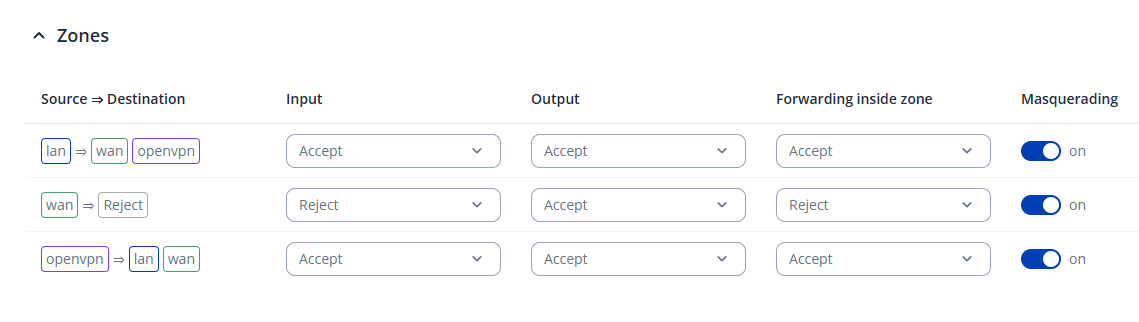
I’ll be very happy to provide any logs needed.
Best regards,
Kamil