Could you kindly clarify your desired configuration & what you’re trying to achieve? What exactly did you exactly change in the DNS & WAN settings, could you perhaps provide some screenshots for clarity sake?
Make sure to blur out any sensitive information such as your Public IP address, MAC address, serial numbers, passwords, etc.
The router comunicates through the WAN interface with a SCADA, I want to resolve hostnames such as name.mydomain.com.
This router can access to the internal network where the DNSs (Windows DC DNSs) are connected.
I know the router has access to the inside because this works: telnet IP_DNS_SERVER1 53, but if I run this command name_DNS1.domain.com 53 the answer is “bad address”.
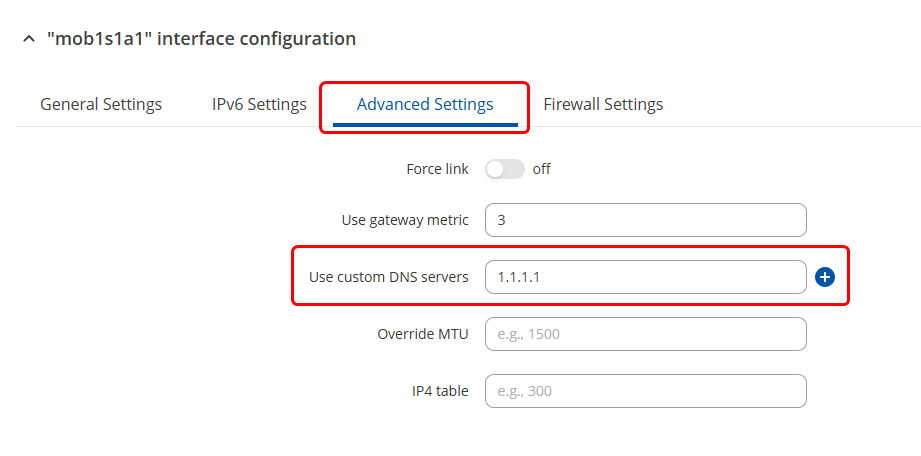
If your mobile WAN interface (from the private APN) provides DNS servers via DHCP or PPP, the router will use those by default - even if you added custom ones elsewhere.
That’s why your Windows DNS servers aren’t being used by system lookups. Could you please try to force the DNS server settings by heading to the WebUI → Network → WAN → Press “edit” on the mobile interface → Advanced Settings tab → “Use custom DNS server settings” and set it to the server address:
For troubleshooting purposes, we will require more sensitive information from your end, such as the troubleshoot file, which may contain passwords, public IP addresses, serial numbers, and such. To avoid leaking this information, we have sent you a form to fill out, which you will receive in your e-mail inbox that you have registered your account with in the forums. In the Ticket ID field of the form, please enter the ID of this thread, which is 15941.