I currently have a RUT950 router that is connected via WAN to a business/enterprise Starlink connection, which provides a public IP address. This router is in turn connected via IPsec VPN to a remote site/installation.I don’t know how to block web access (HTTP/HTTPS, the router’s web interface) from the public IP on the WAN side, while still allowing access to the web interface from devices inside the remote site’s network through the VPN tunnel.
Hi there,
Blocking WAN access can be as simple as disabling Remote Access under System → Administration → Access Control on both the HTTP and HTTPS protocols.
Now ,for allowing access through IPSec, nothing extra needs to be done, as the subnets/addresses that you’ve configured under Local and Remote subnet settings, are the addresses which will be allowed to access the router:
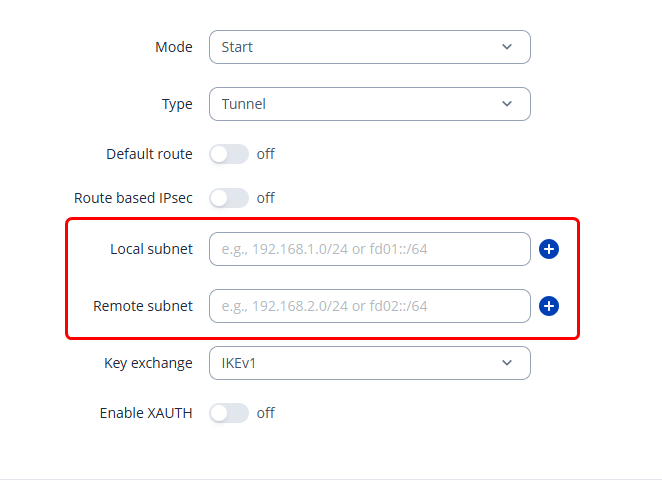
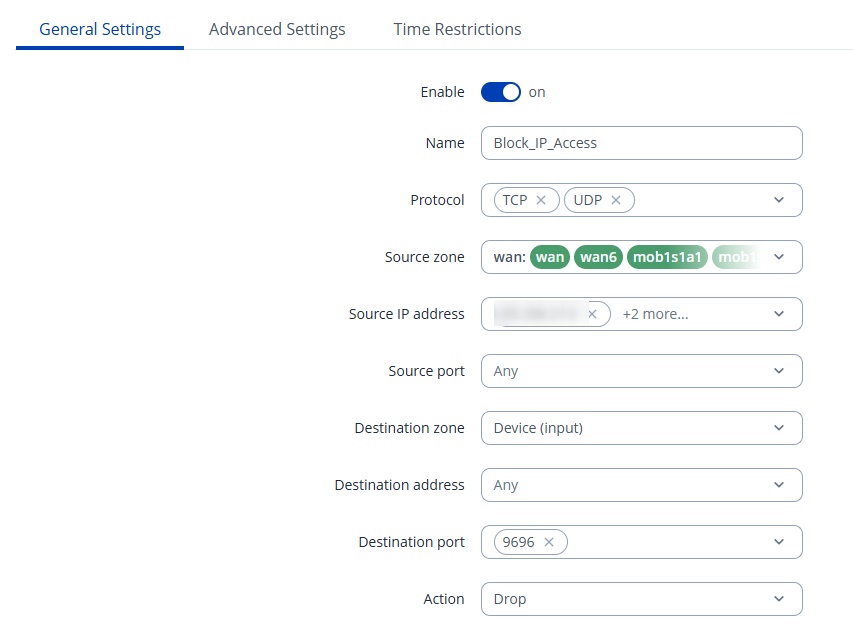
So basically, any device under, for example, the 1.0/24 or 2.0/24 subnet will be able to reach the router. If you want to block any specific IP addresses, you can do so by utilizing the Firewall Traffic Rules with a rule such as this:
Regards,
M.