Me encontré con un RUT950 muy antiguo solo enciende el led de power, como puedo arrancar desde cero….bootloader,o necesito un archivo para iniciar…..
Intente leer el eprom flash pero no tiene información….esta en blanco…
¿Dónde puedo descargar el bootloader para revivirlo?
gracias de antemano
El problema es que no enciende ningún puerto LAN
Are you the standard power supply?
Look at the device… in front of it… Do you have any leds on?
Fuente de alimentación 12 vdc 2.amp.
El LED fe power está encendido …
ok..
Maybe you have a broken device in hands… sorry.
Intentare reescribí la memoria flash …lo que no sé si es el firmware RUT9XX_R_00.06.09.5_WEBUI.bin o habrá un archivo bin.
Si alguien tiene el archivo sería mucho mejor realizar el intento..
Hi..
All firmware files for the RUT950, can be download at
Alguien que a realizado leer la memoria flash del rut950 y la tenga y si la puede compartir se lo agradecería mucho…
MatasR
September 8, 2025, 7:47am
11
Hello,
If you don’t mind, could we please continue the conversation in English to avoid any mistranslations and therefore miscommunication?
Regarding your situation, it does sound like the device is broken, but attempting to do the bootloader process could be a viable solution to this.
For the entire process, you may follow this guide: Bootloader menu - Teltonika Networks Wiki
Regarding the files you’ve asked about, you just need the firmware file, which can be downloaded in the link provided by Marcelo: RUT950 Firmware Downloads - Teltonika Networks Wiki
Whether you need the version 07.06.19 or 06.09.5 depends on your order code , as stated in the same page:
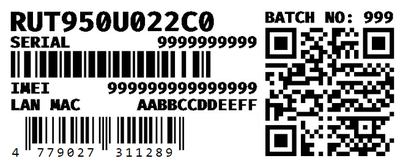
The order code can be found on the product label, at the top:
Afterwards, you just follow the bootloader process and attempt to install the correct firmware. If the LAN ports don’t work during the bootloader state, then unfortunately, there’s not much we can do besides offering to return the device to the original seller, or purchasing a new device altogether.
Regards,
Gracias de antemano…No soy muy bueno en el inglés, intentare hacerles tus recomendaciones por darle una nueva oportunidad de revivir el RUT950….
Gracias y agradecido nuevamente por su apoyo.
1 Like
MatasR
September 9, 2025, 5:27am
14
Hi,
I’ve deleted your message with the screenshot that you’ve provided, users mustn’t post any sensitive details such as serial numbers, passwords, public IP addresses, etc., to public forums to avoid issues.
From what I saw, your order code should allow you to install the firmware version 7.06.19 - please try that and let us know how it goes.
Regards,
Buenos días…. disculpe lo de capturé de foto de equipo…
Bajare esa versión y esperemos funcione y les cuento.