Hi
I have added a static route to another subnet on the LAN side. I can ping hosts from my RUT906 on that subnet so route is fine but devices on that other LAN/local subnet can not ping or access web UI on the RUT906.
Do I have to do something with the firewall rules or zones to accept traffic from another subnet than what is on the LAN interface? From what I can see, default settings should accept everything in the INPUT from LAN.
I can access it when I’m on the same subnet as the LAN interface so it seems to make a distinction when I’m coming from that other subnet.
First things first, what kind of end devices are we talking about here? Are these PLCs or some other type of devices? How are these devices connected to your RUT906?
LAN-to-LAN traffic should work without any extra rules being created by default, as you mentioned yourself, unless you had a rule created that could be blocking such incoming traffic.
LAN side is connected to another 4G router with VPN back to our office (proprietary enterprise stuff). The RUT906 is only used for SMS at the remote site.
From my office I can ping all other devices on this remote site but not the RUT906. And the RUT906 can ping IPs at my office through its 172.16.0.0 255.255.0.0 static route pointing to the other 4G router. That is like the default gateway but for my internal traffic. It is like it does not accept incoming traffic from my other LAN subnets than it’s own. If I have my PC connected at LAN on the same subnet I have no problem accessing the RUT906 from there.
Not sure what other kind of devices you are asking about but yes I have a PLC too at the remote site but that is not involved here. FW rules are default. I have not enabled WAN access for web UI since I’m not accessing it from “that” WAN.
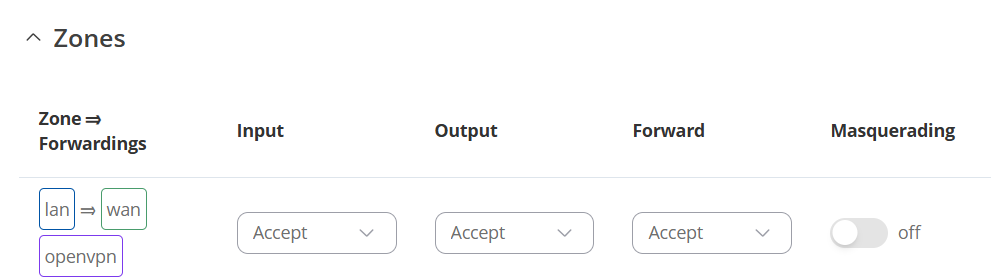
Alright, so since a VPN configuration is involved after all, I’d suggest trying enabling the Masquerading option for all of your available zones under Network → Firewall → Zones:
Your zone might look a little different than mine, but the suggestion remains. If that still doesn’t help, could you perhaps tell me what kind of VPN are you using?
Oki. I will try that at the remote site soon. But I’m not sure how that would help for traffic that is coming in on LAN and is going out again on LAN? Masquerading would not do anything to those packets since the RUT906 LAN IP would already be the src IP of any outgoing packets?
Does everything else than RUT906s own LAN subnet count as WAN somehow no mather what interface it comes in through? I mean, WAN interface is not involved here and all my subnets are 172.16.x.x addresses.
It’s not interface related, you’re accessing the network of the device via the internet, a.k.a, through a VPN tunnel, which the gives you access to the LAN network of the device.
Hi again!
It was a very stupid mistake by me, the server I tried to access the RUT906 had a completely different IP than I thought because our network is under reconstruction so it was not inside my 172.16.x.x static route. Added another static route for 10.x.x.x and now it works
Thanks!