Rut361 netmap nat

HI,

I am trying to do a full subnet NAT using NETMAP.

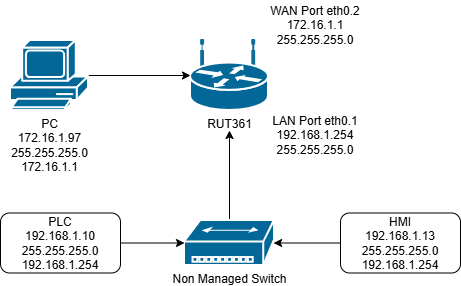
I have a machine network (192.168.1.0/24, gw:192.168.1.254) connected to the LAN port (eth0.1, 192.168.1.254)

I have a PC (172.16.1.97, gw:172.16.1.1) connected to the WAN port (eth0.2, 172.16.1.1)

I used the following iptables:

iptables -t nat -I PREROUTING -d 172.16.1.0/24 -i eth0.2 -j NETMAP --to 192.168.1.0/24
iptables -t nat -I POSTROUTING -s 192.168.1.0/24 -o eth0.2 -j NETMAP --to 172.16.1.0/24

This configuration only works if i create a new WAN port with the address I am trying to reach through translation (ex: PLC is on 192.168.1.10, I need to create a WAN port eth0.2, 172.16.1.10).
As i have a pretty extensive network on the 192.168.1.0/24 subnet is there a way to not have to manually create a new WAN interface for each device?

I believe I am missing a route rule somewhere but can’t figure it out.

Any help would be appreciated.

Hi,

We’re working on your issue, and we’ll get back to you as soon as we have an answer.

Regards,
M.

Greetings,

Just so we could have a better view of the network configuration, could you please send us a drawn topology with the IP addresses (excluding public ones) included?

Thank you,
M.

Hi

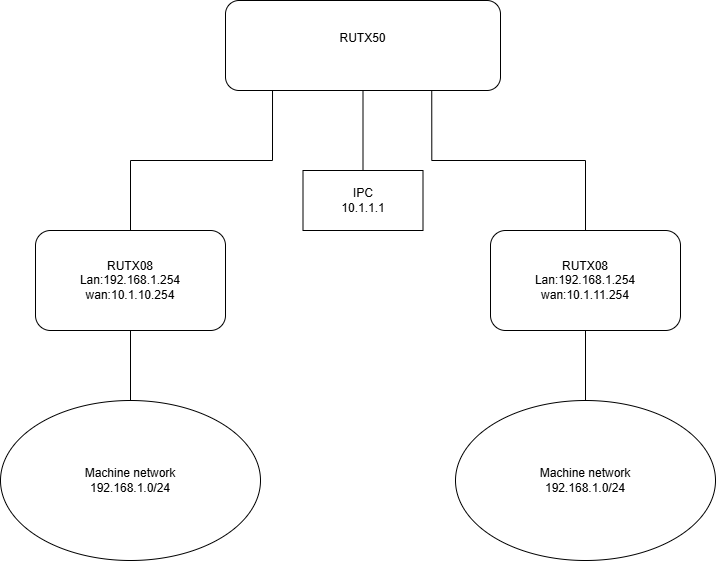
This is what my current bench setup looks like.

This is only a bench setup for now to test the NETMAP 1:1 Nat.
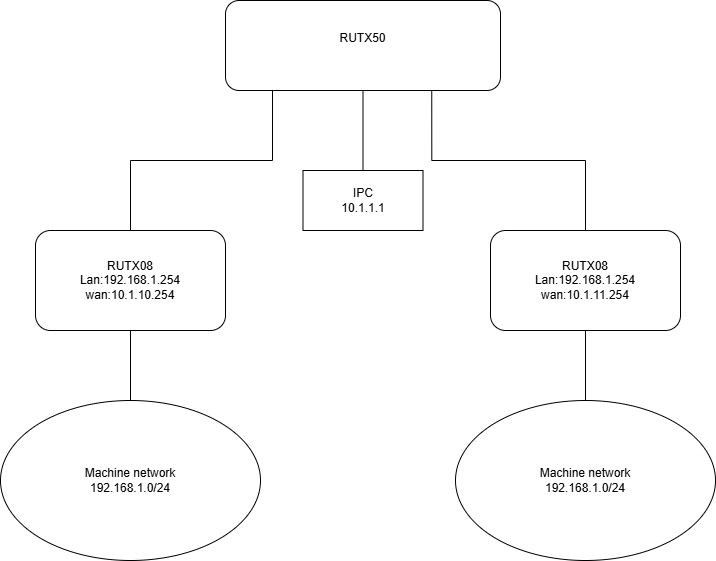
The final design would look like something like this

With the option to add multiple machine networks, each containing up to a 100 different devices.

I am using a RUT361 at the moment as I have one on my desk, but tried with RUTX08 and got the same behavior.

Thanks for the help

Greetings,

I hope this message finds you well,

To make sure we provide the most accurate solution, could you please help us with the details below?

  1. What are the exact firmware versions installed into the devices?

  2. How is the WAN interface configured (routed interface or bridge/VLAN)?

  • NAT operates only on routed interfaces, so this lets us confirm traffic is processed correctly.
  1. Does the WAN-side device initiate connections to the LAN, or does the LAN initiate them?
  • The traffic direction affects how address translation and address resolution are handled.
  1. Are multiple IP addresses or subnets allowed on the WAN interface?
  • This determines the simplest way to make the translated addresses reachable.
  1. Is Proxy ARP available or enabled on the WAN interface?
  • This allows the router to respond on behalf of translated addresses, which is required for subnet 1:1 NAT.
  1. Is reverse path filtering (rp_filter) enabled on the WAN interface?
  • If enabled, valid translated traffic may be dropped before reaching the destination.
  1. Are there any additional NAT or masquerade rules applied on the WAN interface?
  • This helps us ensure no other rules are interfering with the NETMAP translation.
  1. Do you need full two-way (bidirectional) 1:1 NAT, or only inbound access from WAN to LAN?
  • This helps us tailor the configuration to your actual use case.
  1. If possible, could you provide a short packet capture from the WAN interface during a failed connection attempt?
  • This allows us to quickly confirm whether address resolution is working as expected.

Additionally, you can check this thread as the user had a similar topology, that might help you with the setup:

Looking forward to your reply,

Warm regards,
V.

HI Vilius, thanks for the reply.

here are some more details:

  1. Firmware version: RUT361_R_00.07.18.3
  2. WAN is routed not bridge/VLAN
  3. the direction depends on the devices, PLC would initiate Lan>Wan but engineering PC would initiate Wan>LAN
  4. All configuration are default at the moment except for the
    iptables -t nat -I PREROUTING -d 172.16.1.0/24 -i eth0.2 -j NETMAP --to 192.168.1.0/24
    iptables -t nat -I POSTROUTING -s 192.168.1.0/24 -o eth0.2 -j NETMAP --to 172.16.1.0/24
  5. not sure where the proxy ARP can be enabled on the wan interface
  6. where do you check this?
  7. no additional rules, everything from default configuration
  8. yes I need a full two-way bidirectional 1:1 NAT

Just to make things clear, I am trying to achieve a 1:1 NAT for the all subnet and achieve the same end result as what was described in the post you mentioned.
I also have access to RUTX08 but it does the same behavior.
It just feels I am missing a small config somewhere but can’t put my finger on it.
Thanks for the help

Hi,

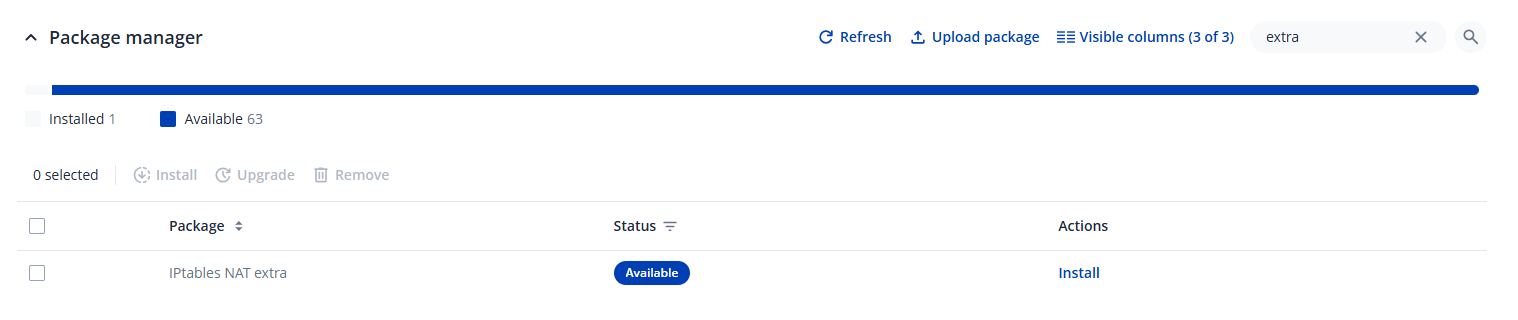
Could you please try installing the IPTables NAT extra custom package under System → Package manager?

Regards,
M.

Hi Matas,

the package is already installed

Cheers,

Hi, again,

After further testing and investigating, this is a solution I came up with. For reference, I took your “end-game” setup that you wanted to achieve:

I am going to refer to the left-hand side RUTX08 as RUTX08 1, and to the right one, as RUTX08 2;

On the RUTX08 1 → Setup the following custom rules:

iptables -t nat -I POSTROUTING -s 192.168.1.0/24 -d 192.168.4.0/24 -j NETMAP --to 192.168.3.0/24 iptables -t nat -I PREROUTING -s 192.168.4.0/24 -j NETMAP --to 192.168.1.0/24
^ Install the IPtables NAT extra package as well.

On the RUTX08 2 → Setup the following custom rules:

iptables -t nat -I POSTROUTING -s 192.168.1.0/24 -d 192.168.3.0/24 -j NETMAP --to 192.168.4.0/24 iptables -t nat -I PREROUTING -s 192.168.3.0/24 -j NETMAP --to 192.168.1.0/24
^ Install the IPtables NAT extra package as well.

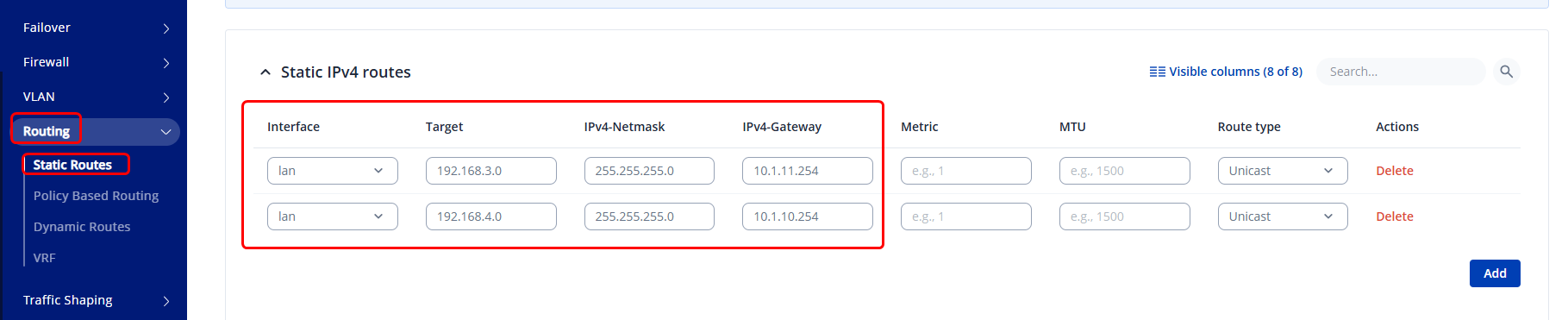
On the RUTX50 → Head to WebUI → Network → Routing → Static Routes and add the following routes:

If this setup doesn’t end up working, you may have to edit the firewall traffic rules/zones to allow traffic between certain IP addresses in the network. For testing purposes, you could add a traffic rule that allows all traffic from WAN to LAN, the source IP address being any.

Explanation:
We are tricking our devices to think that the networks they are accessing aren’t overlapping (as yours are in the topology, both being 192.168.1.0/24). Essentially, the left RUTX08 is accessing the 192.168.3.0/24 subnet, whereas the right RUTX08 is accessing the 192.168.4.0/24 subnet.

Finally, we’re adding routes to the RUTX50 so it knows how to access said networks.
Regards,
M.

To add on top of my previous message, the reference Wiki I’ve used was this: Overlapping subnets with IPsec solution - Teltonika Networks Wiki

This is also one of the solutions you could possibly use for your network setup; I’ve just excluded the use of IPSec.

Regards,
M.

This topic was automatically closed after 60 days. New replies are no longer allowed.