RUT361 IPSEC tunnel not passing traffic

RUT361 IPSEC tunnel configured connecting to main office via PFSense host. Tunnel builds and connects as expected, and main office can see/ping RUT but no traffic can pass through to devices behind the RUT and no traffic is being passed back from the remote network to the main office.

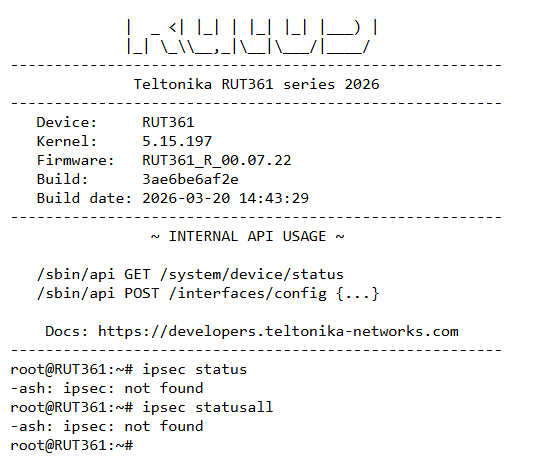
Have tried every combination of IPSEC options, static routes, traffic rules, NAT rules, etc. that I have been able to think of or found elsewhere online, and nothing will allow traffic to flow properly. One strange symptom also is that the RUT doesn’t seem to see the IPSEC tunnel as an interface anywhere; it can’t be referenced in Zones, LAN or WAN, and ipsec status in the CLI returns an error.

Greetings,

For troubleshooting purposes, we will require more sensitive information from your end, such as the troubleshoot file, which may contain passwords, public IP addresses, serial numbers, and such. To avoid leaking this information, we have sent you a form to fill out, which you will receive in your e-mail inbox that you have registered your account with in the forums. In the Ticket ID field of the form, please enter the ID of this thread, which is 18678.

Best Regards,
Justinas

Hi, @ewaggoner

Welcome to community… :sunglasses:

Have you try this?

command: /etc/init.d/swanctl status
running

command: swanctl --list-conns

swanctl --list-conns
test: IKEv2, no reauthentication, rekeying every 3600s, dpd delay 30s
local: %any
remote: 1.2.3.4
local pre-shared key authentication:
id: 192.168.14.1
remote pre-shared key authentication:
id: 192.168.7.1
test_c_0: TUNNEL, rekeying every 26181s, dpd action is start
local: 192.168.14.0/24
remote: 192.168.154.0/25
test_c_1: TUNNEL, rekeying every 26181s, dpd action is start
local: 192.168.14.0/24
remote: 192.168.7.0/25

command: swanctl --list-sas
test: #94, ESTABLISHED, IKEv2, fd92b6b732d31fdf_i aa7bf594ac167ade_r*
local ‘192.168.14.1’ @ 192.168.1.200[4500]
remote ‘192.168.7.1’ @ 1.2.3.4[4500]
3DES_CBC/HMAC_MD5_96/PRF_HMAC_MD5/MODP_2048
established 2618s ago, rekeying in 862s
test_c_1: #35, reqid 2, INSTALLED, TUNNEL-in-UDP, ESP:3DES_CBC/HMAC_MD5_96/MODP_2048
installed 5952s ago, rekeying in 18490s, expires in 22849s
in c1a23f32, 0 bytes, 0 packets
out c33d6fe5, 0 bytes, 0 packets
local 192.168.14.128/25
remote 192.168.7.0/25
test_c_0: #36, reqid 1, INSTALLED, TUNNEL-in-UDP, ESP:3DES_CBC/HMAC_MD5_96/MODP_2048
installed 3800s ago, rekeying in 20474s, expires in 25001s
in c849d7c2, 64816 bytes, 1229 packets, 0s ago
out cb3149e3, 107118 bytes, 784 packets, 0s ago
local 192.168.14.128/25
remote 192.168.154.0/25

can you provide full list of CLI commands for IPsec VPN?

Hi….

swanctl --help
strongSwan 5.9.14 swanctl
loaded plugins: md4 mgf1 random nonce x509 revocation constraints pubkey pkcs1 pgp pem openssl pkcs8 xcbc
usage:
swanctl --counters (-C) list or reset IKE event counters
swanctl --initiate (-i) initiate a connection
swanctl --terminate (-t) terminate a connection
swanctl --rekey (-R) rekey an SA
swanctl --redirect (-d) redirect an IKE_SA
swanctl --install (-p) install a trap or shunt policy
swanctl --uninstall (-u) uninstall a trap or shunt policy
swanctl --monitor-sa (-m) monitor for IKE_SA and CHILD_SA changes
swanctl --list-sas (-l) list currently active IKE_SAs
swanctl --list-pols (-P) list currently installed policies
swanctl --list-authorities (-B) list loaded authority configurations
swanctl --list-conns (-L) list loaded configurations
swanctl --list-certs (-x) list stored certificates
swanctl --list-pools (-A) list loaded pool configurations
swanctl --list-algs (-g) show loaded algorithms
swanctl --flush-certs (-f) flush cached certificates
swanctl --load-all (-q) load credentials, authorities, pools and connections
swanctl --load-authorities (-b) (re-)load authority configuration
swanctl --load-conns (-c) (re-)load connection configuration
swanctl --load-creds (-s) (re-)load credentials
swanctl --load-pools (-a) (re-)load pool configuration
swanctl --log (-T) trace logging output
swanctl --version (-v) show version information
swanctl --stats (-S) show daemon stats information
swanctl --reload-settings (-r) reload daemon strongswan.conf
swanctl --help (-h) show usage information

1 Like

Thank you Marcelo for help here, as I can see below, I have connection configured but showing as below
root@RUT951:~# swanctl --load-conns
no files found matching ‘/etc/swanctl/conf.d/*.conf’
loaded connection ‘New1X’
successfully loaded 1 connections, 0 unloaded