RUT301 - Profinet doesn't work, VPN problems

Hello everyone,

I’m currently setting up an industrial network with a new Teltonika RUT301 and have run into a couple of issues. I’m hoping someone can point me in the right direction.

My network setup includes:

  • A Windows PC

  • Siemens S7-1200 G2 PLC

  • Kuka Robot with a KRC5 controller

  • Several other Profinet devices

All devices have static IP addresses within the same subnet.

## Problem 1: Profinet Device Discovery

When all devices are connected to the RUT301’s LAN ports, I can successfully ping every single device from the Windows PC. This confirms basic IP connectivity is working fine.

However, the S7-1200 PLC is unable to see or discover the other Profinet devices on the network. When I swap the RUT301 for a simple, unmanaged switch or a different basic router, the Profinet communication works perfectly and the PLC finds all devices immediately. This leads me to believe a setting on the RUT301 is blocking the specific Layer 2 traffic that Profinet uses for discovery (EtherType 0x8892).

My question is: Is there a specific firewall setting, multicast/IGMP snooping option, or another feature on the RUT301 that needs to be configured to allow Profinet’s Layer 2 discovery frames to pass between the LAN ports?


## Problem 2: Transparent VPN for Full LAN Access

Once the Profinet issue is solved, my next goal is to establish remote access to this entire LAN.

I need a VPN solution that makes my remote computer behave as if it were physically plugged into a LAN port on the router. I need to be able to use industrial software (like Siemens TIA Portal) which relies on network scans and Layer 2 discovery to find and connect to devices.

I want to avoid having to configure access to each device individually in RMS. The ideal scenario is connecting to the VPN and instantly having full, transparent access to the entire subnet, including any new devices that might be added later. This is the functionality I’m used to with other systems like IXON.

My question is: Does the RUT301 support a “bridged” (TAP/Layer 2) OpenVPN setup that would provide this level of transparent access? If so, could you provide any guidance? Or is there another recommended method using the Teltonika ecosystem to achieve this “virtual network cable” type of connection?

Thank you in advance for any help or advice you can offer!

Hello,

Thank you for reaching out.

  1. Regarding Profinet device discovery:

Normally, Profinet communication should work transparently through the RUT301 without additional configuration, but there are two points worth checking:

  • If your router is running an older firmware, please update to the latest version, as starting with RutOS 7.8 there were some changes related to Profinet support and handling.
  • In similar cases, setting the LAN interface VLAN ID to 0 instead of 1 has resolved Profinet discovery issues. This can be done via WebUI, e.g.,:

    (set only on LAN port 2)
  1. Regarding OpenVPN in TAP/bridge mode setup:

Yes, the RUT301 supports OpenVPN in TAP (Layer 2) mode. You can find a detailed setup guide here:

Best regards,

First of all, a big thank you to this community for the previous help. I’m happy to report that with your guidance, I have successfully configured my network, and PROFINET communication is now working perfectly on VLAN 0.

However, as I’ve continued setting up the device, I’ve run into two new challenges that I’m struggling to diagnose. I have analyzed both the system and kernel logs and would appreciate any insights you might have.

Issue 1: LAN Ping Failure from Router to Siemens PLC
I have a strange issue where my router cannot ping a device on the LAN, but my PC on the same network can ping it without any problems.

My Setup:

Router: Teltonika RUT301 (LAN IP: 192.168.20.1)

Device: Siemens PLC with IP address 192.168.20.67

My PC: On the same subnet, IP 192.168.20.100

All devices are on the same bridge (br-lan) and VLAN 0 (eth0.0).

The Symptom:

From my PC’s command line, ping 192.168.20.67 works perfectly (0% packet loss).

When I use the router’s built-in diagnostic tool (System > Maintenance > Troubleshoot) to ping 192.168.20.67, it fails with 100% packet loss.

I have already confirmed that the PLC has the correct Default Gateway set to the router’s IP (192.168.20.1). PLCs don’t have a typical firewall, but I’ve also checked its access control settings.

Issue 2: Unstable OpenVPN Connection to RMS
My router is having trouble maintaining a stable connection to the Teltonika RMS service. The connection is established successfully, but it drops every few minutes and then attempts to reconnect. The system log is filled with recurring errors.

Here is the system log showing the cycle of errors:

// First TLS error and process restart
Fri Sep 12 13:54:39 2025 daemon.err openvpn(RlaIHtn0)[2910]: TLS Error: TLS key negotiation failed to occur within 60 seconds (check your network connectivity)
Fri Sep 12 13:54:39 2025 daemon.err openvpn(RlaIHtn0)[2910]: TLS Error: TLS handshake failed
Fri Sep 12 13:54:39 2025 daemon.notice openvpn(RlaIHtn0)[2910]: SIGUSR1[soft,tls-error] received, process restarting

// Connection drop due to inactivity and another restart
Fri Sep 12 13:58:42 2025 daemon.notice openvpn(RlaIHtn0)[2910]: [teltonika-vpn-RlaIHtn08uJkeeK8] Inactivity timeout (–ping-restart), restarting
Fri Sep 12 13:58:42 2025 daemon.notice openvpn(RlaIHtn0)[2910]: SIGUSR1[soft,ping-restart] received, process restarting

Further Diagnostics: Kernel Log Analysis
To provide more data, I have also analyzed the kernel log (dmesg). The main takeaways are:

The router’s boot-up sequence is clean. Hardware is initialized correctly, and all necessary drivers load without any critical errors.

The log confirms that the br-lan bridge and eth0.0 VLAN interface are configured and come up as expected.

The log registers several link state changes on the Ethernet switch, including a brief “link down” event on the br-lan interface about 30 seconds after boot. The other changes correspond to me physically plugging/unplugging cables.

Overall, the kernel log suggests that the hardware and low-level drivers are functioning correctly. This leads me to believe the issues are related to higher-level configuration, routing, or specific service behavior.

My Questions:
Has anyone experienced a similar one-way ping issue where the router can’t ping a LAN device but clients can? Any ideas what could be specific to the RUT301 or a PLC?

Could the RMS VPN instability be a known issue, or does it point to a subtle problem with my WAN connection that only affects long-lived TLS connections?

FW.
RUT301_R_00.07.16.3

Edit:
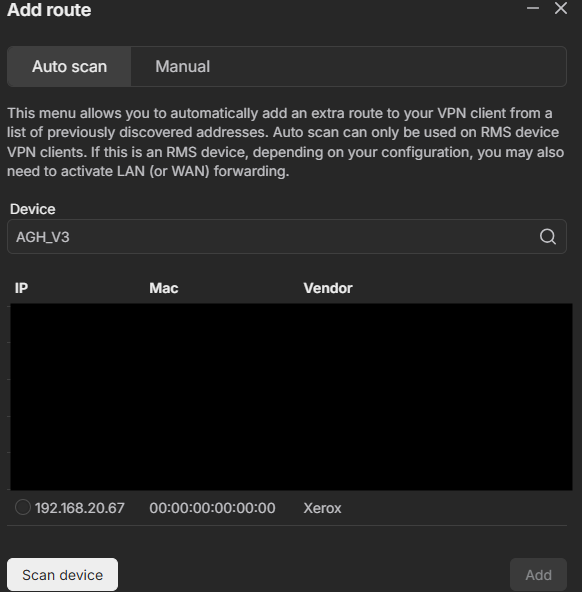
Screenshot from Hub configuration:

I still have this problem, I would appreciate your help.

Hello,

Thank you for the reminder.

Regarding the LAN ping issue:

  • Could you try enabling masquerading on the LAN firewall zone to see if this improves reachability from the router to the PLC?
  • Can you confirm whether the PLC’s entry appears in the router’s ARP table (arp -a)?
  • Do the pings succeed if you run them specifically from the br-lan interface (e.g., ping -I br-lan 192.168.20.67)?

Regarding the RMS VPN instability:

  • Could you let me know which RMS hub region you are connecting to? Does using a different server location improve the situation?
  • I assume you’re using VPN hub configured in the default TUN mode, not in TAP, right?

It may be a known issue. If it persists after checking these points, we may need to continue troubleshooting privately to narrow it down further.

Best regards,

This topic was automatically closed after 60 days. New replies are no longer allowed.