With a RUT301 I would like to block outgoing multicast traffic. However, I can’t do this.
What I need is:
Put the 4 LAN ports in bridge mode.
Allow all incoming traffic.
Drop all outgoing traffic with destination 239.139.0.0/28
Allow all other traffic through
Does anyone have experience? Or an example for me?
Could you please clarify whether your intention is to bridge the 4 LAN ports into a single VLAN (port-based VLAN), or if you’re simply looking to block outgoing multicast traffic from the existing default LAN network to the 239.139.0.0/28 range?
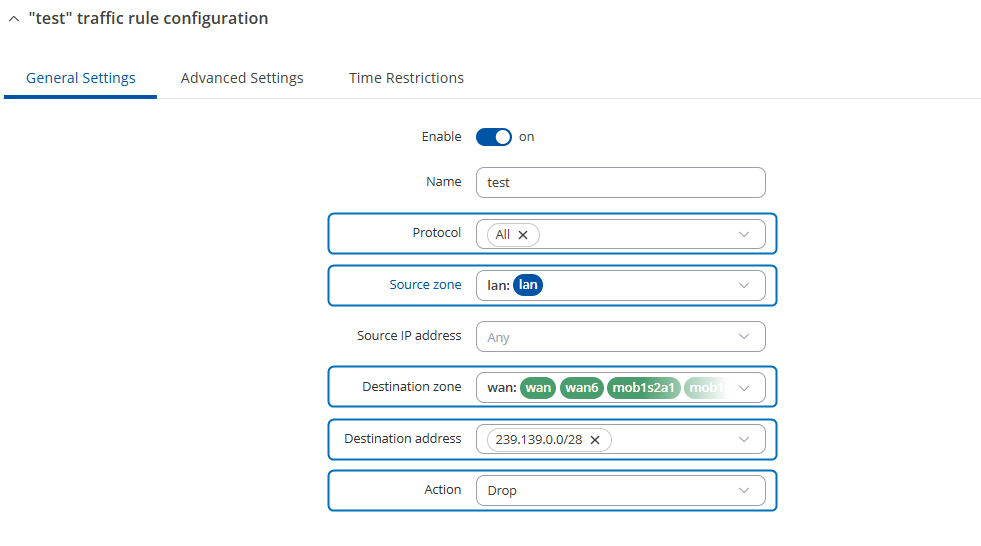
If it’s just about blocking multicast traffic on the existing LAN, this can be easily achieved by adding a traffic rule via Network → Firewall → Traffic Rules. You would create a rule to drop outgoing traffic with a destination IP in 239.139.0.0/28, as shown in the example screenshot below:
If you need to bridge the 4 LAN ports as a dedicated VLAN (port-based VLAN setup), it would involve creating a VLAN, assigning a new LAN interface for it, bridging its physical interfaces, and then creating a separate firewall zone and traffic rules in the same way.
More information and a port-based VLAN guide can be found here:
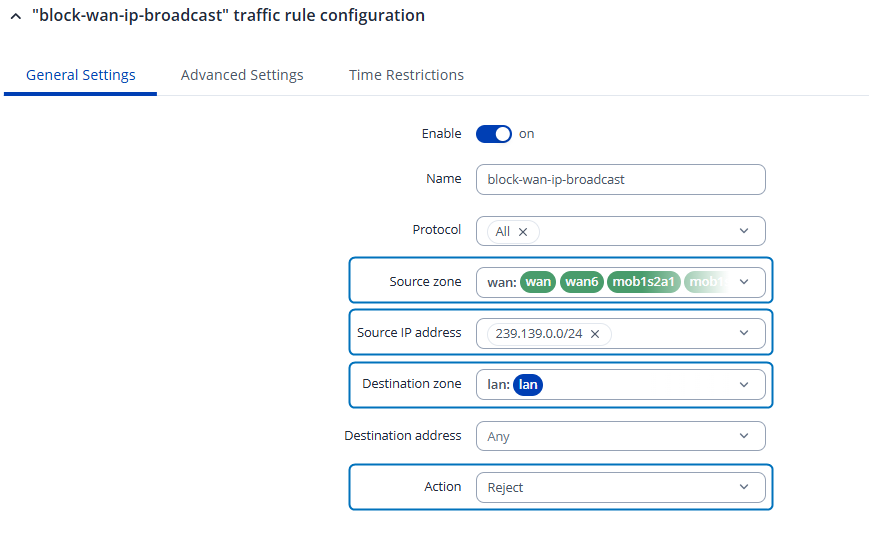
Apologies for the delay, and thank you for the clarification. If your goal is to block all inbound broadcast/multicast traffic from the 239.139.X.X range coming from WAN, then the traffic rule should look more like this:
You can place the rule at the top of the firewall traffic rule list.
P.S. Please adjust the subnet mask depending on how large the range is in your environment (e.g., /24 blocks 239.139.0.0–239.139.0.255, while /16 covers 239.139.0.0–239.139.255.255).