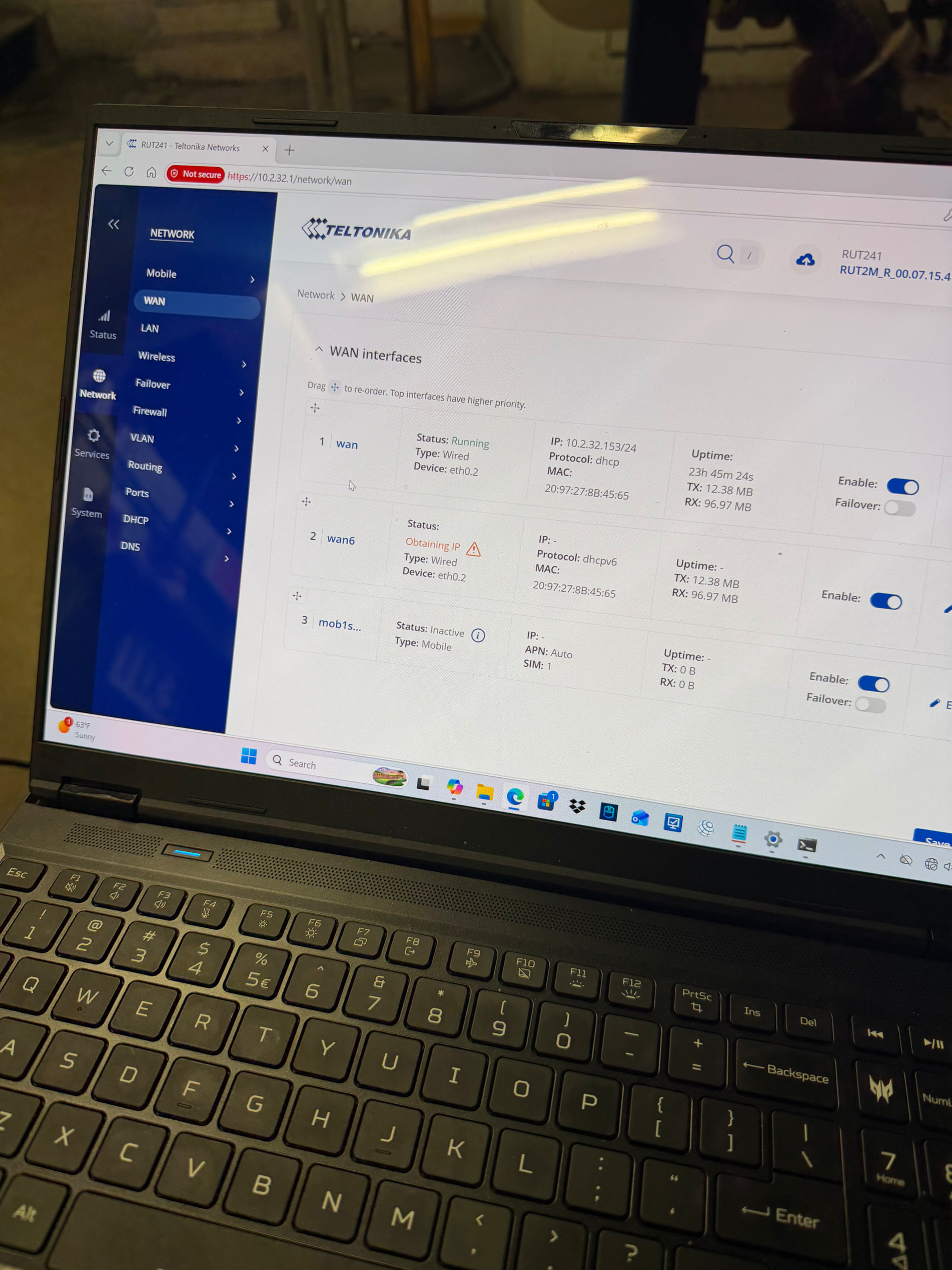
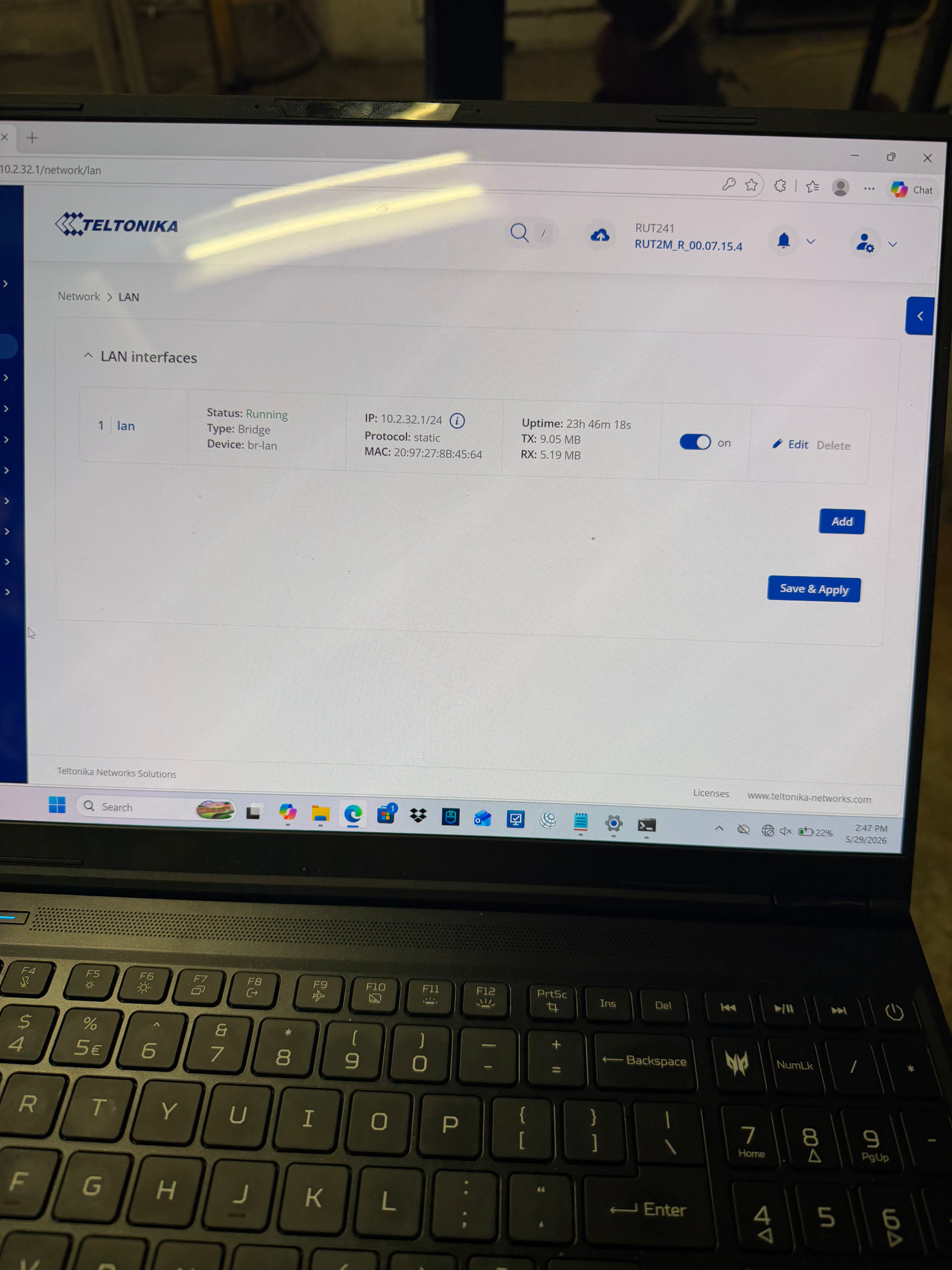
Hello, I am having issues discovering the RUT241 on bacnet.
This device is located on static IP: 10.2.32.5 with a gateway ip: 10.2.32.1. I am trying to connect this to a Niagara BAS server located on 10.3.18.39. Currently there are 10 devices with the same subnet of 10.2.32 pulled into the system which leads us to believe there is already a BBMD act in place. We have configured the bacnet as follows.
Bacnet Routing Enabled: Yes
BIP Config: BR-LAN network 667 port 47808 which is a random unused network number
ETH0.2 which is our WAN network 1 which is our BAS network for this subnet that’s already pulled in
Port 47808
When we change the network ids it seems that Niagara registers there is a new network of either is but no objects are discovered during discovery.we have yet to configure the control that will be hooked to the router but figured we should still be able to see the router on the bacnet. Another thing is we show UDP communication in the traffic feed with our BAS IP which leads us to believe there is some sort of communication. Any ideas will help, thank you.
Greetings, @Gavin15644
Apologies for delayed response and thank you for the detailed overview of your RUT241 BACnet integration with your Niagara supervisor.
Based on the configuration described, BACnet routing is enabled, with BACnet/IP Network 667 assigned to LAN (br-lan) and Network 1 assigned to WAN (eth0.2), matching your existing BACnet network. As your Niagara supervisor (10.3.18.39) sits on a different IP subnet than the RUT241’s WAN interface (10.2.32.x), reaching it typically requires the RUT241 to operate as a BACnet Broadcast Management Device (BBMD), combined with a defined broadcast path to the supervisor – either through Foreign Device Registration (the BACnet server registering itself to the router’s BBMD) or through Broadcast Distribution Table (BDT) peering between BBMDs.
For reference, our official BACnet configuration example covers this exact cross-subnet topology:
wiki.teltonika-networks.com/view/BACnet_configuration_example#Configuration_overview_and_prerequisites
In that example, the field-side router has BBMD enabled on its WAN-facing interface with port forwarding enabled (“Allow Remote Access” on current firmware), and the BACnet server registers to that router’s WAN IP address via Foreign Device Registration.
To progress this case, could you please confirm the following:
- Is BBMD currently enabled on the RUT241 (Services → BACnet → General Configuration)? If so, which interface (expected: eth0.2/WAN) and port are set, and is “Allow Remote Access” enabled?
- Is your BAS platform (Niagara or another on-site BACnet device) configured to perform Foreign Device Registration to the RUT241’s WAN IP (10.2.32.153)? Or does your site instead rely on BDT-based peering between BBMDs?
- Is IP routing in place between the 10.2.32.0/24 subnet (RUT241 WAN) and the 10.3.18.0/24 subnet (Niagara), allowing two-way reachability on UDP port 47808?
- We noticed that the RUT241’s LAN interface (10.2.32.1/24) and WAN interface (10.2.32.153/24) fall within the same subnet. Could you confirm whether this is intentional, and if so, how the two interfaces are physically separated?
In the meantime, the following steps may help:
- Enable BBMD on the WAN-facing interface (eth0.2), port 47808, and enable “Allow Remote Access.”
- If Foreign Device Registration is used on the BAS side, confirm it is pointed to the RUT241’s WAN IP (10.2.32.153).
- If BDT peering is used instead, add the existing BBMD’s details to the RUT241’s BDT, and request the RUT241 be added to that BBMD’s BDT as well.
- Run a packet capture on the WAN interface during a Niagara discovery to confirm whether Who-Is requests are reaching the router and I-Am responses are being returned.
For reference, your device is currently running firmware RUT2M_R_00.07.15.4. Could you please clarify if there is a specific reason why you are using this firmware?
You can find the latest firmware image here:
https://wiki.teltonika-networks.com/view/RUT241_Firmware_Downloads
Once we have the above details, we will be able to provide more targeted guidance.
Thank you for your cooperation, and please don’t hesitate to reach out with any questions in the meantime.
Best regards,
V.