Hi
i have 4 RUT 241 firmware RUT2M_R_00.07.18.3 the all have fixed public ipv4 adresse by DHCP from provider (TDC Denmark), and we are expirencing network-initiated PDP/PDN detach on LTE every 2 hours for now we have set up reboot when we can’t ping 8.8.8.8 but this is not a solution
i have seen that others have had simular problems in the forum but no solution
Do your routers lose connection exactly every 2 hours?
Have you tested any of the routers with a SIM card from a different provider?
Are all the devices experiencing the same issue and disconnecting at the same time?
In some cases, mobile operators may enforce session or inactivity timers. If the disconnection occurs precisely every 2 hours, this could indicate that it is being initiated by the provider. You may want to contact your SIM provider to confirm whether such timers are configured on their side.
We have not tried changing the sim card, as all RUT241 are in mounted masts and are used for monitoring and connection to cameras that monitor road status and traffic. As a note, we have a lot of RUT 200 that are used for monitoring IOT equipment, these do not have a fixed public IP address but have also had the problem, but this was resolved with a firmware upgrade. sim card from the same ISP, it seems that the problem is related to the fact that they have a fixed DHCP assigned public IP address. We have a RUT 241 in our test lab, same firmware, this one has a standard data sim without a fixed public IP, this one does not have the problem
…..add yes they loos connection at exactly 2 hours
Had exact same problem in my country. Disconnecting every 2 hours. Switch to a new provider that performs these disconnects every 24h since the last connection was established. This works fine. These mobile providers are real pain to deal with. I wonder if its really necessary to reset connection, or this is some safety method on their end.
You mentioned, that in your test lab, you have RUT241 and everything seems to be working fine. Could you pleas share the firmware versions that you are using in both RUT240 and RUT241?
we are doing portforwarding and have a vpn to the 241, but when creating portforwarding
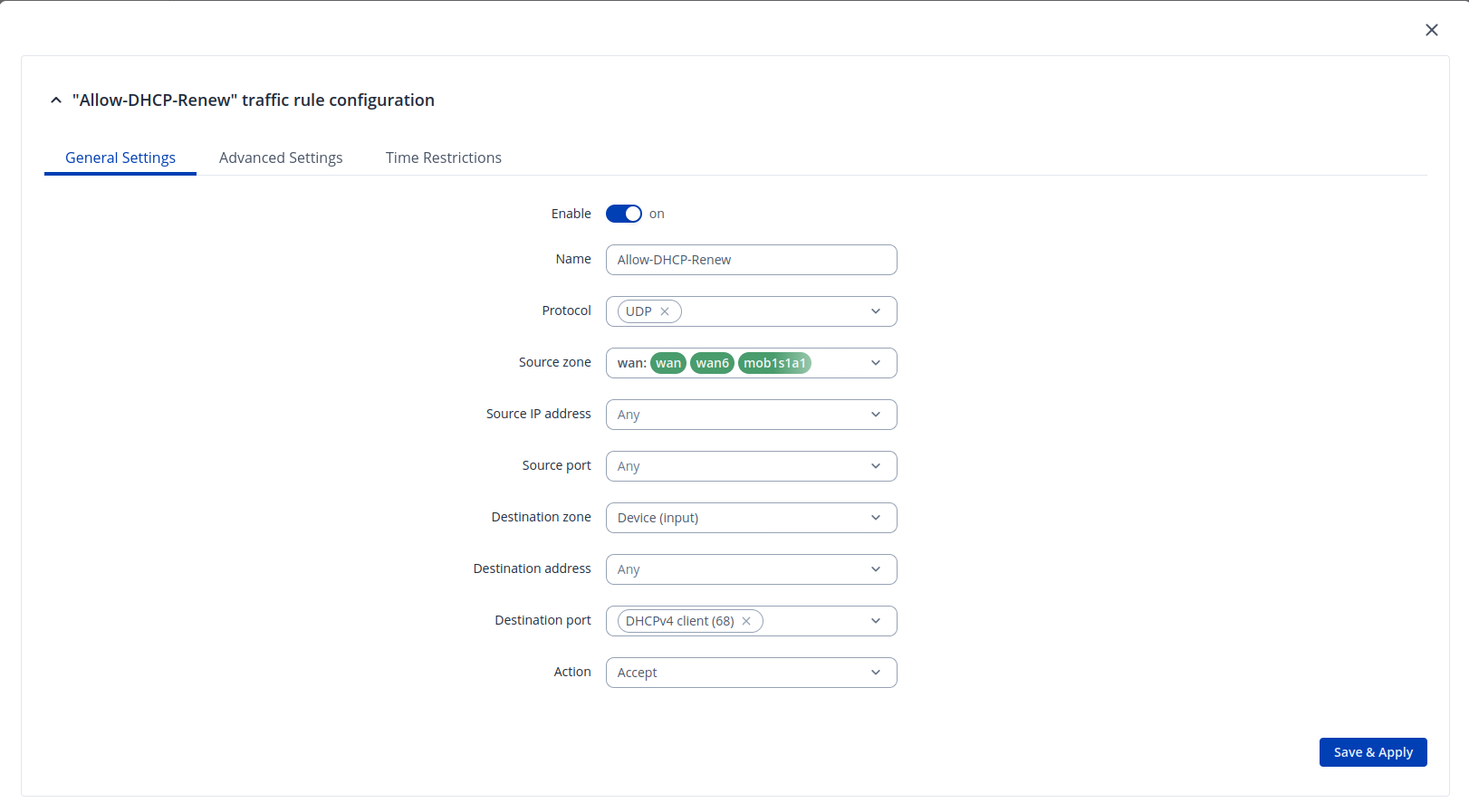
the 241 stops accepting DHCP updates from the provides and the lease time is set på to 2 hours from the provider, we had to create firewall rules/NoNAT to allow DHCP updates on LTE
i my objective this is at bug in the firmware for the 241
If you don’t mind - could you please share screenshots of the rules you’ve created to resolve this issue? I believe this would be beneficial in case other users come to meet these kinds of issues in the future.