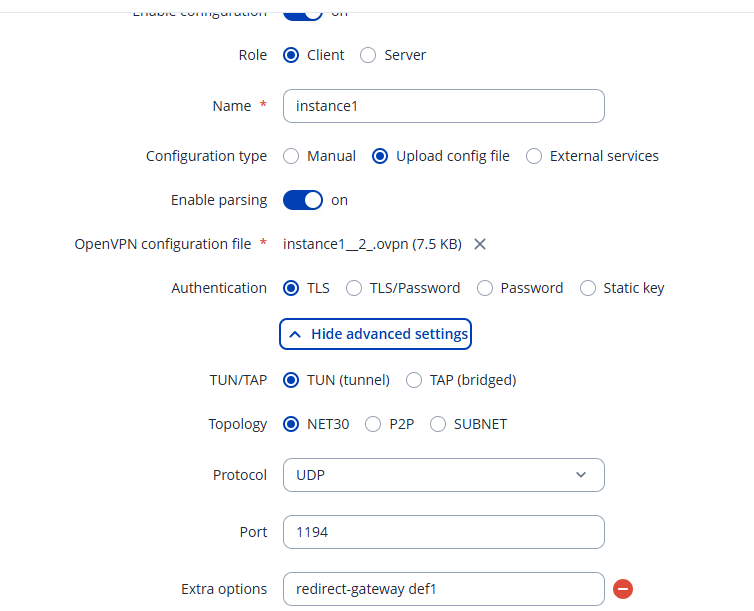
I manually created an initial OpenVPN client configuration which works fine.
As I wanted to redirect all traffic through the OpenVPN tun interface and avoid routing LAN traffic through WAN and Wifi client interface, I exported the manual configuration to a .ovpn file and editet it by appending the following line:
redirect-gateway def1
at the end of the parameter list just before the certificates section (see .zip content).
I disabled the intial OpenVPN configuration and created a new one by uploading the edited .ovpn file. When enabling the new configuration the log contained the following error:
542 Tue Nov 25 13:52:33 2025 daemon.err openvpn(inst2)[7175]: ERROR: Endtag missing
543 Tue Nov 25 13:52:33 2025 daemon.notice openvpn(inst2)[7175]: Exiting due to fatal error
Checking the uploaded .ovpn file it turned out that terminates the
-----END CERTIFICATE----- line without trailing linefeed.
After manual insertion of the missing linefeed and re-upload into a new configuration everything works fine including the intended routing through the tun interface.
Please could you check and comment the following:
consider offering the redirect-gateway def1 option via Web GUI so that it can be activated in manual configurations?
is the erroneous behaviour on a missing linefeed before the tag intended?
in the created export file the linefeed had already been missing.
I wasn’t able to reproduce the missing linefeed issue on a RUT142 running the same firmware. It’s possible that the text editor you’re using to open the file is altering the formatting. Could you try exporting the file and uploading it again without opening it first to see if the issue still occurs?
Thanks for the hint regarding redirect-gateway, seems to work fine and does what it should.
I again downloaded the .ovpn configuration and formatting was fine - so this most probably was my fault when handling the editor. Obviously no problem in RutOS.
After manually removing the trailing linefeed before [/ca] tag the corrupt .ovpn file uploads without complaint but enabling the configuration leads to the known error. RutOS obviously does not touch this file as after re-downloading it is identical with the corrupt upload. So it would be helpful if RutOS would complain already on upload about misformed .ovpn files.