RUT X50 no 5g after upgrade

I updated firmware from RUTX_R_00.07.23.1 to RUTX_R_00.07.23.6 and now I do not have a 5g connection.

The router always showed 2 LTE B3 connections and one 5G NSA connection where the bands are displayed. This has been the case for over 12 months. Now the router only shows the 2 LTE B3 connections, the 5G connection is not there in the bands
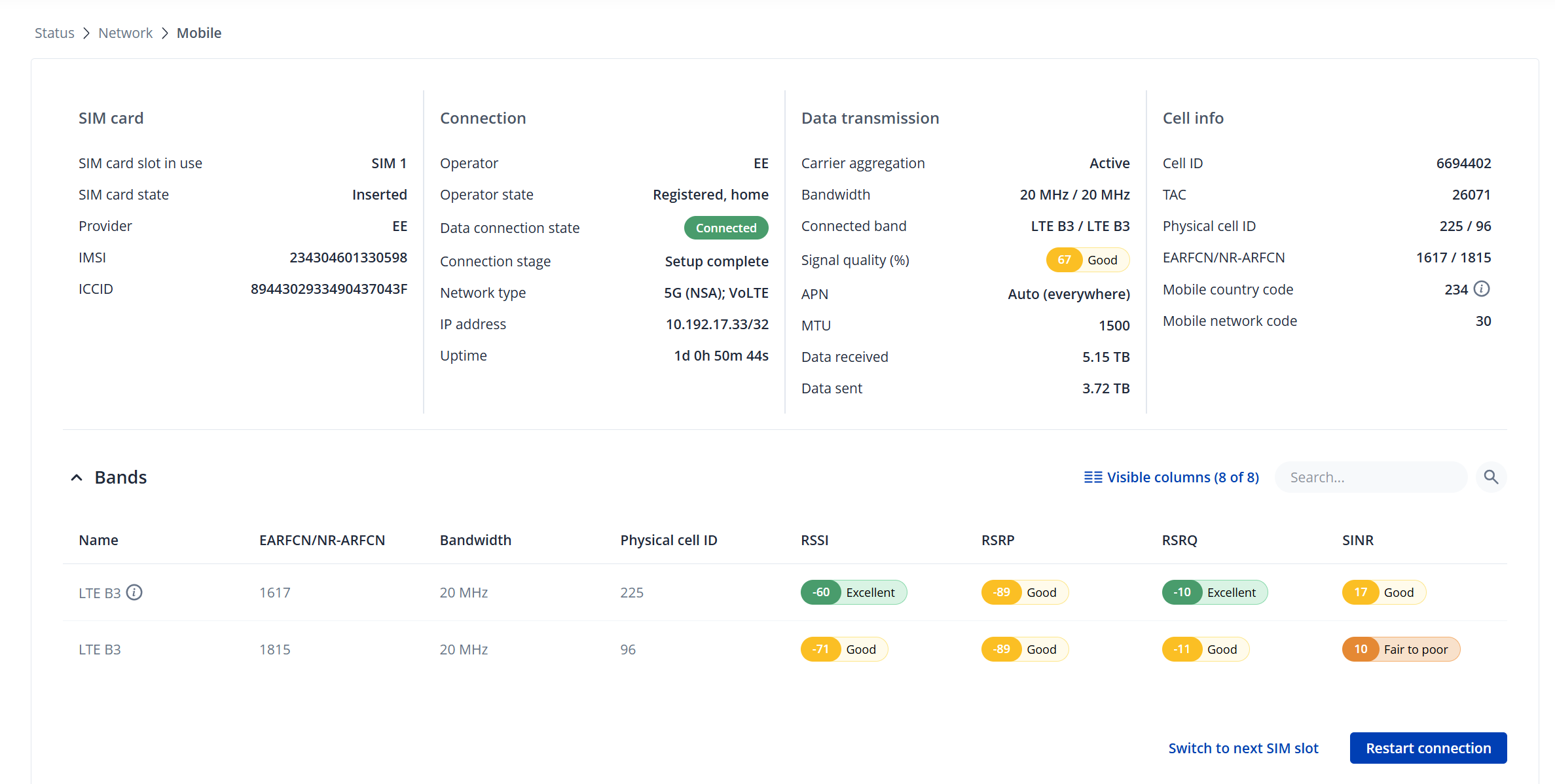
.

I have two different 5G mobile phones, if I put the sim card from the router into each of those mobile phones I get a very strong 5G signal. My network operator confirms there is an excellent 5G signal in my location.

I’m pretty sure it stopped working as part of the update process.

Any thoughts or suggestions please?
Don’t worry, this is a known issue. You will have a 5G connection, i’m 99% confident of that it’s just not being displayed on the GUI.

Hopefully this will be resolved with the next firmware update shortly.

Still not convinced!? How confident are you with the use of CLI …

Go to System > Maintenance > CLI, login using the username root and your admin password and execute the follow commands, you will get similar responses to those below.

root@RUTX50:~# gsmctl -K
Access tech: LTE | TDD mode: FDD | MCC: 234 | MNC: 20 | UE state: 3
Access tech: NR5G-NSA | TDD mode: | MCC: 234 | MNC: 20 | UE state: 3

root@RUTX50:~# gsmctl -A ‘AT+QCAINFO’
+QCAINFO: “PCC”,1363,100,“LTE BAND 3”,1,173,-79,-14,-44,4
+QCAINFO: “SCC”,641376,12,“NR5G BAND 78”,880

root@RUTX50:~# gsmctl -A ‘AT+QNWINFO’
+QNWINFO: “FDD LTE”,“23420”,“LTE BAND 3”,1363
+QNWINFO: “TDD NR5G”,“23420”,“NR5G BAND 78”,641376

This result shows that i’m connected to LTE Band B3 and 5G band n78, but my GUI only shows one LTE Band B3.

root@RUTX50:~# gsmctl -A ‘AT+QENG=“servingcell”’
+QENG: “servingcell”,“NOCONN”
+QENG: “LTE”,“FDD”,234,20,C88202,173,1363,3,5,5,CC1,-79,-13,-45,12,8,20,-
+QENG: “NR5G-NSA”,234,20,880,-82,27,-10,641376,78,12,255

Thank you for your reply. I do indeed get responses as you described from the CLI.

GUI bug then…

Thanks again.

A new firmware is now available and the issue has been fixed.

You can wait until the router lets you know or you can download it from here and manually install it early: https://wiki.teltonika-networks.com/view/RUTX50_Firmware_Downloads

Thanks. Initially that worked, I made the change the same day you informed me. But I went back and checked today and the 5g status has disappeared from the GUI again (still on RUTX_R_00.07.23.7).

Now it is not showing in the CLI either:

+QNWINFO: “FDD LTE”,“23430”,“LTE BAND 3”,1617 this is the only line and

root@RUTX50:~# gsmctl -A 'AT+QENG="servingcell"'                                                                                                              

+QENG: “servingcell”,“NOCONN”,“LTE”,“FDD”,234,30,3B9A01,225,1617,3,5,5,65D7,-82,-15,-46,17,12,100,-

There is absolutely a 5g signal where the antennae is.

And oddly only one line in the CLI commands but two cells showing in the GUI

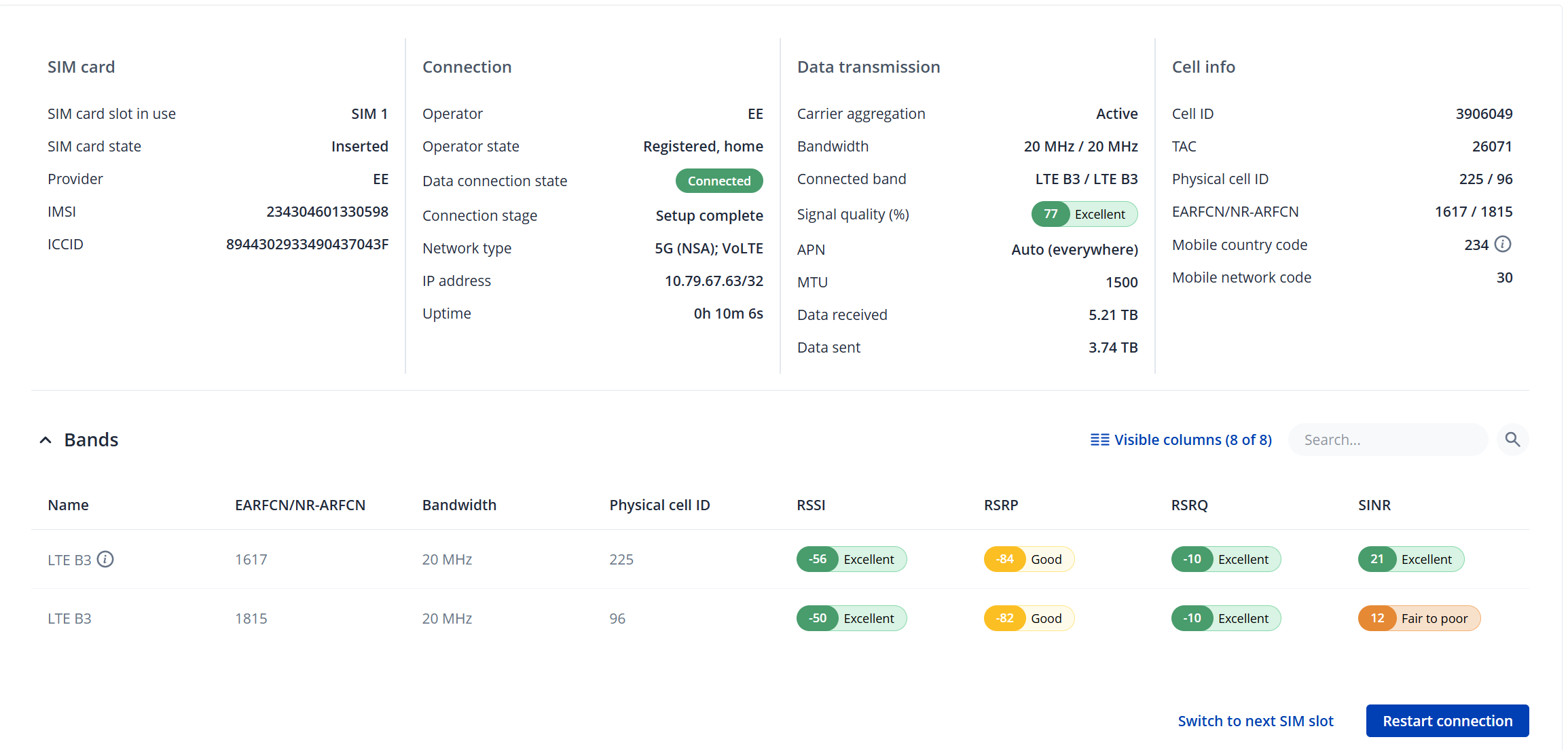
Your screenshot shows that you’ve been connected for just 10 minutes at the time.

Remember EE will only connect you to a 5G band when the demand for one is needed.

Try downloading a big file, Win11 iso file from microsoft or an OpenSuSE iso file from opensuse whilst watching if you get a 5G band. At the end of the download EE will drop the 5G band if there is no demand for it afterwards. This is normal.

Your screenshot shows that you’ve been connected for just 10 minutes at the time

Of course…I had restarted the connection several times to see if the 5g band appeared.

Remember EE will only connect you to a 5G band when the demand for one is needed.

This is not my experience in over 2 years of using the RUTX50 with EE. If there is a 5g connection available it is always shown in the list of bands, regardless of load or mobile data throughput.

Oddly, I did a full reboot of the router and the 5g band appeared, so issue has resolved itself.

Now working :blush:

At the point the above screenshot was taken there was almost no traffic to/from mob1s1a1

Thanks for your suggestions though.

Pleased it’s sorted. I was with EE UK for 4yrs and my experience was different. A 5G band would regularly appear then disappear from the list of bands being used. With Three UK this isn’t happening.

Do you suffer IPv4 failing and or offline issues? I did during the last year i was with EE and i’ve moved to Three UK which so far after roughly two months has been faultless.

No I’ve not had any issues previously with EE IP4 failing or connection dropping. The EE connection is strong, fast and reliable in my area. In my location Three is the worst, constant disconnection and very poor data speed. Just goes to show how location dependent goog 4/5g is.