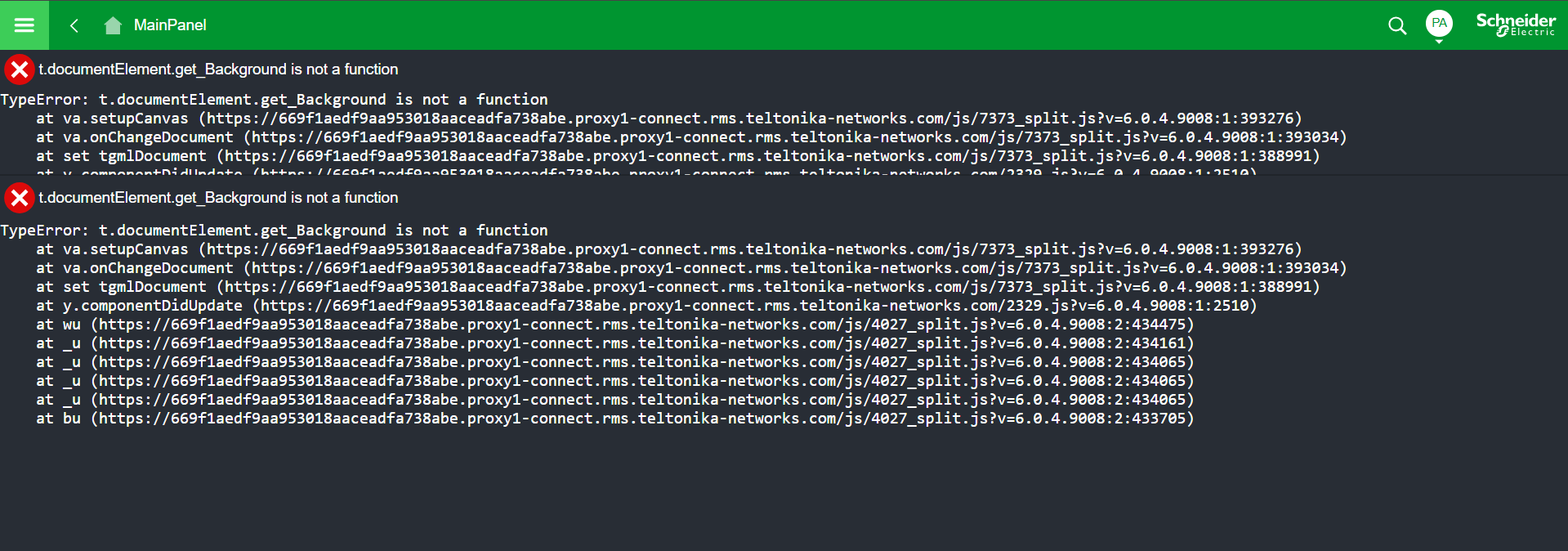
I’m facing a compatibility issue when using the Remote Access feature in RMS and am hoping someone here might have an idea or a similar experience.
I am trying to access the web interface of a Schneider Electric Building Management System through RMS.
Problem Steps:
I initiate the connection via Remote Access → WebUI. The page opens in a frame within RMS. Browsers (Firefox and Chrome) block this (e.g., “Firefox can’t open this page” or similar in Chrome).
Workaround: I open the frame in a new tab. This works, and I can see the BMS login page.
I successfully log in to the web interface.
As soon as I open a view that contains graphical elements (system schematics), the graphics fail to load, and the browser console shows a JavaScript error: TypeError: t.document.documentElement.get_Background is not a function
This error occurs in both Firefox and Chrome.
Context:
If I establish a direct VPN connection to the same device via RMS, everything works perfectly. Therefore, the error seems to be specific to the WebUI proxy service.
The firmware on both the Teltonika router and the Schneider device is up to date. The WebUI feature is critical for us, as some of our technicians cannot establish a VPN connection from their laptops due to security policies.
My Question:
Has anyone encountered a similar issue with web applications (especially from Schneider Electric) when accessed through the RMS WebUI proxy, which occurs regardless of the browser used? Are there any known solutions or special configurations that might resolve this?
Thank you for reaching out regarding the JavaScript error you are encountering when accessing the Schneider Electric BMS graphical views through the RMS WebUI proxy. To help us investigate this further, we have a few questions:
Setup & Configuration
Which Teltonika router model are you using, and what firmware version is currently installed?
How is the Remote Access connection configured in RMS Connect - were you using Auto scan or Manual mode? If manual, which protocol did you select (HTTP or HTTPS) and what port number?
Is the BMS web server running on a standard port (80/443), or a custom port?
Error Behavior
The error “t.documentElement.get_Background is not a function” appears in the browser console - does this occur immediately upon opening a schematic view, or only after a certain interaction?
Have you tried accessing the BMS via the RMS-generated link opened directly in a new tab (not inside the RMS frame)? If so, does the error still occur?
Does the issue happen consistently, or only on specific schematic/graphical views within the BMS interface?
Comparison with VPN Access
You mentioned that direct VPN access via RMS works correctly. Could you confirm which VPN type you are using for that (e.g., OpenVPN, WireGuard, IPsec)?
When using VPN, are you accessing the BMS via HTTP or HTTPS?
Browser & Environment
Which browser versions have you tested (exact version numbers for Firefox and Chrome)?
Are there any browser extensions active that could interfere with JavaScript execution (e.g., ad blockers, script blockers)? Have you tested with extensions disabled?
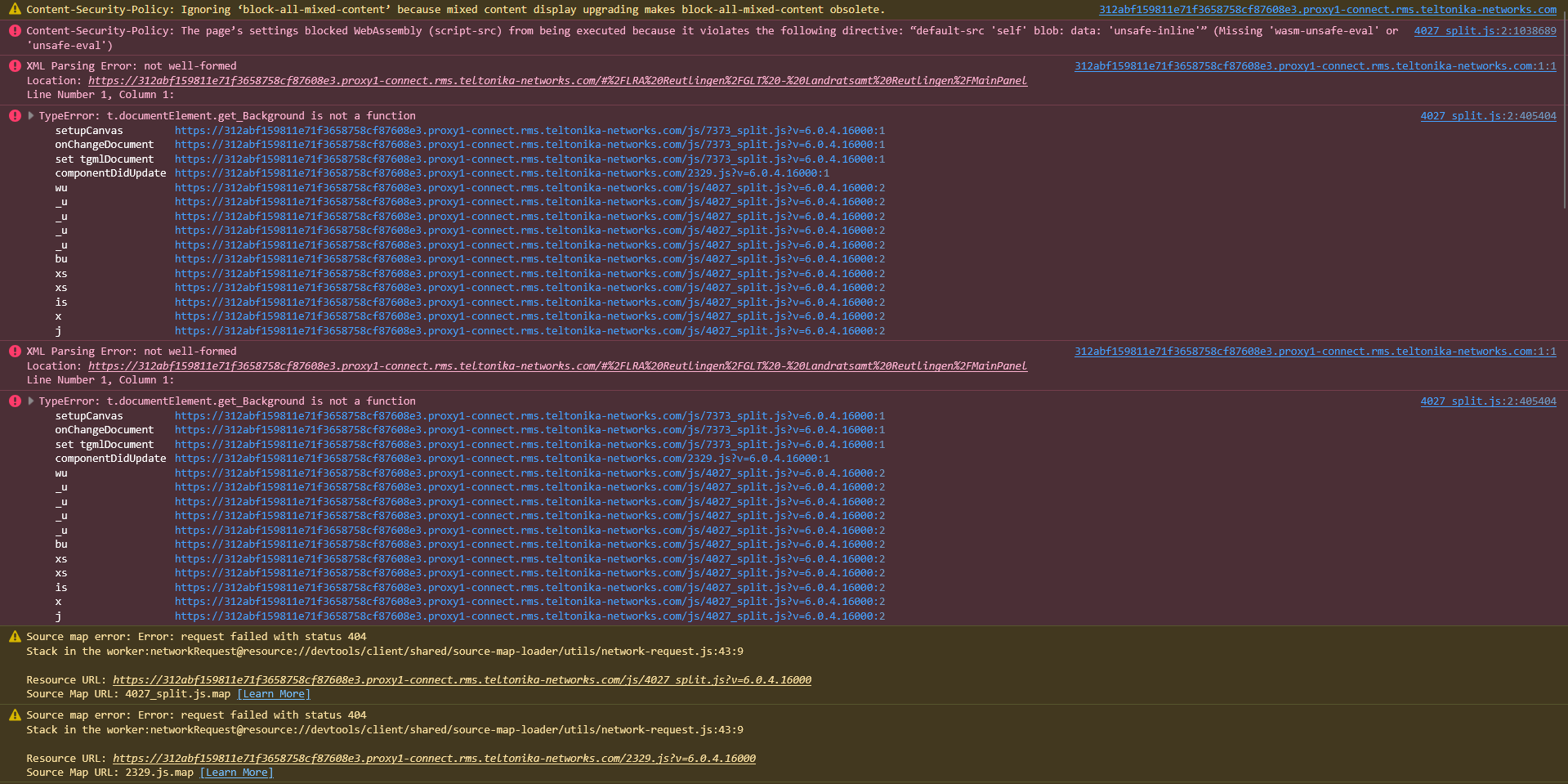
Have you checked the browser console for any additional errors besides the one shown?
BMS & Schneider Details
What is the model and software/firmware version of the Schneider Electric BMS you are connecting to?
Does the BMS web interface use any WebSocket connections or canvas-based rendering for its graphical views? (This can often be disrupted by a reverse proxy.)
Any additional screenshots of the full browser console output (not just the error shown) would be very helpful for our analysis.
Thank you for your patience, and we look forward to your response.
Thank you for your detailed questions and for looking into this issue. Please find my answers below.
Setup & Configuration
Which Teltonika router model are you using, and what firmware version is currently installed?
I am using a Teltonika RUT950 with firmware version RUT9_R_00.07.06.21.
How is the Remote Access connection configured in RMS Connect?
Mode: Manual
IP: 172.17.10.10
Port: 443
Protocol: HTTPS
Is the BMS web server running on a standard port (80/443), or a custom port?
The BMS runs on the standard ports 80 and 443.
Error Behavior
The error “t.documentElement.get_Background is not a function” appears in the browser console - does this occur immediately upon opening a schematic view, or only after a certain interaction?
The error occurs immediately upon opening a schematic view.
Have you tried accessing the BMS via the RMS-generated link opened directly in a new tab (not inside the RMS frame)? If so, does the error still occur?
Yes. When I click the connect button, an RMS frame is opened first. After the frame has loaded, I can open this frame in a new tab (or copy the generated link to a new tab, depending on the browser). The error still occurs in the new tab.
Does the issue happen consistently, or only on specific schematic/graphical views within the BMS interface?
The error has so far only occurred when loading the graphical views from the BMS. The rest of the UI (menus, settings, etc.) loads without any issues.
Comparison with VPN Access
You mentioned that direct VPN access via RMS works correctly. Could you confirm which VPN type you are using for that?
I use OpenVPN and the Teltonika VPN Hub. With both methods, the graphics are loaded correctly.
When using VPN, are you accessing the BMS via HTTP or HTTPS?
When using the VPN, I access the BMS via HTTP.
Browser & Environment
Which browser versions have you tested (exact version numbers for Firefox and Chrome)?
Firefox: 140.10.0esr (64-Bit)
Chrome: 147.0.7727.117
Are there any browser extensions active that could interfere with JavaScript execution?
No, there are no extensions installed.
Have you checked the browser console for any additional errors besides the one shown?
What is the model and software/firmware version of the Schneider Electric BMS you are connecting to?
It is a Schneider WebStation with software version 6.0.4.16000.
Does the BMS web interface use any WebSocket connections or canvas-based rendering for its graphical views?
To be honest, I am not entirely sure about the specific technologies used by the Schneider WebStation’s interface. However, the new, more detailed screenshot of the browser console might provide your development team with clues about this. If there is a specific way I can check for WebSocket connections or canvas elements, please let me know, and I will gladly perform the test.
I have a significant update regarding my issue with the JavaScript error when accessing the Schneider Electric BMS:
The remote access works perfectly when I use the Teltonika RMS app on my iPhone.
When I initiate the remote access connection through the app, the web interface opens in the Safari/Chrome browser, and all graphics are loaded correctly without any errors.
Summary:
Fails: Desktop PC with Firefox & Chrome → JavaScript error.
Succeeds: iPhone with Safari (via RMS App) → Works as expected.
Succeeds: Desktop PC with a direct VPN connection → Works as expected.
I hope this information is helpful in troubleshooting the issue to find a solution for the desktop environment.