Rms management pack 10y - issue

Hello,

I have a Teltonika RUTC50 router which was previously connected to RMS under another account using a trial license.

After some time, I wanted to transfer the device to my company account, so I performed a factory reset on the RUTC50.

Following the reset, I had one available 10-year Management Pack license, which I assigned to this RUTC50 device. However, the device was never able to connect successfully to the RMS platform. As a result, the license now appears to have been consumed, but RMS is still not working for this device.

Initially, I was seeing a message mentioning that the “credit is expired”. After some troubleshooting, the device status now shows as:

“Down – Device is not registered in RMS. Please login to rms.teltonika-networks.com and add this device to your account device list.”

However, the device already appears in my RMS device list. I am not sure whether I need to delete it and add it again, but I am concerned because I now have 0 available packs/credits, even though the RMS connection was never successfully established.

Could you please check this issue and advise how we can restore the RMS connection and recover or reassign the 10-year Management Pack license to this device?

Thank you in advance.
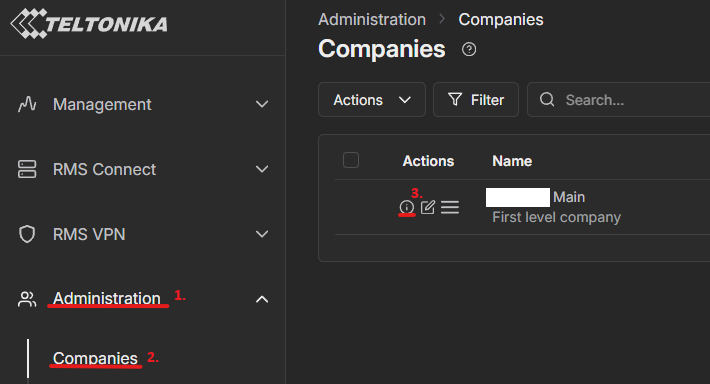
Hello @balander,

Thank you for reaching out to us.

Could you please check how many Management Packs are available in your RMS company?
You can find this information by navigating to AdministrationCompaniesView company details.

If your company still has available Management Packs, please assign one to the desired device by following the instructions in this Wiki article:

https://wiki.teltonika-networks.com/view/RMS_Device_menu

If you see that you have 0 packs remaining, we will need to continue communication on a private channel.

Best regards,

Povilas

Hello,

i have 0 credits and 0 packs right now.

Hello @balander,

For troubleshooting purposes, we will require more sensitive information from your end. to avoid leaking this information, we have sent you a form to fill out, which you will receive in your e-mail inbox that you have registered your account with in the forums. In the Ticket ID field of the form, please enter the ID of this thread, which is 20002.

Thank you,

Povilas

Hello Teltonika Support Team

I hope you don’t mind me replying to this existing thread instead of creating a new one.

I deliberately chose to post here because I believe my issue may be identical to the one described above, and I thought it would be more useful to keep similar cases together.

After spending almost 52 minutes on the phone with Teltonika Technical Support, they kindly recommended that I post my case here in the Community Forum, as other users or Teltonika engineers may have encountered the same behaviour or be able to provide additional insights.

The only differences are:

  • I assigned a 5-year RMS Management Pack instead of a 10-year pack.

  • My RUTC50 was factory new and has never used a 30-day trial voucher.

Apart from these differences, the symptoms appear to be exactly the same:

  • The Management Pack is correctly assigned to the router.

  • The device is correctly listed in my RMS account.

  • Internet connectivity is fully operational.

  • The router is running the latest stable firmware.

  • The device status remains “Down – Device is not registered.”

  • The license expiration date is not displayed in the RMS portal.

What has already been verified

During the support session, we thoroughly checked the following:

  • Latest stable RutOS firmware installed.

  • Device Serial verified

  • Device MAC address verified.

  • RMS credentials verified.

  • Management Pack correctly linked to the device.

  • Device successfully appears in my RMS account.

  • Internet connectivity fully operational.

  • Mobile connection configured for IPv4.

  • Successful ping tests (no packet loss).

  • DNS resolution working correctly.

  • Dynamic Monitoring enabled.

  • Static Monitoring enabled.

  • Device was unregistered and registered again.

  • Router configuration reviewed together with the support engineer.

Despite all these checks, the router still cannot complete the RMS registration process and continues to show:

“Down – Device is not registered.”

Since I found this thread describing almost exactly the same behaviour, I am beginning to wonder whether both cases share the same root cause.

I hope these technical details are also helpful for other community members, as they summarize the troubleshooting steps that have already been completed and may save others from repeating the same diagnostics.

If anyone from Teltonika could investigate whether these two cases are related, I would greatly appreciate it.

Thank you very much.

Kind regards from Switzerland

Paolo