I’ve register many RUT241 devices to RMS and they working fine,
recently I’ve added a new RUT241, it’s wired to the WAN, internet connection seems to be good and the WEBUI is reachable from the RMS.
I’ve issues connecting to the LAN port remotely using VPN Client (Teltonika RMS),
No ping, therefore I can’t reach my devices (PLCs, power meters etc..) which are all configured to static IP and the Teltonika can ping them from the WEBUI.
attached to this link the system log and troubleshoot.
FW version is the latest.
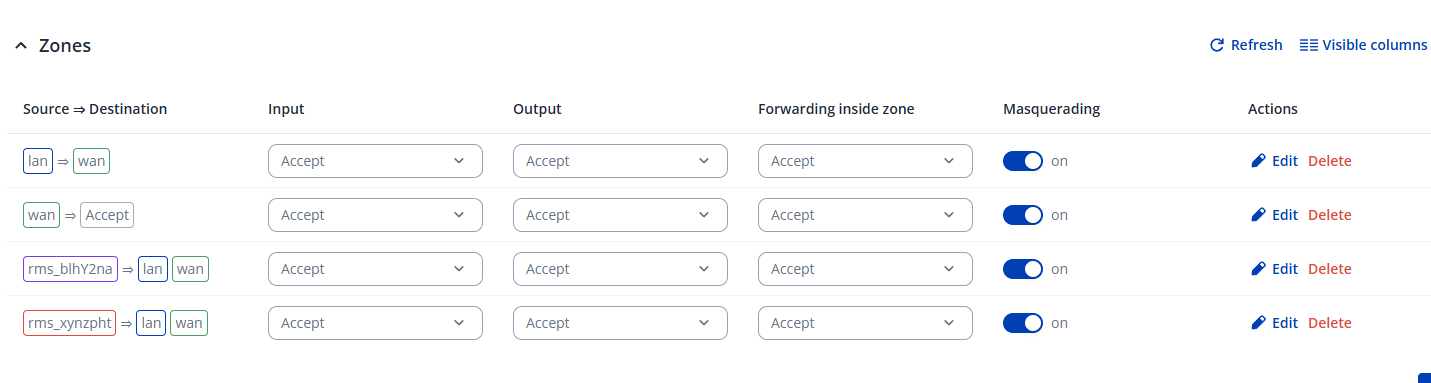
Masquerading is enabled.
LAN fowrarding enabled.
The connection for the internet is using wired WAN.
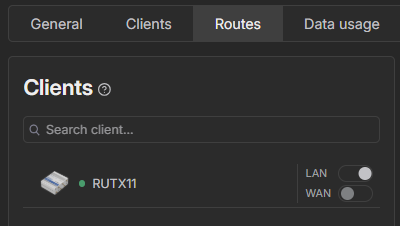
I would like to clarify whether LAN forwarding and routing have been configured on the RMS VPN hub. You can verify and set this up by navigating to the Routes tab in your VPN hub, selecting the device, and performing a scan. All devices connected to the router’s LAN network should then appear. Please select the required LAN devices and click Add.
Once this is done, enable LAN forwarding as shown in the screenshot and restart the VPN hub. This should allow you to access devices located on the router’s LAN network through the RMS VPN hub.
After using a SIM card insted of WAN connection, it works fine.
But because that the 4G signal is bat at the router location, I want to use the WAN port,
The WAN is connected to a customer network, I think it means some port openings is required, what is the port that should be opened in the customer firewall ?
There is no need to open any additional ports. Simply connect an Ethernet cable from an internet source (for example, another router) to the WAN port of the RUT241. Once connected, the RUT241 should obtain internet access and become reachable.
Could you please confirm whether the device appears as Online in RMS after being connected to the WAN port?