You can utilize RMS VPN Hubs, which are based on OpenVPN. Here is a wiki article with a step-by-step guide, including a video tutorial explaining the setup process:
Additionally, if possible, could you please share the router model you are using and describe your specific use case? This information would allow me to provide more precise guidance.
I look forward to your reply. If you have any additional questions, please don’t hesitate to ask.
I user RMS VPN Hubs now for all sites that have an RUTxx (RUT241 mostly).
This solves 90% of cases we used Zerotier for.
The reminder of cases is sites where we don’t have a Router at all, just a PC which clients need to reach remotly. Right now we have Zerotier installed om the PC, this is what I would like to change. If the only way is to install a router we probably will keep zerotier for these.
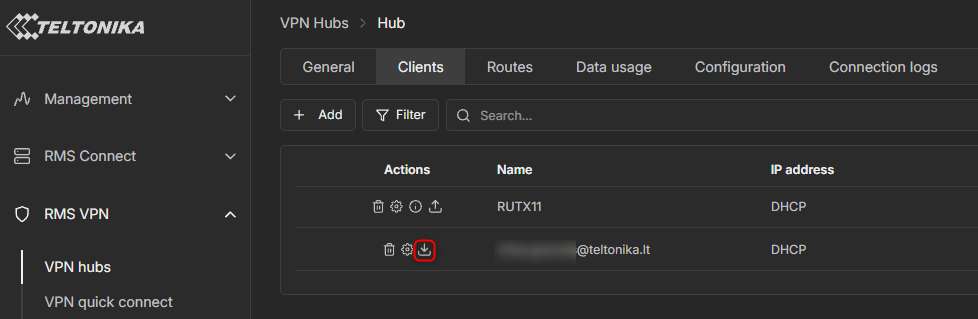
If you already have an RMS VPN Hub set up and running, you can download a client configuration file and apply it to an OpenVPN client to remotely access devices within the same VPN. No additional routers are required. The PCs at your remote locations only need a stable internet connection and the configuration file applied to their OpenVPN client.
To download the configuration file, navigate to RMS VPN Hubs , open your specific VPN Hub, and switch to the Clients tab. There you will see your VPN clients. You can download the configuration file by clicking the button marked in red in the screenshot below.
Once downloaded, import this configuration file into your OpenVPN client on your PC. This should allow you to establish a VPN connection to your VPN Hub from a remote location.
Please let me know how it goes. If you have any additional questions, don’t hesitate to ask.