I have an RUT241 in a very remote location; remote access to the router and the datalogger behind it are essential to the end customer’s on-going project.
I am able to remotely connect to the router and the datalogger on the LAN via the RMS, but I am unable to sustain the connection long enough to download even one day’s worth of files from the logger.
On each attempt, after some number of files, the logger’s UI reports a failed download and the link no longer functions for remote access to the LAN device.
A single day’s worth of data results in at least 72 individual files that need to be downloaded. Almost every single file is =< 100 Kb in size, and I wonder if the number of individual connections required is part of the problem.
Ultimately, I require some assistance in stabilizing the Remote Connect connection so that I can extract the data from the LAN device.
(NB: The router’s SIM has a fixed IP, but we are unable to access the router even though exact same configuration file works flawlessly on our test unit. The SIM provider is actively troubleshooting from their end. RMS is currently our only way of accessing the devices.)
Any advice or troubleshooting approaches are very appreciated!
Cheers,
Ben Buckley
Technical Support Specialist
NRG Systems, Inc.
Hinesburg, Vermont, US
Could you please clarify how you are attempting to download the files? Specifically, does the download fail because the link expires, or is it due to a connection issue (for example, mobile connectivity dropping)?
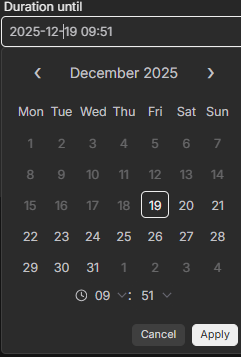
If the downloads are failing due to an expired link, you can extend the link’s validity by clicking on the date in the “Duration until” field and setting a longer lifetime. By default, the link expiration is set to 30 minutes.
Thanks so much for your response. With more investigation on our end, the problem I’ve encountered turns out to be a combination of a high-latency connection from the carrier and a datalogger with very rudimentary file transfer routines. So, ultimately, a connectivity issue.
When that happens, though, the RMS Connect link frequently becomes unusable going forward, even though it still has time before expiration. Deleting the previous link and creating a new one restores access. This is not a blocking issue, but it does make the RMS Connect annoying to use.
Thank for getting back to us. I look forward to reaching out in the future as we do more with Teltonika devices.
Best regards,
Ben Buckley
Technical Support Specialist
NRG Systems, Inc
Hinesburg, VT, USA