RMS Appear Like On LAN Network

Hello,

I am using RMS to connect to remote PLCs, which has been working fine, thanks Teltonika.

I now have a use case, where I cannot set a ‘gateway’ address of the PLC to the IP of teltonika device (RUT200 in my case), as it is used for other functionality.

I need to set up NAT(?) or some other method, so that my remote PC, appears like it is in local network and then I could connect to the PLC. I don’t need layer 2 access, for broadcast, etc.. Just need to be appear like I’m in local IP range. Hope that is clear.
Could you advise/give some directions? Thanks.

Hello, Juozas,

I have a couple of suggestions for your question that I would like you to try:

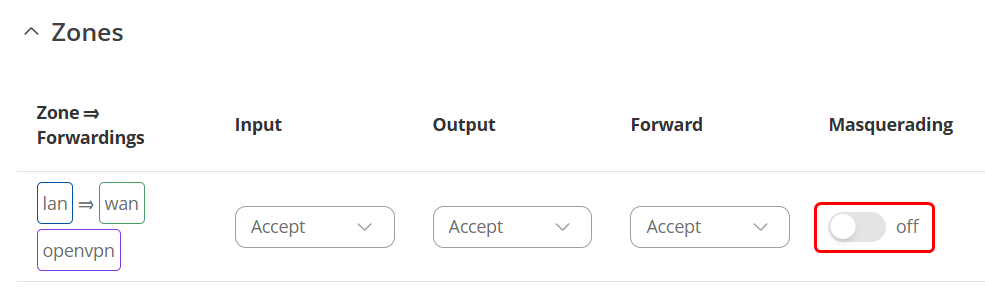
  1. Ensure that you’ve enabled Masquerading under WebUI → Network → Firewall → Zones (Or general settings, if you’re on older firmware):

    This does exactly what you’ve described, and if not enabled already, should resolve the issue.
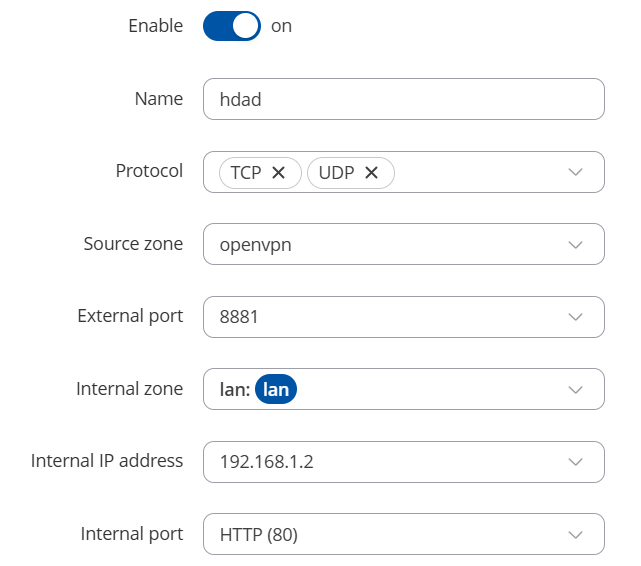
  2. You can also set up a port-forward rule from the OpenVPN (RMS VPN) zone to the PLCs IP + PORT under Network → Firewall → Port Forward, for example:

    Yours, of course, will look different, as the ports & IP might be different.

Regards,
M.

1 Like

Thank you, it works!

1 Like

This topic was automatically closed 2 days after the last reply. New replies are no longer allowed.