Good afternoon,
The Mobile devices end point you use, refers to the functionality which has been removed, therefore you receive “Forbidden values”. This functionality is not related to device Sim card, or mobile interface control.
In your case, to be able to change you Sim card pin code, we will be utilizing RMS API along with RUTOS API. You would firstly need to follow this guide : Generate RMS Connect link API example - Teltonika Networks Wiki
Up to Getting the device ID in RMS bit.
After that, generate an RMS WEBUI link (see screenshot and link to video)
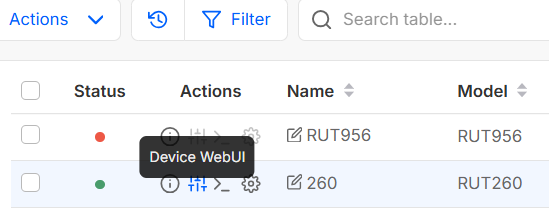

And paste that link in Postman as a POST command, with endpoint /api/login at the end. https://developers.teltonika-networks.com/reference/rut260/7.14.3/v1.6.3/authentication#post-login . As Authorisation type choose bearer token, and then post the token you received in RMS API. in BODY paste this text :
{
“username”: “String”,
“password”: “String”
}
While changing the values to the ones you use to login to router’s WEBUI.
In the values you receive, you will receive another token. Please save that token in your notes, as it will be needed in further steps. (See screenshot example)
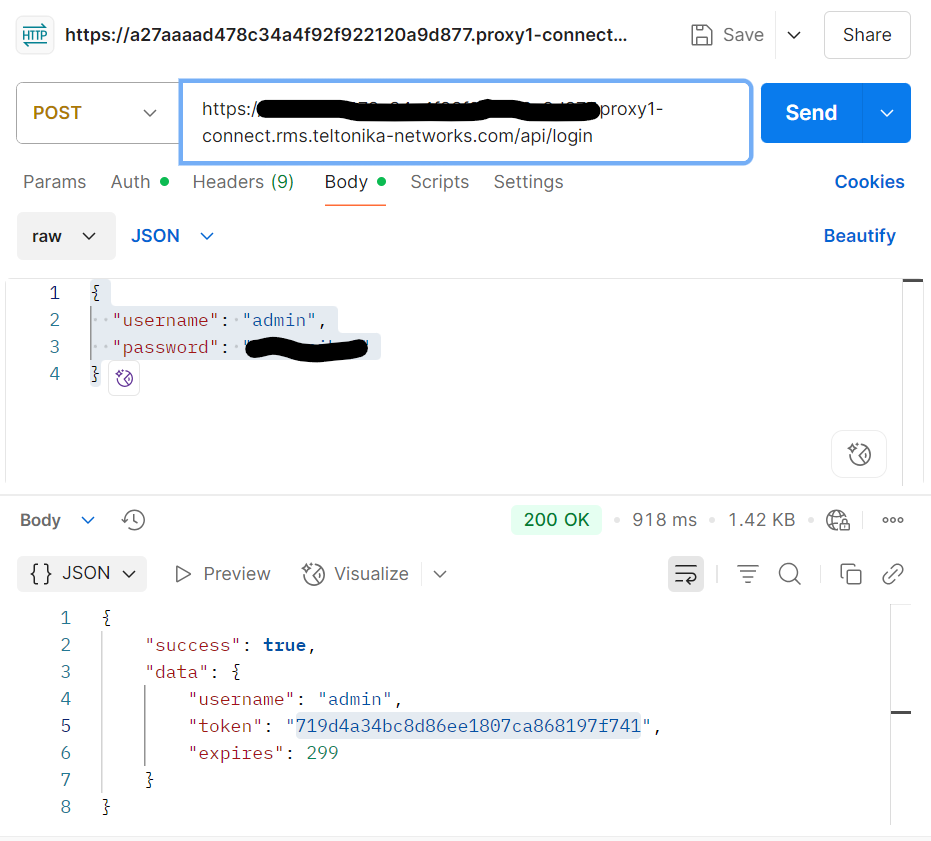
Getting this device access token allows you to utilize the rest of the API capabilities.
In your case, as you need to change the Pin code of Sim card, you will firstly need to find out the modem ID. To do so, you need to open up another Postman instance, now choose GET, and then paste the RMS WEBUI link, along with endpoint /api/modems/status. https://developers.teltonika-networks.com/reference/rut260/7.14.3/v1.6.3/modems#get-modems-status .
Go to auth, choose bearer token, and paste the token that you received in the previous request. Not the one received in RMS API. Then press send. (see screenshot of example)
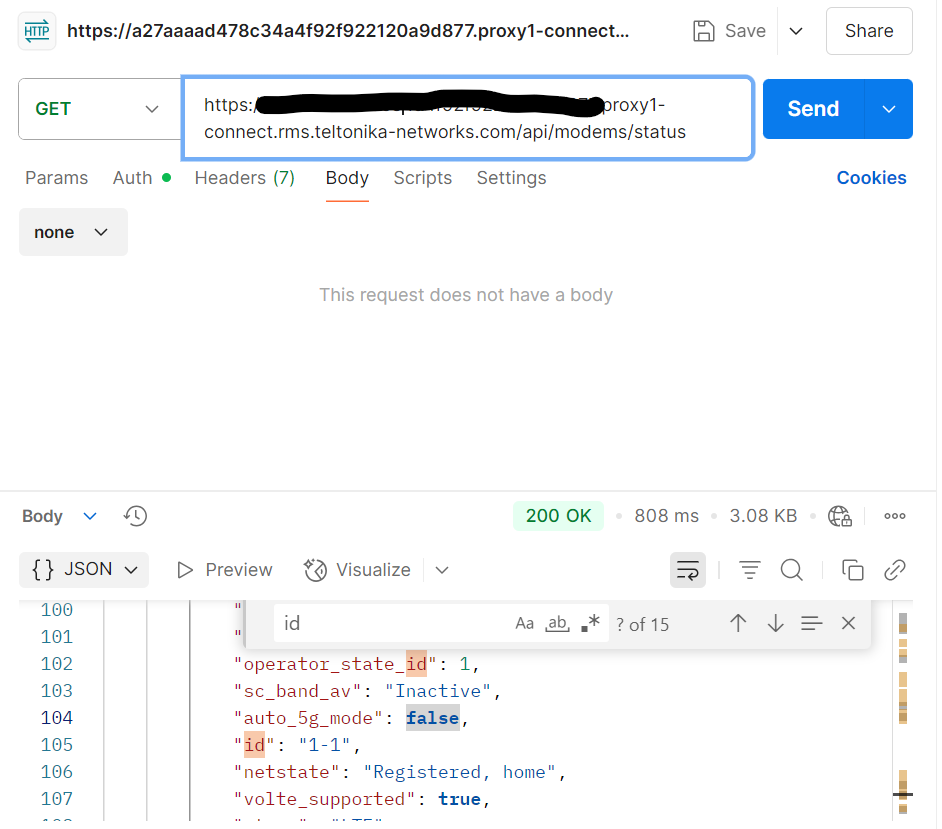
In the received values, you need the “id” value (For example 1-1). Save that value, as you will need it in the next step.
Then last request to be sent in your case, is a POST request in Postman. Once again, paste the RMS WEBUI link, along with the endpoint /api/modems/{id}/actions/change_pin while replacing the ID bit, with what you have received in the previous task, the ID value. https://developers.teltonika-networks.com/reference/rut260/7.14.3/v1.6.3/modems#post-modems-id-actions-change_pin .
In auth choose bearer token, and paste the token that you received in the previous request. Not the one received in RMS API.
In Body, paste
{
“data”: {
“pin”: “String”,
“new_pin”: “String”
}
Put the current pin in the above string, and new pin in the bottom string. After all the above steps, press send. Your pin code should be sucessfully changed.
You can then check your current Pin code in by sending another GET request via postman. Once again, paste the RMS WEBUI link, along with the endpoint /api/sim_cards/config. https://developers.teltonika-networks.com/reference/rut260/7.14.3/v1.6.3/sim-cards#get-sim_cards-config .
Go to auth, choose bearer token, and paste the token that you received in the initial request with the token. Not the one received in RMS API. Then press send.
In the returned values, the pincode section will show the newly updated PIN.
Regards,
Arturas