RMS API - keep getting "FORBIDDEN" / basic API setup help needed

Hi,

(first of all, I could not send this post as intended, as “a new user only can put 2 links in a post” which is a bit ridiculous if you want to discuss API endpoints). I will replace the links with Numbers and add the corresponding links in a comment right after the original post)

I’m new to RMS and the API so this might be a beginner / base understanding issue, but I hope that someone is able to guide me in the right direction.
We have multipe RUTX09 routers, credits and I also have created API tokens (to test with all 88 privileges activated).
However: some requests are just fine, e.g.
[1] → returns all relevant data
also
[2] → returns all devices
and
[3] > returns details for a single device

However, some requests just don’t work, I just get back “FORBIDDEN”, such as:
https://rms.teltonika-networks.com/api/mobile-devices
I get:

{
    "success": false,
    "errors": [
        {
            "code": "FORBIDDEN",
            "message": "Forbidden."
        }
    ]
}

What I want to do is: get the SIM card configuration of an existing device and later on configure it, e.g. SIM Card 1 → set Pin to 1234, default=false; SIM Card 2 → Pin = 5678, default = true
Also I’d like to tweak fallback, etc.

Is this possible at all?
I’m finding it quite complicated to follow the different API documentations.
I was trying this one here:
[4]
but also found this one:
[5]
which looks quite different
Especially if I look at this.
[6]
I don’t see any similar request (/sim_cards/config) in the above documentation.

Probably an issue of basic understanding on how the API works, so I hope that someone gives me the necessary hint to get started!

Thanks,
Fritz

Here are the missing links (Part 1 - as I can’t event put more than 2 links in a reply…):
[1] https://rms.teltonika-networks.com/api/companies
[2] https://rms.teltonika-networks.com/api/devices

here’s part 2:
[3] rms . teltonika-networks . com /api/devices/123
[4] developers . rms . teltonika-networks . com /pages/api.html

Part 3:
[5] https:// developers . teltonika-networks . com/tutorials/
[6] https:// developers . teltonika-networks . com/reference/rutx09/7.10.1/v1.2/sim-cards#sim-cards-sim-configuration

Here are all the links as image, as I can’t event post them here.

Good afternoon,

Thank you for your query.

We are currently working on it, and will be back with a response as soon as possible.

Thank you for your patience,

Regards,
Teltonika Team

1 Like

Good afternoon,

The Mobile devices end point you use, refers to the functionality which has been removed, therefore you receive “Forbidden values”. This functionality is not related to device Sim card, or mobile interface control.

In your case, to be able to change you Sim card pin code, we will be utilizing RMS API along with RUTOS API. You would firstly need to follow this guide : Generate RMS Connect link API example - Teltonika Networks Wiki
Up to Getting the device ID in RMS bit.

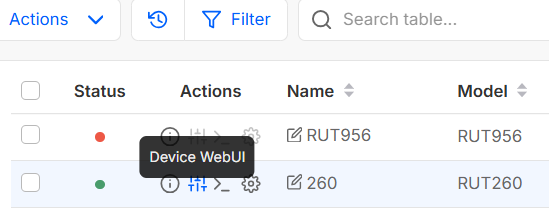
After that, generate an RMS WEBUI link (see screenshot and link to video)

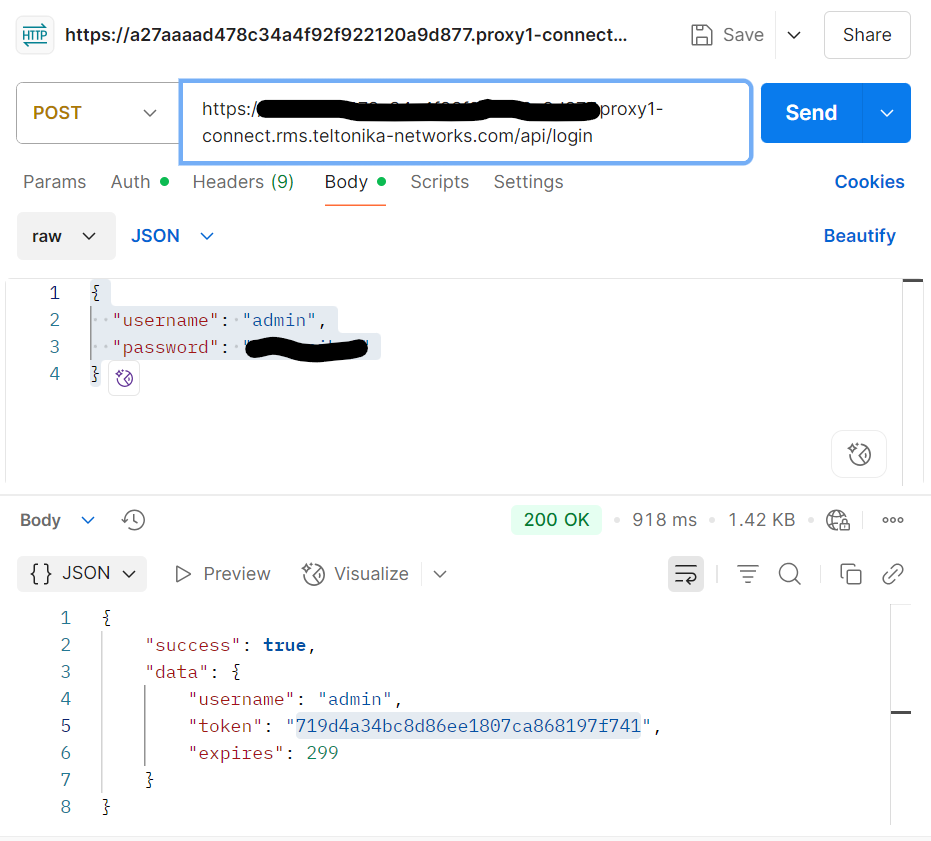
And paste that link in Postman as a POST command, with endpoint /api/login at the end. https://developers.teltonika-networks.com/reference/rut260/7.14.3/v1.6.3/authentication#post-login . As Authorisation type choose bearer token, and then post the token you received in RMS API. in BODY paste this text :
{
“username”: “String”,
“password”: “String”
}
While changing the values to the ones you use to login to router’s WEBUI.

In the values you receive, you will receive another token. Please save that token in your notes, as it will be needed in further steps. (See screenshot example)

Getting this device access token allows you to utilize the rest of the API capabilities.

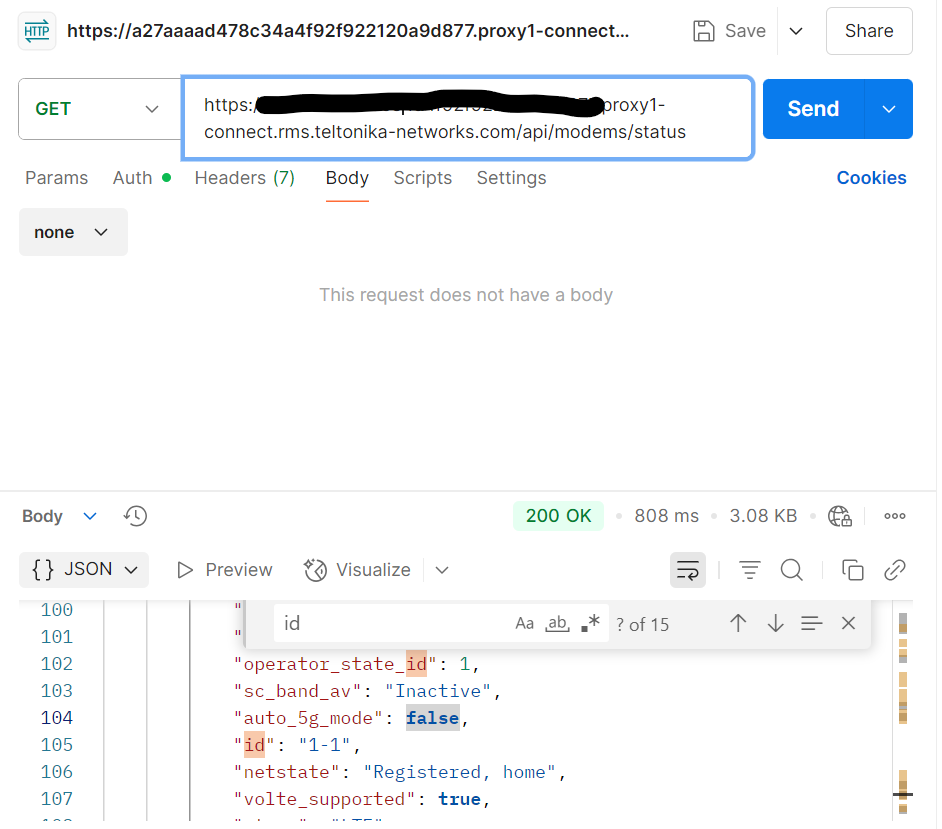
In your case, as you need to change the Pin code of Sim card, you will firstly need to find out the modem ID. To do so, you need to open up another Postman instance, now choose GET, and then paste the RMS WEBUI link, along with endpoint /api/modems/status. https://developers.teltonika-networks.com/reference/rut260/7.14.3/v1.6.3/modems#get-modems-status .
Go to auth, choose bearer token, and paste the token that you received in the previous request. Not the one received in RMS API. Then press send. (see screenshot of example)

In the received values, you need the “id” value (For example 1-1). Save that value, as you will need it in the next step.

Then last request to be sent in your case, is a POST request in Postman. Once again, paste the RMS WEBUI link, along with the endpoint /api/modems/{id}/actions/change_pin while replacing the ID bit, with what you have received in the previous task, the ID value. https://developers.teltonika-networks.com/reference/rut260/7.14.3/v1.6.3/modems#post-modems-id-actions-change_pin .
In auth choose bearer token, and paste the token that you received in the previous request. Not the one received in RMS API.
In Body, paste

{
“data”: {
“pin”: “String”,
“new_pin”: “String”
}

Put the current pin in the above string, and new pin in the bottom string. After all the above steps, press send. Your pin code should be sucessfully changed.

You can then check your current Pin code in by sending another GET request via postman. Once again, paste the RMS WEBUI link, along with the endpoint /api/sim_cards/config. https://developers.teltonika-networks.com/reference/rut260/7.14.3/v1.6.3/sim-cards#get-sim_cards-config .
Go to auth, choose bearer token, and paste the token that you received in the initial request with the token. Not the one received in RMS API. Then press send.
In the returned values, the pincode section will show the newly updated PIN.

Regards,
Arturas

Hi Arturas,
thanks for the detailed instructions - much appreciated.
One question however: As we need to automate this - is there a way to do this programmatically? I mean, going to a web ui to create an access link seems like a manual process.
Do I really need to perform the requests on the URL of the device? I would have hoped that I can configure the device differently? Meaning: preparing all the settings upfront by setting everything against the RMS API endpoints and the moment the device goes online, it will get its desired configuration.
Or can I at least automate the process of getting an rms webui link?

Thank you very much
Fritz

Hi there,

What you requested to achieve, the way to do it would be in the above guide.

Regards,
Arturas

Hi,
I’m missing the part where I would get the device URL. Right now, the guide asks me to login to RMS and then click a link and copy the URL. Is there a REST request to generate the URL?
Thanks

Hi there,

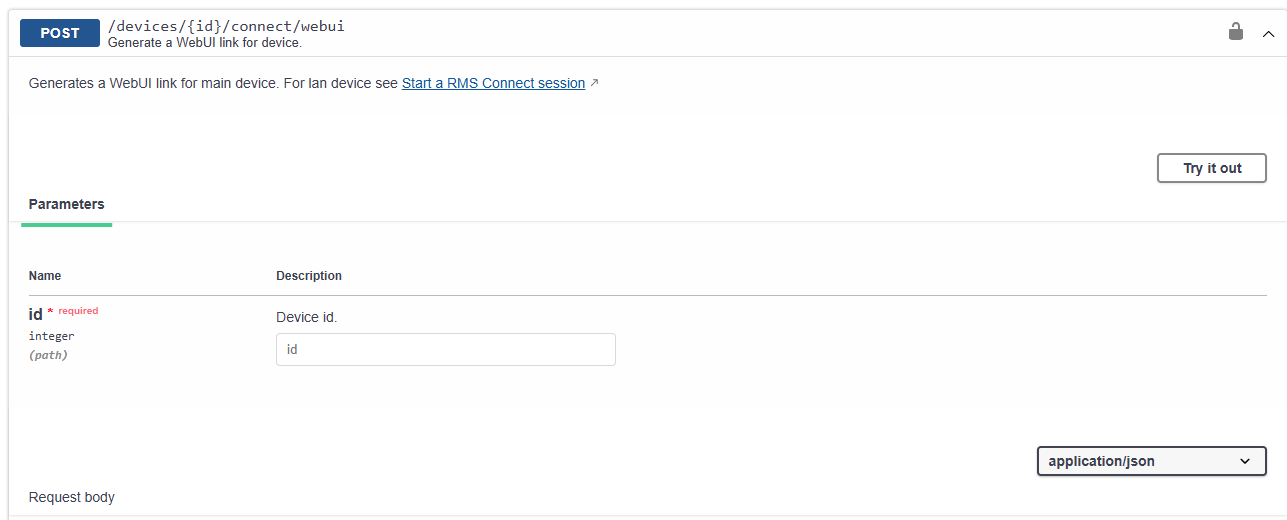
Please see the endpoint for generating a remote connection for API

I would also recommend having a read on our API functionality, to understand and use it more efficiently.

Regards,
Arturas

1 Like

Hi Arturas,
thanks for the final hint.
I did read the API functionality but for me (on first sight) it was quite complicated to understand that there are 2 different APIs. The RMS API and the RUTOS API. At first I thought it’s new and old API documentations, that’s I was constantly searching for the same functionality of of the RUTOS API in the RMS API, that’s why I was confused.

You guided me in the right direction, thanks for that!

Best regards,
Fritz

1 Like

This topic was automatically closed 2 days after the last reply. New replies are no longer allowed.