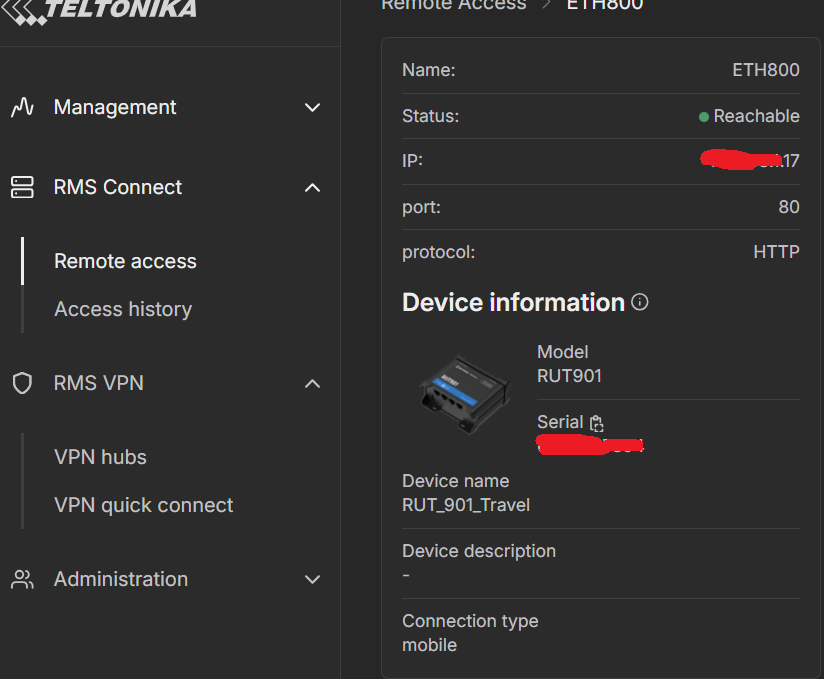
To start troubleshooting the issue, you can check the following settings:
Verify RMS / Remote-Access configuration
In RMS → Remote Access, ensure you’ve added a connection for your PLC (or “end device”) — either via Auto scan or Manual entry.
If using Manual mode: check that the IP address is exactly the LAN-side IP of your PLC, and the correct port & protocol (e.g. HTTP, Modbus-TCP, or whichever service you use) are configured.
Check that RMS credits/data are available
If using RMS “Connect” or “VPN/Remote Access” via a data-credit system, ensure your account hasn’t exhausted the allotted quota - no data remaining may cause remote-device access to fail even if the router is reachable.
Network settings of the target device (PLC / end device)
Confirm the device IP, subnet mask, and default gateway are correct, so replies from the PLC can return to the router and then over RMS.
If using a subnet different from the router’s LAN, double-check that routing is properly configured (especially under RMS VPN mode).
Use correct protocol & port in RMS Remote-Access
RMS supports SSH, Telnet, HTTP(S), RDP, VNC, SFTP, etc. Use the right protocol for your target device and service.
If the device’s service is disabled (e.g. web-UI not running, or Modbus not enabled), RMS link won’t work — verify that the service is up locally first.
Update firmware / ensure router compatibility
Make sure the router (e.g. RUT901) firmware is up-to-date. Some users have reported that VPN/remote-access issues got resolved after firmware updates.
Additionally, you can find more information regarding granting remote access to the PLC in this article:
For troubleshooting purposes, we will require more sensitive information from your end, such as the troubleshoot file, which may contain passwords, public IP addresses, serial numbers, and such. To avoid leaking this information, we have sent you a form to fill out, which you will receive in your e-mail inbox that you have registered your account with in the forums. In the Ticket ID field of the form, please enter the ID of this thread, which is 16736.