Problems with creating two separate LAN on RUTX11

Hi,

I am blocked since the last 48h with my RUTX11, I need to create to seprate LAN, with ethernet port LAN1 and LAN2 on the first LAN (recreationnal_lan) and another LAN (navigation_lan). I created a VLAN3 and untagged LAN3 for it and left LAN1 and LAN2 on VLAN1 and 2.

Then I created the two lan and on physical setting I mapped them to eth0 and eth0.3. I also have two seprate wifi for the two lans.

Everything is working great on wifi networks but I can’t access any Adminstration page when connect with ethernet on port LAN3. Tough I can ping devices wired to this interface.
Is there any settings I am missing to be able to access the admin page on the LAN3 port, thank you :slight_smile:

Greetings, @mkergo35 ,

Welcome to Teltonika Community!

Could you please clarify the following:

  • By Administration page you mean device’s WebUI?
  • Does the issue accessing the administration page occurs only on LAN3?
  • Are you able tor reach the device’s WebUI from any other network (WLAN / LAN / LAN2)?
  • Are there any error messages appearing while you try to connect?

This information will help me to investigate further.

Warm regards,
V.

I am not sure I explained the issue well. When I am manually configuring VLAN, everything is working great, but when I compile the firmware using the files/etc/config method the two lans become merged. I attched my network config file and an image of the merged VALN

config interface ‘loopback’
option device ‘lo’
option proto ‘static’
option ipaddr ‘127.0.0.1’
option netmask ‘255.0.0.0’
option area_type ‘lan’

config globals ‘globals’
option ula_prefix ‘fd42:9955:ad76::/48’

config port ‘_lan2’
option enabled ‘1’
option autoneg ‘on’
option role ‘lan’
option port_num ‘2’

config port ‘_lan3’
option enabled ‘1’
option autoneg ‘on’
option role ‘lan’
option port_num ‘3’

config port ‘_lan4’
option enabled ‘1’
option autoneg ‘on’
option role ‘lan’
option port_num ‘4’

config port ‘_wan5’
option enabled ‘1’
option autoneg ‘on’
option role ‘wan’
option port_num ‘5’
option ifname ‘eth1’

config interface ‘lan’
option device ‘br-lan’
option area_type ‘lan’
option proto ‘static’
option ipaddr ‘192.168.1.1’
option netmask ‘255.255.255.0’
option ip6assign ‘60’
option name ‘recreational_lan’

config device ‘br_lan’
option name ‘br-lan’
option type ‘bridge’
list ports ‘eth0’

config interface ‘wan’
option device ‘eth1’
option proto ‘dhcp’
option metric ‘1’
option area_type ‘wan’

config interface ‘wan6’
option device ‘eth1’
option proto ‘dhcpv6’
option metric ‘2’
option area_type ‘wan’

config switch
option name ‘switch0’
option reset ‘1’
option enable_vlan ‘1’

config switch_vlan
option device ‘switch0’
option vlan ‘1’
option vid ‘1’
option ports ‘0t 2 3’

config switch_vlan
option device ‘switch0’
option vlan ‘2’
option vid ‘2’
option ports ‘0t 5’

config interface ‘mob1s1a1’
option proto ‘wwan’
option modem ‘3-1’
option metric ‘3’
option sim ‘1’
option dhcpv6 ‘0’
option pdptype ‘ipv4v6’
option method ‘nat’
option auth ‘none’
option area_type ‘wan’
option auto_apn ‘1’

config interface ‘mob1s2a1’
option proto ‘wwan’
option modem ‘3-1’
option metric ‘4’
option sim ‘2’
option dhcpv6 ‘0’
option pdptype ‘ipv4v6’
option method ‘nat’
option auth ‘none’
option area_type ‘wan’
option auto_apn ‘1’

config switch_vlan
option device ‘switch0’
option vlan ‘3’
option vid ‘3’
option ports ‘0t 4’

config interface ‘lan1’
option proto ‘static’
option area_type ‘lan’
option netmask ‘255.255.0.0’
option ipaddr ‘172.16.1.1’
option device ‘br-lan1’
option name ‘garmin_lan’

config device ‘br_lan1’
option name ‘br-lan1’
option type ‘bridge’
list ports ‘eth0.3’

config interface ‘wan1’
option proto ‘dhcp’
option name ‘wifi1’
option metric ‘5’
option area_type ‘wan’

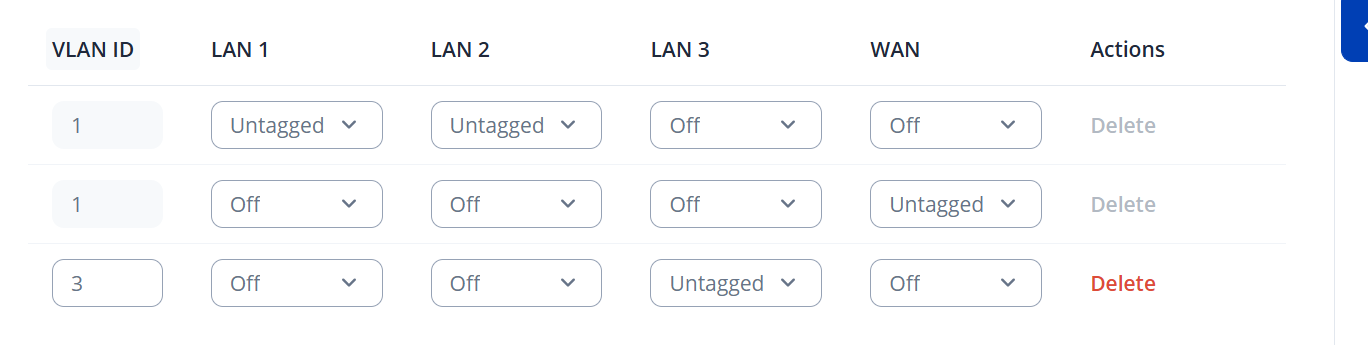
For more info I need to have to seperate LAN with different MAC ADDRESS

Greetings, @mkergo35 ,

Thank you for your message,

If possible, could you please provide a scheme or topology of your network with the IP addresses (excluding public IPs)?

I look forward to your response,

Warm regards,
V.

Hi I need to make to separates lan

FIrst one is recreationnal lan on IP 192.168.1.1 woth mask 255.255.255.0 thai is only accesible on LAN Physical port 1 and 2, full acceess to wan/internet and have its own wifi

The other one, LAN2, is only accessible on physcal port lan 3 with addresses 172.16.1.1 with mask 255.255.0.0 and also have its own wifi network.

I created a VLAN3 and added eth0.3 on LAN2 while LAN1 is on eth0.

Hello,

For troubleshooting purposes, we will require more sensitive information from your end, such as the troubleshoot file, which may contain passwords, public IP addresses, serial numbers, and such. To avoid leaking this information, we have sent you a form to fill out, which you will receive in your e-mail inbox that you have registered your account with in the forums. In the Ticket ID field of the form, please enter the ID of this thread, which is 17351.

Thank you,
V.

VLAN configuration itself is working since devices on LAN3 can communicate and respond to pings. The issue is likely related to the router management access settings rather than the VLAN setup. By default, the administration interface may only allow access from the main LAN zone. If your new navigation_lan (mapped to eth0.3) is placed in a different firewall zone, access to the router’s web interface can be blocked. You should check the access control or firewall settings and allow HTTP/HTTPS (LuCI) access from that LAN zone. Once management access is allowed for the navigation_lan interface, you should be able to reach the router’s admin page when connected to port LAN3.

This topic was automatically closed after 60 days. New replies are no longer allowed.