Hello, I would like to ask if sending SMS using the “Email to SMS” service has already been fixed.
It doesn’t work as we expected it to, which is why we bought it.
So please help.
Thank you very much MiGa
Good afternoon,
Email to SMS functionality currently works, no known issues.
Please advise of your use case for this service.
Please also provide screenshots of your current configuration, while hiding sensitive data.
Please advise what guide you have been following, and at which step you are struggling.
Helpful thread for your issue : RUT240 SMS Gateway - Teltonika Networks Wiki
Another client has had a similiar question to yours which was answered, please take a look at this thread : Email to SMS not working
Regards,
Arturas
Hello, thank you for your quick response.
We are using TRB245 with email to sms package.
We followed this RUT240 SMS Gateway - Teltonika Networks Wiki of course.
But we did not solve the problem.
Our settings seem to be correct. Connecting via ssh2 with root privileges, we received a single sms after entering the command “email to sms start”
Thanks 
Hi there,
To be able to assist further I would like you to answer to this part of the above question :
Please also provide screenshots of your current configuration, while hiding sensitive data.
Please advise what guide you have been following, and at which step you are struggling.
In addition, please advise of the device model in question, and firmware version.
Regards,
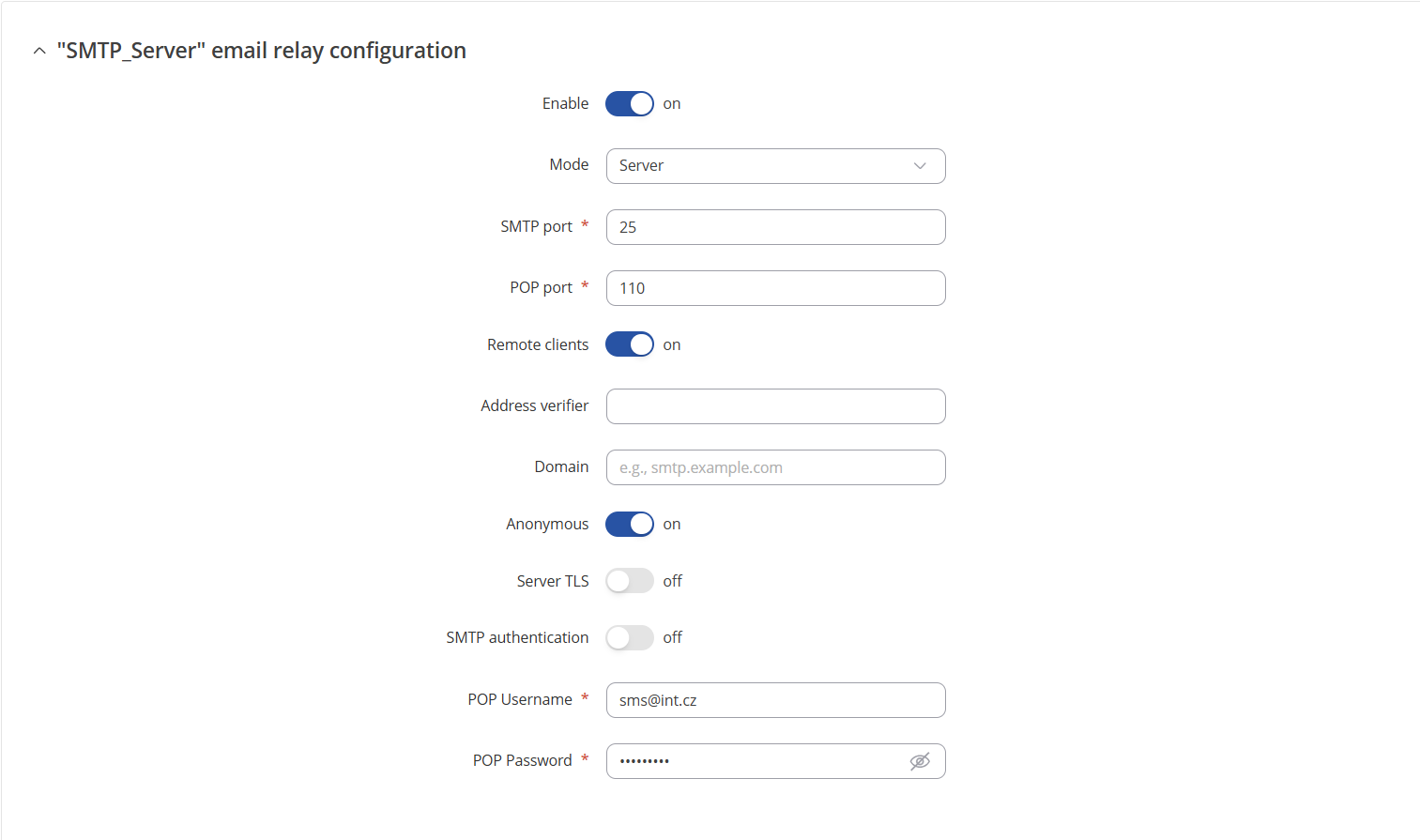
Hi there,
Before any steps, i recommend double checking whether the firmware in the device is the newest, and if not, please upgrade it.
Port 110 (POP3) usually does not use TLS by default. If TLS is enabled, switch the POP3 port to 995 which is the default POP3S (POP3 over SSL/TLS).
Alternatively, disable “Secure connection (TLS)” to match port 110 if the server does not support encrypted POP3 on port 110.
Please also try try disabling “Verify TLS certificate validity” temporarily, for testing purposes.
Regards,
Arturas
Of course, for POP3 without TLS we use port 110 and that’s how we want it. The image should rather show that we are trying TLS on port 993. But both POP3 settings do not help for the correct function of Email to SMS and I do not know what to do with it. We have probably crawled everything.
That’s why I turned to you to see if it would help.
Please note that we are using POP3 ports correctly
Thank you
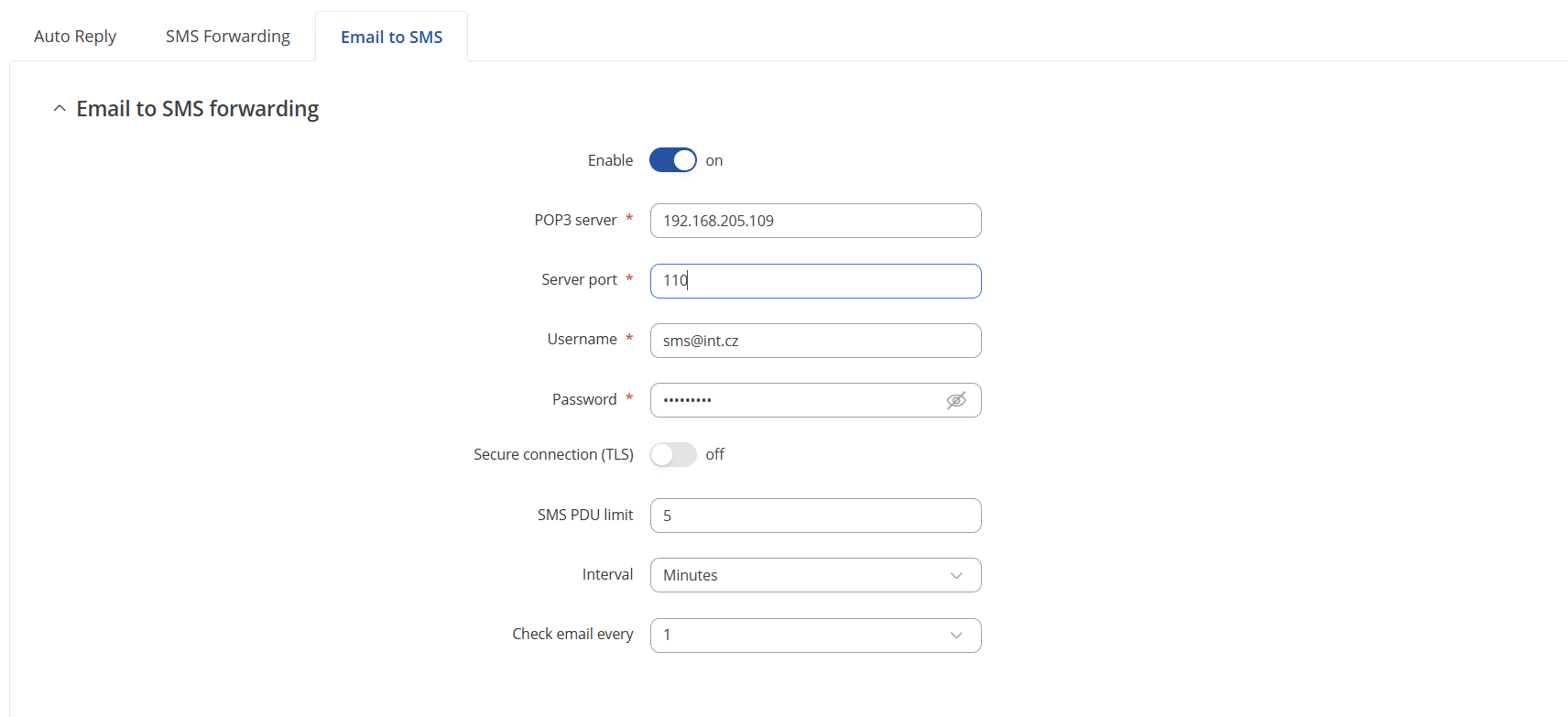
Firmware version
TRB2_R_00.07.14.3
Hello again.
We managed to send an SMS after the command emal_to_sms start.
I also found that sending works correctly after entering the command, but after rebooting TRB245 the service does not run again.
We have a feeling that the script is missing the option to start the email_to_sms service automatically after startup.
Or am I stupid and I did not check something regarding this service startup after reboot?
What do you think?
Thank you very much
MiGa
Hi there,
I have sent you a form for private communication, please fill in the form, and in ticket ID provide this query ID which is 14781. This form should arrive to your personal email address used to register to this site.
Regards,
Arturas
OK, understand.
I’m waiting for this form. Thx
Hi there,
You should have received this form to your personal email inbox already.
Regards,
Arturas
It,s OK…ready
Hi there,
To be able to assist you further, I need to ask you to send me a troubleshoot file from the device. As it is a sensitive piece of information, I need to request that privately.
However when we try to email you, email instantly bounces, as it identifies our email as spam. Please either change your email settings, create an account with a different mailbox, or send us the troubleshoot file in response to the first email you received.
Regards,
Arturas
Hi there, pls give me your using email address for allowing in our spamfilter. Thank you
I give another email. We could communicate with this email:
thank you
MiGa
Hi there,
I have just tried to send an email, seems due to limitations we are unable to get in contact through this account. In this case, you would need to create a new account with a functioning mailbox. You can quote my name in that post, and please quote the query number 14781.
Regards,
Arturas
Hello, try this email: aster.matrix7596@gmail.com
Hi @MiGa ,
Due to privacy reasons, I would need you to follow the process advised in my above message.
By creating an account with specific email address you are allowing us to work with your private data with that specific email.
Create a new account with the email, and a new thread, quoting this one, and we will be able to assist further.
Regards,
Arturas
Hi there,
Just pinging this case here.
@MiGa we are encountering an issue when trying to email you on the email used to register on this site : “A recipient on this email thread previously bounced, marked an email as spam, or unsubscribed”
I would recommend in your hotmail mailbox settings to add specific email addresses or domains to your Safe Senders list (also called Safe Senders and Domains) in the Junk Email settings. This ensures emails from those senders skip spam filtering and go directly to your Inbox. You can find this under Settings > Junk email > Safe senders and domains.
Add specific email addresses or domains to your Safe Senders list (also called Safe Senders and Domains) in the Junk Email settings. This ensures emails from those senders skip spam filtering and go directly to your Inbox. You can find this under Settings > Junk email > Safe senders and domains.
Review and adjust your Junk Email filter protection level in Outlook settings. Lowering the protection level may reduce aggressive spam filtering but may increase unwanted emails.
Regards,
Arturas