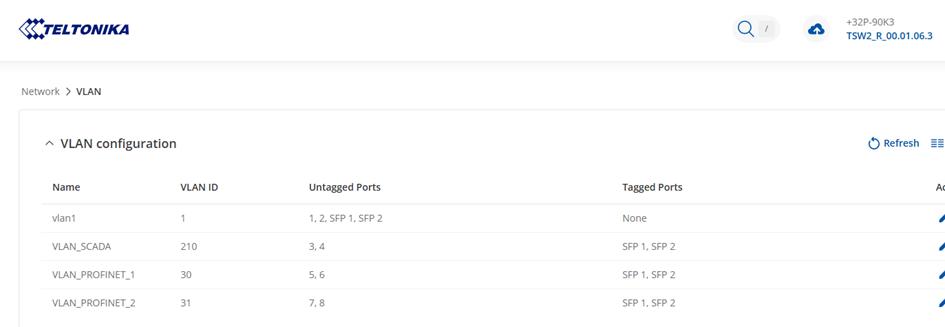
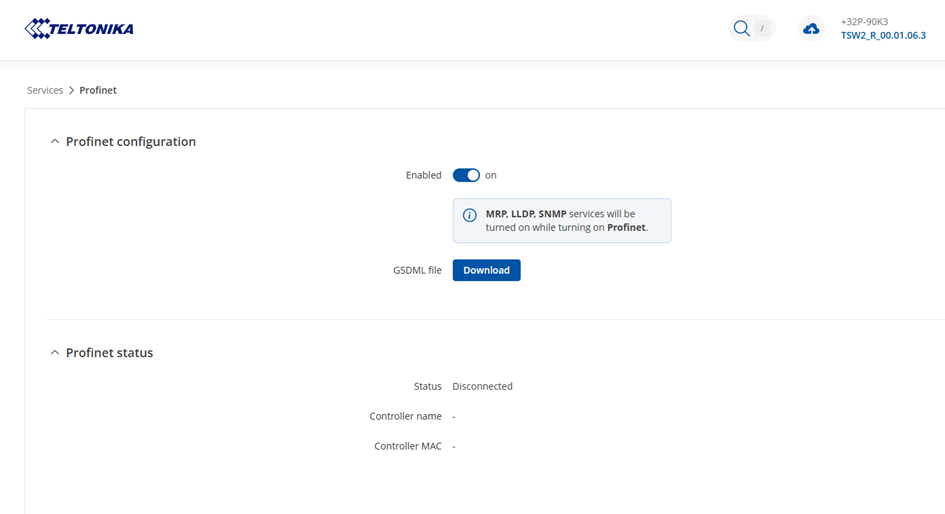
We do have some problems reading the port status via Profinet. Whith an factory default switch this works fine, but when we configure VLANS in the switch, suddenly the switch status isn’t availible anymore via profinet, it disappears completely.
The switch is still accessable trought the webinterface and works fine.
Alternatively to this we tried to use OPC UA, wich in fact works, but lacks the status of the 2 SPF ports. We just can read-out the port status wich is an 8-bit array, just containing the status of the RJ45 ports.
The reason we want to read-out the port status, is to get insight into the network state. We have configured an MRP ring over the SFP ports of about 10 TSW212 switches, wich we want to monitor to be sure the redundancy is still in an good state.
To be able to assist you effectively, I wanted to clarify a couple things :
How are the VLANs currently configured on the switch? Are the Profinet devices and the monitoring system in the same VLAN? Can you send us some screenshots, while hiding sensitive data.
Are the SFP ports configured as tagged or untagged ports for the VLANs carrying Profinet traffic?
I also wanted to clarify what firmware version you use with the device.
Please advise a bit more, what end devices you have connected to the switch.
The switch has an interface in the SCADA VLAN, which is connected to one Profinet interface of the PLC. At the moment there are no other profinet devices connected to the same interface.
I apologize for the wait, I’d like to ask you to try to create just a single new VLAN instead of having 3 new ones, and on that single VLAN, you should try to either set your SFP ports as tagged/untagged. I believe the issue could be the fact that you have 3 separate VLANs and all of them have the SFP ports tagged on them, which could potentially cause a conflict, and therefore things are not working as expected.
We have tried the following with an factory resetted TSW212.
With an “clean“ device and switched on profinet, we can discover the device using Proneta and everything works fine. As soon as we create one new VLAN (without any ports mapped), the device disappears in Proneta and suddenly stops working on Profinet.
Are there any other things what we can try to give you more information?
I believe that to be able to analyze this issue further, we would need a troubleshoot file from when it stops working completely, or in other words, when the device disappears. The troubleshoot file may contain passwords, public IP addresses, serial numbers, and such. To avoid leaking this information, we have sent you a form to fill out, which you will receive in your e-mail inbox that you have registered your account with in the forums. In the Ticket ID field of the form, please enter the ID of this thread, which is 15306.