WAN Interfaces: Mobile 4G LTE ( SIM) & Starlink (WAN/Wi-Fi Client)
Primary Use Case: Remote management of an amateur astronomical observatory.
Issue Description
I am experiencing periodic connection drops lasting between 1 and 2 minutes when managing my observatory remotely via AnyDesk. While automated overnight runs are unaffected, these drops are critical—and potentially dangerous for the equipment—during telescope positioning and alignment.
Troubleshooting Actions Taken
Firmware: Updated to the latest release (07.06.21).
Signal Quality: Installed an outdoor antenna. Signal reception improved drastically, but the connection drops persist.
Failover Setup: Configured mwan3 failover using Starlink as backup.
Decisive Test: Configured Starlink as the primary WAN and the SIM card as backup. The 1-2 minute connection drops continued with the exact same frequency and behavior.
Hardware / Power Hypothesis: Because the behavior is identical regardless of whether Starlink or Mobile LTE is set as the primary WAN, I suspect either a power supply degradation issue under load, thermal throttling, or an intermittent hardware fault on the RUT950.
Questions and Support Request
Are these symptom patterns consistent with power supply degradation or internal hardware failure on the RUT950?
Should I generate and upload a Troubleshoot Package for your team to analyze the kernel logs during a drop?
Any guidance on how to proceed or isolate this issue would be greatly appreciated.
For troubleshooting purposes, we will require more sensitive information from your end, such as the troubleshooting file, which may contain passwords, public IP addresses, serial numbers, and such. To avoid leaking this information, we have sent you a form to fill out, which you will receive in your e-mail inbox that you have registered your account with in the forums. In the Ticket ID field of the form, please enter the ID of this thread, which is 20978
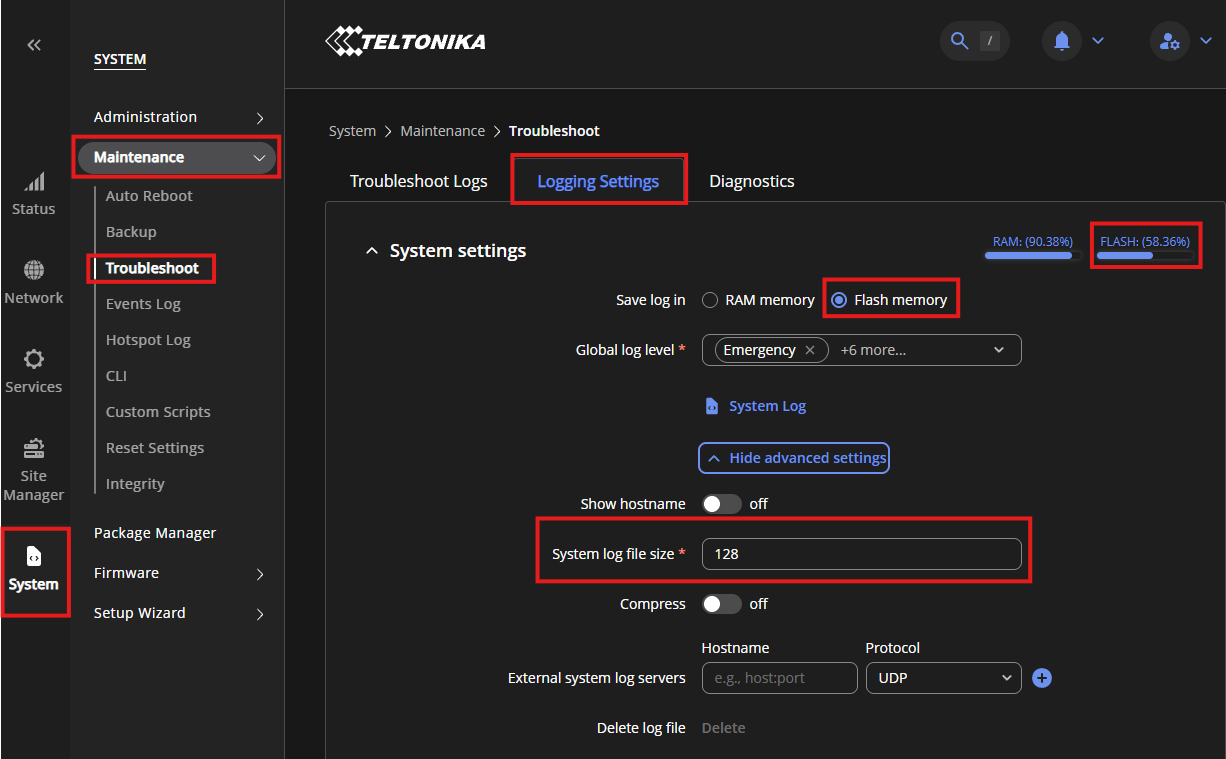
If during the router restarts during the connection drops, the necessary logs will be lost since they are stored in RAM memory. I would suggest changing the logs to be stored in FLASH memory.
You can enable this as follows:
Navigate to System → Maintenance → Troubleshoot.
Open the Logging Settings tab.
Under System settings, locate the Save log in option.
Change the selection from RAM memory to Flash memory.
Under Advanced settings, review the System log file size.
We recommend increasing the system log file size if possible, based on the amount of available Flash memory on the device. A larger log file allows the device to retain a longer history and reduces the possibility of the relevant troubleshooting information being overwritten before it can be collected.
After several more nights of remote work, I can update the description of the problem as follows:
"Issue Description
When managing my observatory remotely via AnyDesk, I experience periodic connection drops. The drops occur after approximately 13 minutes of stable operation, with recovery taking just under 2 minutes. This cycle repeats continuously. While automated overnight runs are…"