I have two routers set up in a OpenVPN Client-Server TAP setup. The server-router gets a fixed IPv6 prefix /64. I can ping IPv6 Addresses in the WAN from both routers.
However, I have to put in the complete IPv6 WAN Address of the Server-Router in the Client-Router as the server address for OpenVPN to connect. If I only put in the prefix, I cannot reach the server.
Any help is appreciated, additional information can be provided.
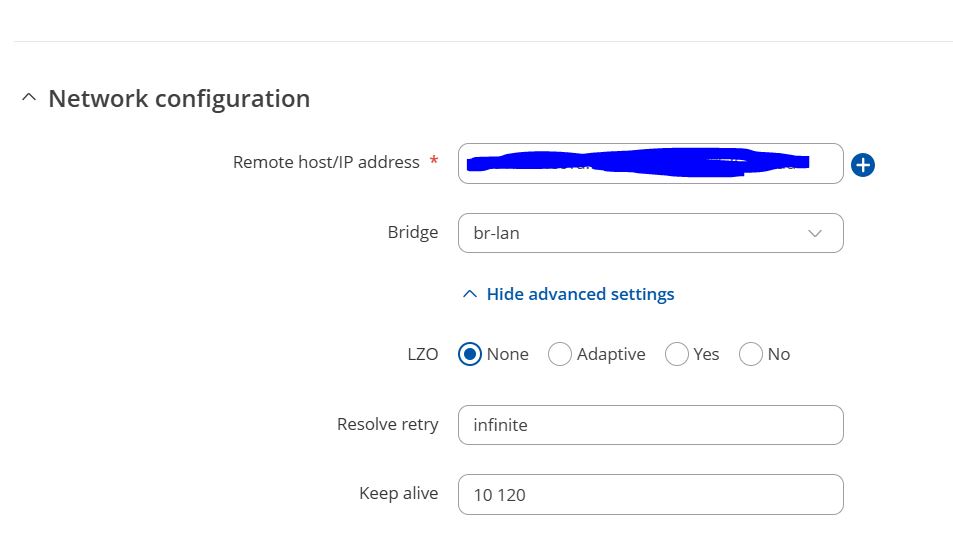
Just to clarify, could you confirm how you’re specifying the IPv6 prefix in the OpenVPN client’s configuration, in the remote host/IP address field? I assume you’re referring to entering something like 8413:a80a:1074:32d5::/64 instead of the full address, for example 8413:a80a:1074:32d5:1552:2d53:4b47:d347, is that correct?
If I am mistaken, for better understanding, and if it’s feasible, could you please provide a screenshot of the OpenVPN client configuration page you’re referring to? That would be really helpful and appreciated in clarifying the context.
thank you for the swift response!
Yes, we tried putting in 8413:a80a:1074:32d5:: , as well as 8413:a80a:1074:32d5:0000:0000:0000:0000.
Also, when trying to ping prefix addresses I get the following: 8413:a80a:1074:32d5:: ← does not work 2001:4860:4860::8888 ← works 2600:: ← does not work
Following the screenshots, also hadd to edit the openvpn traffic rule to also allow IPv6.
First, to clarify regarding the Remote host/IP address field in the OpenVPN client configuration: according to our developer, this field should contain a specific, full IPv6 address without any prefix notation. Prefix-only entries like 8413:a80a:1074:32d5::/64 aren’t supported for establishing a connection, as the client needs to resolve an exact endpoint address.
On the IPv6 delegation side, when using OpenVPN in TAP mode, both ends operate in Layer 2, meaning IPv6 traffic (including router advertisements and DHCPv6 packets) should pass transparently. However, for IPv6 address delegation to work properly over this bridged connection, it must be set up correctly on the OpenVPN server’s side. Specifically:
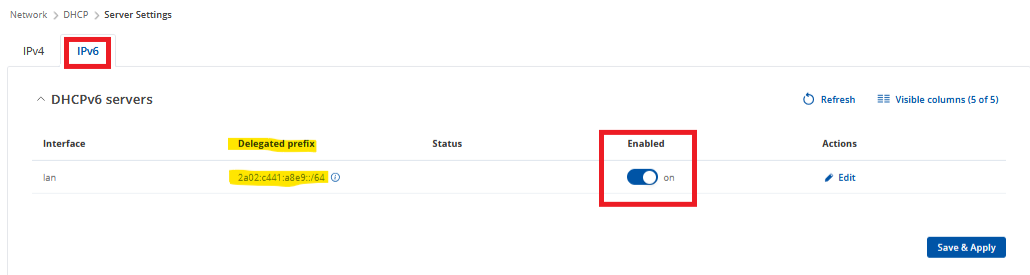
Ensure IPv6 DHCP or DHCPv6-PD (Prefix Delegation) is enabled on the server’s LAN bridge interface. How this option looks on our device:
Could you also confirm what device is being used as your OpenVPN server? If it’s not a Teltonika router, please check whether it has an option to enable IPv6 DHCP or prefix delegation on the server-side LAN interface. This is necessary for IPv6 clients in the TAP bridge to obtain proper addresses and routes.
a complete fixed IPv6 is not possible, we only get a fixed prefix from the ISP. We also already had a TUN-Setup (different Hard&Software setup, RUT955, not RUT956 and older Firmware) running with config-file configuration, where the server-address was also only given as : 8413:a80a:1074:32d5:0000:0000:0000:0000 (so no \64 at the end) and the client did connect. However, I do not have access to the config files anymore.
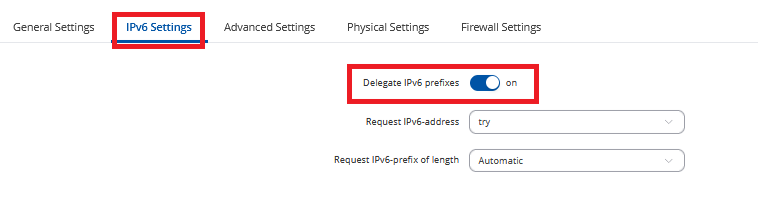
Server is also a Teltonika router, DHCPv6-PD is enabeled, as well as IPv6 prefix delegating is enabeled in the mob1s1a1 settings.
To address your note, the “Request IPv6 address” and “Request IPv6 prefix of length” options are only available on the wan6 (wired WAN IPv6) interface configuration. If you’re using a mobile as your only WAN source, then you should rely on the “Delegate IPv6 prefixes” option (these settings apply to the VPN server).
Also, could you kindly clarify what device model you are using here as the OpenVPN client?
And just to make sure I understand your current issue correctly, is it:
The configuration UI doesn’t allow you to enter a server IP with a prefix like 8413:a80a:1074:32d5::
or
That your client device doesn’t receive an IPv6 address via delegation after the VPN connection is established?
thank you for the clarification with the wan options!
Both Server and Client Router are a RUT956.
Ahh, now I understand, that there was an initial understanding problem.
Neither of your points are the problem.
We can enter a prefix address in the GUI, but the Client never connects to the Server with it. Only if we copy the fully assigned address of the server we can connect to it. This is however unpractical, since the server gets a new address on every boot and only the prefix stays.
Apologies for the delay. Could you please confirm if the issue you’re describing is that you’re unable to specify the server’s IPv6 address with a prefix? If so, according to our developers, this is the intended behavior – the address should be entered without a prefix in this case.
Hello,
no, I can put in the servers IPv6 Address as a prefix (e.g. 8413:a80a:1074:32d5:0000:0000:0000:0000), but it does not connect to it.
In a previous setup, this however worked.
All the best!
In this case, to assist you effectively, we’ll need to continue this process privately, because sensitive/publicly unshareable information needs to be gathered. You should find a support request form in the inbox of the email address you used for your forum registration. Kindly fill out the form, and please reference Ticket ID: 14244 when submitting it. Once the form is completed, we’ll contact you directly via email to investigate the issue in detail and help work towards a solution.