We are setting up Tiandy TC-C38TS CCTV cameras that are used for people counting outdoors. Need to make the CCTV camera IP static so it will not change the IP addresses in time. Also, I would like to get a guide on how to set up remote access, as we need to use it with Tiandy NVR TC-R3120. I think the architecture Tiandy uses is very close to Hikvision.
We use Tiandy TC-C38TS - ODT140 4G - High speed 4 port switch - Tiandy NVR TC-R3120.
Following should give you an idea of how to access a remote camera. Setting a static IP address for a camera would be something covered in the specific camera manual
As @Mattk mentioned, setting a static IP on the camera itself, should be noted in guides for that specific camera. Usual process is connecting to the camera when it is in the same network via it’s default IP, then going to Network or IP configuration section, and set a static IP there
Static IP: f.e., 192.168.88.101
Subnet Mask: 255.255.255.0
You would also need to access our device’s WEBUI, and go to Network →DHCP →Static leases, and add that camera details, which means binding a specific IP address to your camera’s unique MAC address so that whenever the camera connects to the router, it will always get assigned the same IP address
Afterwards, the advised method to connect to that camera is our own RMS platform, more specifically, RMS VPN hubs, also as another user advised above. Go to VPN Hub from the RMS dashboard.
Create new VPN Hub.
Add client, Device, and routes. Download the VPN configuration file. (This process you can find in the video)
I can access the RMS webpage for remote access to the camera settings, so it should be all okay. But I can’t get the picture to the NVR. I’m missing something, but I’m not sure what.
So, assuming that both the camera and NVR are on the same local network infrastructure, getting their IP from the OTD140 but are on different subnets …..
If you place a laptop on the same subnet as the camera, can you ping the NVR or access the NVR management interface?
If you place a laptop on the same subnet as the NVR, can you ping the Camera or access the Camera management interface?
If the answer is Yes …. then this would initially point to a configuration issue with the Camera (e.g. knowing destination of NVR, any triggers correctly set) or a configuration issue with the NVR (e.g. digital channels correctly configured, the NVR is not acting as a DHCP server, any triggers, schedules etc. correctly set)
If the answer if No …. then, assuming you are using VLANs for the different subnets, check that your Firewall Zones are correctly configured, are there any Traffic Rules preventing traffic from crossing subnets, etc.
A network topology diagram, and a short description of how the topology has been setup, will help others try and understand your setup.
Once you’re satisfied the local network is functioning properly, then you can start to de-bug any RMS connectivity.
Hi Mike! Thank you very much of this input. I will describe the full setup: there is a health track that the city wants to monitor (have in and out people counting with a CCTV camera that has this functionality). The IP CCTV camera is planned with POE switch and with ODT140 4G router on a streetlight pole in a remote park (the POE switch is to power the camera and ODT140 and leave extra ports for sensors in the future if they choose to add something else). The idea of the project was that as the control center is far away, and for that reason the NVR is behind a different router in a different network kilometers away from that location. So the camera works well if CAT directly connected between the camera and NVR, through a switch and the same network, it works well and can access NVR and camera settings. The issue is that if NVR is completely in a different network (most likely with different internet providers). I think both the camera and NVR are not set in DHCP as we were advised; it has to be a static IP, as otherwise the IP will change. So I think DHCP is switched off in ODT140 and in the camera. We are a people-counting company but really lack experience with CCTV camera architecture, but it needs a solution. Really struggling, as we did not know clearly how the ODT 140 is set up the right way in this case, so if we can get that in order, then we can focus on the camera or NVR. So this is the reason why I wrote here. To get some kind of guide on how to set up a 4G router in this specific use case. I guess we really underestimated our understanding of it. The situation is so bad we really ready to pay for help.
I will suggest an architectural outline, but others may see a better way of doing it.
a) Let the OTD assign a static lease (via DHCP) to the camera. Ensure that it is different to any subnet involved on the NVR side of things. You may wish to use the default Management VLAN whilst others like to separate the Surveillance VLAN from the Management VLAN (normal best practice). Ensure your firewall zones allow traffic. Ensure any Traffic Rules allow trafic.
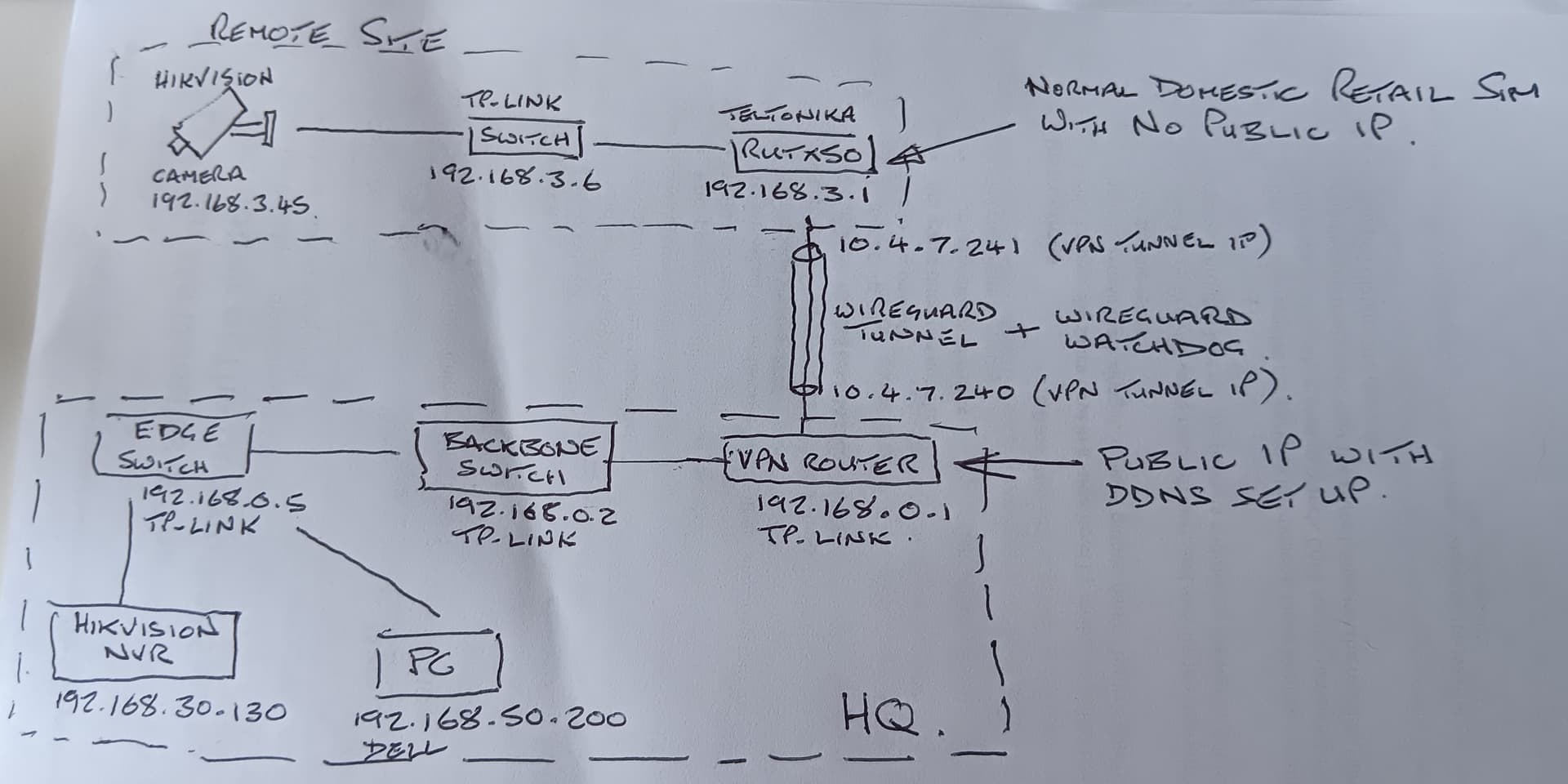
b) Configure a VPN to connect the OTD with the network Gateway/Router/VPN Server that the NVR is on. As we’re dealing with video, Wireguard is a nice compact and efficient VPN. You may need to enable a watchdog facility on the OTD, to re-establish the VPN, should it go down. If using Wiregaurd, then ensure the allowed IP’s setting lets through the correct subnets. Again ensure Firewall Zones and Traffic Rules allow traffic.
c) You MAY have to configure static routes on one or both sides of the network, to ensure the devices can see eachother.
d) Configure rules, triggers, detination address/port(s) of the NVR on the camera.
e) If all is correctly in place, then you should be able to configure the NVR, as it has visibility of the camera IP.
Considerations ….
Ideally both the OTD and the NVR’s gateway have Public IP’s. If the OTD has a normal domestic retail SIM in it, this isn’t a public IP, so the OTD will have to initiate the VPN. If bothsides do not have a public IP, then this isn’t a deal-breaker, as you’d use a differnt type of VPN connection e.g. Tailscale.
For any Public IP’s, it is best to setup a DDNS address, as even though these IP addresses may never seem to change …. they can for various reasons.
Using RMS as your VPN hub could be a costly alternative as we are dealing with Video bandwidths here, and data can be quickly gobbled up.
I am unfamiliar with Tiandy, but with Hikvision devices and NVR’s, we try and run as much of the analytics on the camera as we can. This will reduce the overall load.
Your use case is a very common one and I am confident that there are CCTV Security companies in your country who have done this many times over.
I know the above outline works bacause we setup a single camera installation for a guy, and it has no problem streaming 4K images to his NVR in a different country.
Basic topology below, and note that the HQ has different subnets and VLAN’s involved so, not a ‘plain vanilla’ network topology. If using Wireguard, probably most head-scratching will be around understanding the network topology at the NVR end.
Also note that at the Remote Site, he wanted the camera on the management VLAN, which is not best practice. For your installation, I’d recommend a separate VLAN for the camera to make things easier in the future, should you need to implement seperation/isolation of network segments/devices.
Other VPN’s are available but may have a slightly more complex setup.
Mike, really big bow to you for the help and time you have given for us. Now I’m going to display my lack of knowledge again. So to set up the solution, if I’m understanding correctly, there is a need for a VPN router as well to connect the NVR to that.
As this implimentation is to view a health track that The City wants to monitor …. normally I would expect it to be a stipulation by that public body, helping to ensuring secure communications.
In addtion, the VPN joins-up two disparate netwoks and allows communication between the two networks, in a simplified manner compared to some other alternatives.
The solution, requires two VPN Routers, one at each end of the ‘tunnel’. The OTD in your case is able to act as a VPN Router, whilst The City infrastructure will provide the other VPN router.
As you are dealing with a public body (The City), then they should be giving you the information that you require to establish a VPN tunnel to them, and they would normally be responsible fo ensuring that traffic gets routed through to their NVR, on their internal infrastructure. They should also be telling you what information they require from you and the security standards you need to adhere to.
If you can influence the type of VPN to use, then as I remarked in an earlier post, Wireguard is a good choice due to its compact and efficient operation.
Understood. This is the first project of this type; it was actually planned completely differently architecture, and as we later learned more, we kind of had to abandon the original plan and go with the traditional CCTV solution. Before installation we wanted to test things through and hit the wall. We are using TP-Link switches and also learned we have a one TP-Link VPN router also in stock. So we can play the scenario through before final installation. Again Mike, thank you so much for this!
If you need to set up a ‘test bench’ that mimics the VPN Router/Server inside The City’s infrastructure, then a cheaper router from tp-link’s Omada range will support the following VPN protocols - Wireguard, IPsec, L2TP, PPTP, and OpenVPN. An example cheaper model would be their ER605. It would be advantagous to know which protocols The City can support, in advance of configuring any test bed, as this may influence your choice of VPN Router.


 I’m starting to get the whole picture. Mike, in your opinion, can ER605 handle feed from 2 cameras?