New Backup Options in RutOS 07.24

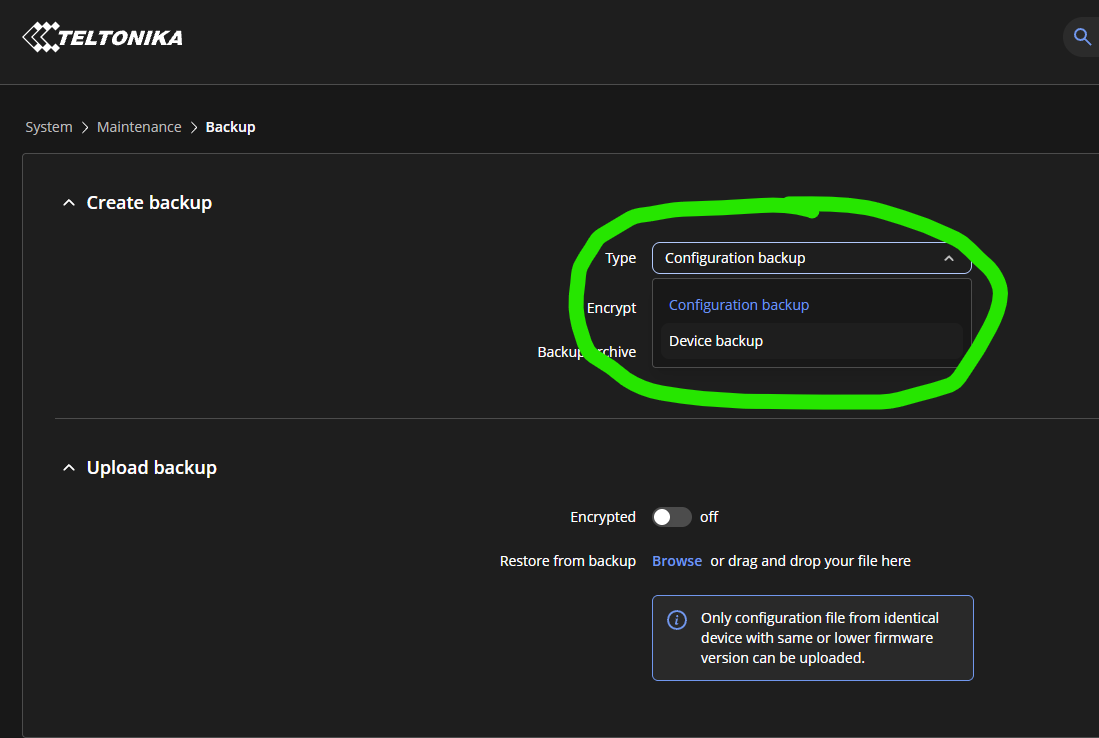
I see we have 2 options to choose from when generating a backup on a RUTX50.

Which option (if any) is the old style of backup and which one is the new style (api) backup?

Under what situation(s) would you select one over the other?

I’m assuming that ‘Configuration backup’ is the more recent API Endpoint style, that has now been reintroduced after being withdrawn. So, I’m guessing that the ‘Device backup’ option could be the older traditional way that we used.

Can someone enlighten me with a confirmation, before I go thrashing around testing things?

Many thanks … Mike

Hello Mike,

You are 100% correct! Your assumption is completely spot on.

To confirm your thoughts, here is a quick breakdown of how both options work and when you should use them:

1. Configuration backup (The New API Style) This is indeed the new, API-based method. Instead of just copying files, it exports your settings through the router’s internal API.

When you restore this backup, the router actively validates every single section. It will even warn you if you are missing any specific software packages that your configuration depends on.

  • When to use it: Make this your daily default. It is much safer because the API double-checks everything during the restore process, preventing broken settings or syntax errors.

2. Device backup (The Old Traditional Style) This is the classic, old-school method we have always used. It simply packages your raw configuration files (like the ones in /etc/config) into a standard archive. When you upload it back, the router blindly overwrites the system files without any validation.

  • When to use it: You should only use this if you want a “raw” copy-paste of your files, or if you are cloning a setup to an identical router running the exact same firmware version.

Essentially, Configuration backup works like a smart assistant that double-checks your settings, while Device backup is just a simple, blind copy-paste.

Hope this helps and saves you some testing time!

@zJakie Thank you for a clear and concise reply. My reply below is directed towards Teltonika.

Having done a very quick test on a RUTX09 running 07.24, some findings are …

CONFIGURATION (NOT DEVICE) STYLE BACKUP & RESTORE – WITH RESET TO FACTORY DEFAULTS PRIOR TO RESTORE

It should be noted that all results were inspected via the Web UI and not directly inspecting the config files.

a) If you manually set an APN with ‘Auto APN = off’ then this setting will not be restored, and you end up with a configuration of ‘Auto APN = off’ but no APN. Most likely because the /etc/config/network file is ignored in the backup.

b) The Zerotier package was not reinstalled - I’m assuming this is because the backup disregards the /etc/package_restore.txt file and the /etc/config/ directory contents where the Zerotier config resides.

c) For an OpenVPN config that was created by importing an ‘.ovpn’ file, the configuration is not restored, although any associated certificates are and the ‘.ovpn’ file is restored in /etc/vuci-uploads/. The backup fails ‘Verify’ due to the discrepancies in the OpenVPN config - /openvpn/config end point. I’m assuming this is because the backup disregards the contents of /etc/config/ and /etc/openvpn/ directories and this is where some of the OpenVPN config resides.

d) Sysupgrade.conf – files and directories included in the sysupgrade.conf file, are honoured in the backup and restore BUT the sysupgrade.conf file itself is not backed up or restored. This means that in any subsequent backup and restore, the behaviour will be totally different. The workaround for this is to add the line /etc/sysupgrade.conf into the sysupgrade.conf file, so it backs itself up and will be restored.

e) SMS Utilities – any ‘Execute Custom Script’ rules, lose their script and therefore would not function. The ‘.sh’ scripts themselves are restored to /etc/vuci-uploads/ but there’s a broken linkage here due to the fact that /etc/config/sms_utils is ignored in the backup.

IN CONCLUSION

If you are thinking that you can use the Configuration backup (The New API Style) as a daily default, and have a ‘functioning as intended’ device upon a factory reset and restore, … then this obviously is NOT the case. It will not backup the /etc/config/ directory, and as the name implies, there’s a whole lot of config going on in there.

The Device backup (The Old Traditional Style) will return your device to the state it was in when the Device Backup was taken.

In its current state, I am struggling to see the real functional purpose and benefit of the Configuration backup … maybe someone from Teltonika can let me know. To use an English idiom, it seems to be a bit of a ‘Dog’s Dinner’.
Greetings @Mike ,

Thank you for reaching out,

For troubleshooting purposes, we will require more sensitive information from your end, such as the backup file, which may contain passwords, public IP addresses, serial numbers, and such. To avoid leaking this information, we have sent you a form to fill out, which you will receive in your e-mail inbox that you have registered your account with in the forums. In the Ticket ID field of the form, please enter the ID of this thread, which is 20130.

Please let me know once you filled out the form.

Thank you,
V.

Troubleshoot file and the generated configuration backup file sent.

Thank you,

Mike

Thank you, @Mike ,

I can confirm that we received the requested files and I have forwarded them to our R&D team for further investigation.

All the best,
V.