Networks Web API - Can't update custom script

I am playing around with the REST API for RUT configuration.
I fail to add or update the SMS Utilities Rule of type ‘exec’ = Execute custom script

Updating a rule where the ‘script’ key is left out works fine

res = router.update_config(config=“sms_utilities/rules”, id=rule_id,
data={“data”: {“enabled”: “1”}})

Updating a rule where the ‘script’ key/value is included generates error 422

res = router.update_config(config=“sms_utilities/rules”, id=rule_id,
data={“data”: {“enabled”: “1”, “script”: "#!/bin/sh \n echo help "}})

Error: 422 Client Error: Unprocessable Entity for url: https://192.168.1.1/api/sms_utilities/rules/config/cfg2092bd

Adding a rule where ‘script’ key/value is included generates error 422

res = router.post_config(config=“sms_utilities/rules”, data={
“data”: {“smstext”: “test”, “enabled”: “1”, “action”: “exec”, “authorization”: “password”, “respond”: “1”, “script”: “#!/bin/sh \n echo hello”}})

Error: 422 Client Error: Unprocessable Entity for url: https://192.168.1.1/api/sms_utilities/rules/config

Must the script value be formatted in a specific way or is this a bug?

Greetings,

At this time, please note that custom scripting and programming-related inquiries fall outside the scope of the technical assistance we provide. Perhaps some users with technical knowledge of scripting may be able to help you, or you may opt for using tools such as ChatGPT.

Thank you for your understanding.

Regards,
M.

Thanks for the reply.

I just want to make clear that it has nothing to do with the script since all other setting updates that I tried works just fine.
The problem is that the Teltonica Web API for sms_utilities role does not accept a payload with the customer script key ‘script’ included. The documentation shows that it shall be a string value but when sending that you get Error 422 back.

So either it is something missing in the documentation or a bug when adding or updating a rule of type action.

To confuse with the Python code I shall reproduce it with curl to show what is working and what is not working.

Apologies for misunderstanding you.

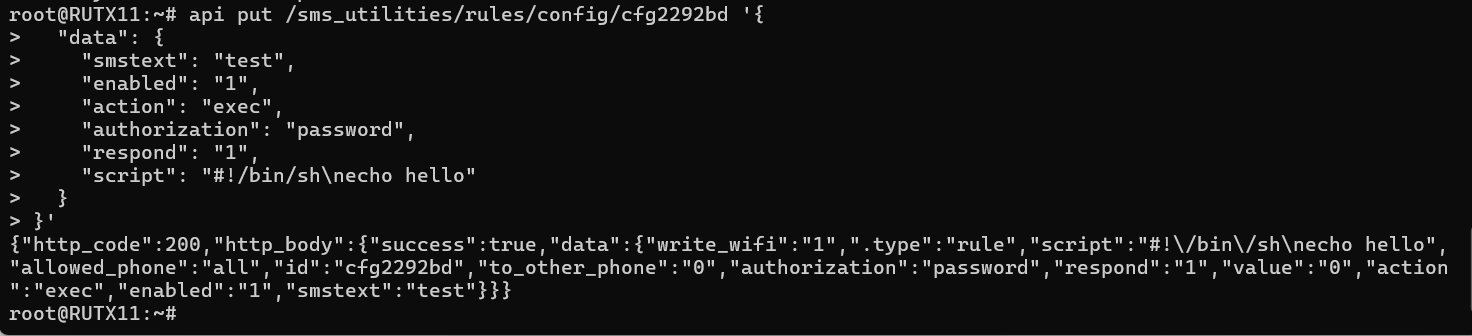
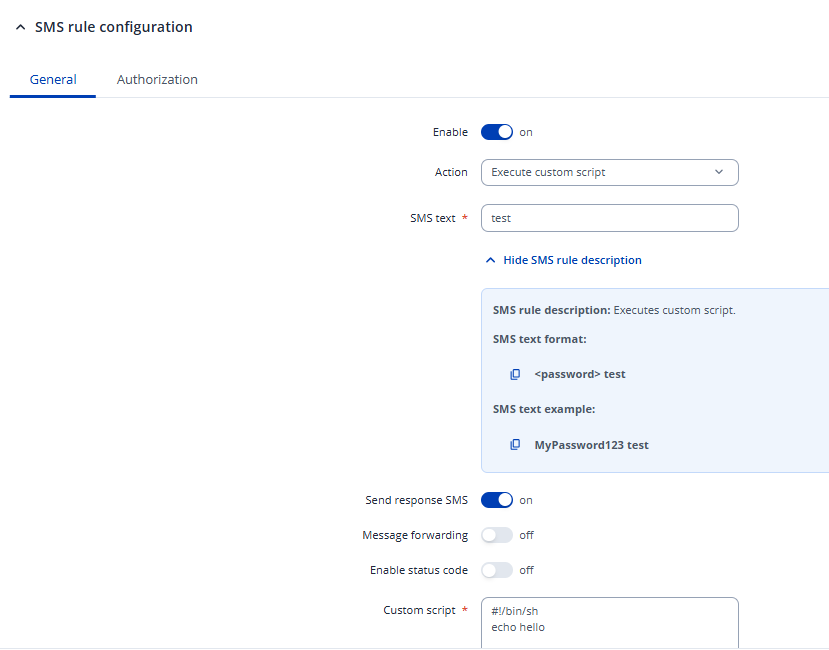
I don’t have a custom script to test this with, but I tried putting in the rule via a simple api call through the SSH, and seems like I was successful:
Regards,
M.

I found the issue.

The script must start with #!/bin/sh\n
In my script I used “#!/bin/sh \n“ which give an error.

A suggestion is to update the schema description for “script” with a note that the string must start with #!/bin/sh\n

Thanks, you can close this topic.

Thanks for sharing the solution! Apologies for the misunderstanding once more.

Regards,
M.

This topic was automatically closed 2 days after the last reply. New replies are no longer allowed.