Need basic documentation about RMS usage

Hi,

I would like to apologize for asking basic and stupid question, but obviously I haven’t found the real documentation for the RMS yet. I have found a couple of videos on youtube that are under a minute of length with music and nice screenshots, and I have found the wiki that basically tells me how do adopt a device (or more) into the RMS.

I need some explanation for a very basic use case. Let’s assume I have a small two-digits number of RUTX08 and RUTX10 to deploy in middle Europe and I would like to have the supplier send the devices directly to the place where they are to be used. Let’s assume that I have Internet on Ethernet with DHCP in all places and I want to put basically identical configuration on the routers, with the only differences being the IP addresses assigned to the LAN interface and some certificates that of course should be individual to each device.

I want those RUTX devices to connect to my own OpenVPN server, authenticating with certificates.

This is what I imagine as my workflow. All actions should be as bulk and automated as possible. I would hate to be forced to log into the web interfaces of each router individually and to repeat each step manually. I have the RMS to save myself from doing that, right?

  1. instruct the persons on site to hook the RUTX up to Internet (WAN interface) and to power and to send me the password, serial number and LAN MAC address printed on the RUTx.
  2. I use Actions => Add Devices in the RMS to enroll each device into the RMS. I can make things easier by importing a CSV.
  3. I assign each router an individual host name. Alternatively, I would address each router with its serial number.
  4. I do a firmware update on all devices and set new admin passwords.
  5. I configure the individual IP addresses for the LAN interface and the IP range for the DHCP servers. How would I do that?
  6. I then instruct all devices to create a new RSA4096 private key and to generate a Certificate Signing Request from that key. Ideally, I would enter C=, O=, OU=, emailAddress= and CN= inside the RMS, with some of the fields templated so that they are identical on all CSRs. How do I do that?
  7. I then download the CSRs and run them through my CA, generating the certificates that the routers will use to authenticate. I then upload the certificates to the routers again. Can I do those download/uploads as a bulk operation without having to log into each device individually?
  8. I then generate a configuration template that will disable all features of the routers that should not be present and roll out that template to all my routers. I think that this configuration will be identical for all devices, right?
  9. I then generate a configuration template that will create an OpenVPN Section in my device configuration. While this has big parts of identical configuration, at least the (file?) names of the private key and the certificates and the LAN IP addresses will be different for every router. Do I have software support inside the RMS to do so or do I need one configuration template per router?

Now let’s assume that I was successful in doing so. If I now have to change, for example, the IP address of the OpenVPN server that is in the configuration of all my routers, how would I do that? I do have (ideally just one) template creating my OpenVPN configuration, do I now need a template to update the OpenVPN configuration? And in tht template I just enter the things that I want to change, leaving everything else intact?

I am obviously missing basic things about using the RMS since this is a totally simple and basic use case and still I can’t find any explanation about how to do this. Please point me to what I have missed reading.

Thanks in Advance, Marc Haber
Greetings, Zugschlus,

Thank you for your questions.

I will try to answer all of your questions briefly, and in case you need more in depth assistance, just let me know.

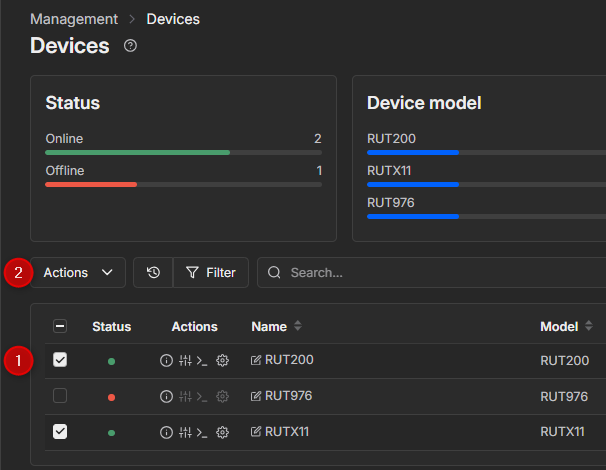
You can make a list of devices and put it in a .csv file. This will allow you to add multiple devices at the same time. If the devices are connected to a power source and have an internet connection, they should connect to RMS automatically once added, since by default, RMS connection in devices is enabled. You can refer to this example for more information:

Here you can find the instructions on how to upgrade the firmware version of the device(s):

You can also change passwords for multiple devices by following this guide:

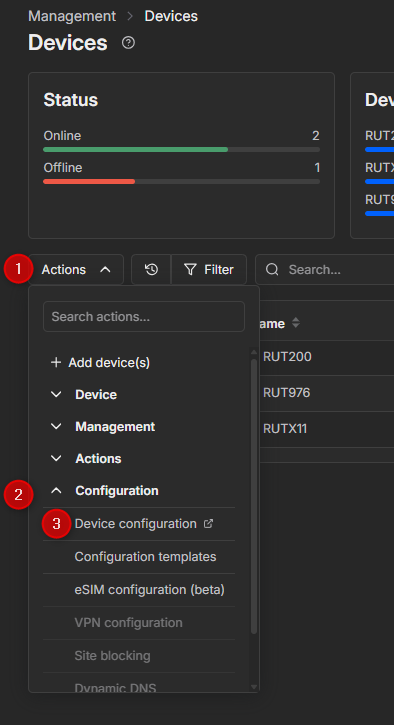
To configure one or multiple devices via RMS, you can use the device configuration feature. To access the configuration settings, choose one or more devices from RMS (please note that the devices must be of the same series, e.g. RUT, TRB, etc.). Then press on Actions->Configuration->Device Configuration. You will be taken to the configuration page, where you can change the device’s settings, including LAN, DHCP, and VPN options. However, regarding the certificates, there is only a delete option.

You can find more information here:

This can be achieved using RMS Task Manager functionality. It allows you to upload files with configuration or certificate information. For more information, refer to this article:

Please note, automating certificate generation for multiple devices requires scripting or using API integration with RMS for advanced setups. More details can be found in the RMS API documentation: RMS API - Teltonika Networks Wiki

The configuration template will apply to the selected devices and will set them up according to the configuration in your template. In case a device does not support certain functionalities included in the template, it will show that these options failed to update. However, all other supported settings will be applied correctly.

Since most of the options are dynamic, you will not be able to create a single universal template. This will require either separate templates for each device or building one template with the static settings and changing the dynamic settings of each device manually.

You can update your current template and either overwrite it or save it as a separate template, which you can reuse. Additionally, you can click on the option, and it will redirect you to the exact field of the configuration.

Additionally, you can maintain one master configuration template and version-control changes using descriptive names (e.g., “OpenVPN_Template_v2”). This approach allows for safer rollbacks if any issue occurs.

I hope this helps. If you face any issues along the way, just let me know, and I will be more than happy to assist you!

Kind regards,
V.

Greetings and thank you for all those answers. That will make this thread vastly more useful to other readers and might even help your technical writers to improve the documentation (“Basic Concepts”). I have deleted everything that I don’t have additional questions for.

So there is no possibility to do a mass import of LAN configuration, like, from a CSV file?

Okay, this is currently beyond what I need. I only have a small two-digit number of devices and next to no experience with RESTful APIs, I think I will bite that bullet and do it by hand.

Again, thank you for your answer, your time is greatly appreciated.

Greetings, Marc

Greetings, Marc!

Thank you for your message,

It is possible to make a template to update settings of the multiple devices at once. Please make sure that devices are online in RMS. Once they are, you can select multiple devices.

Then navigate to Actions → Configuration → Device configuration

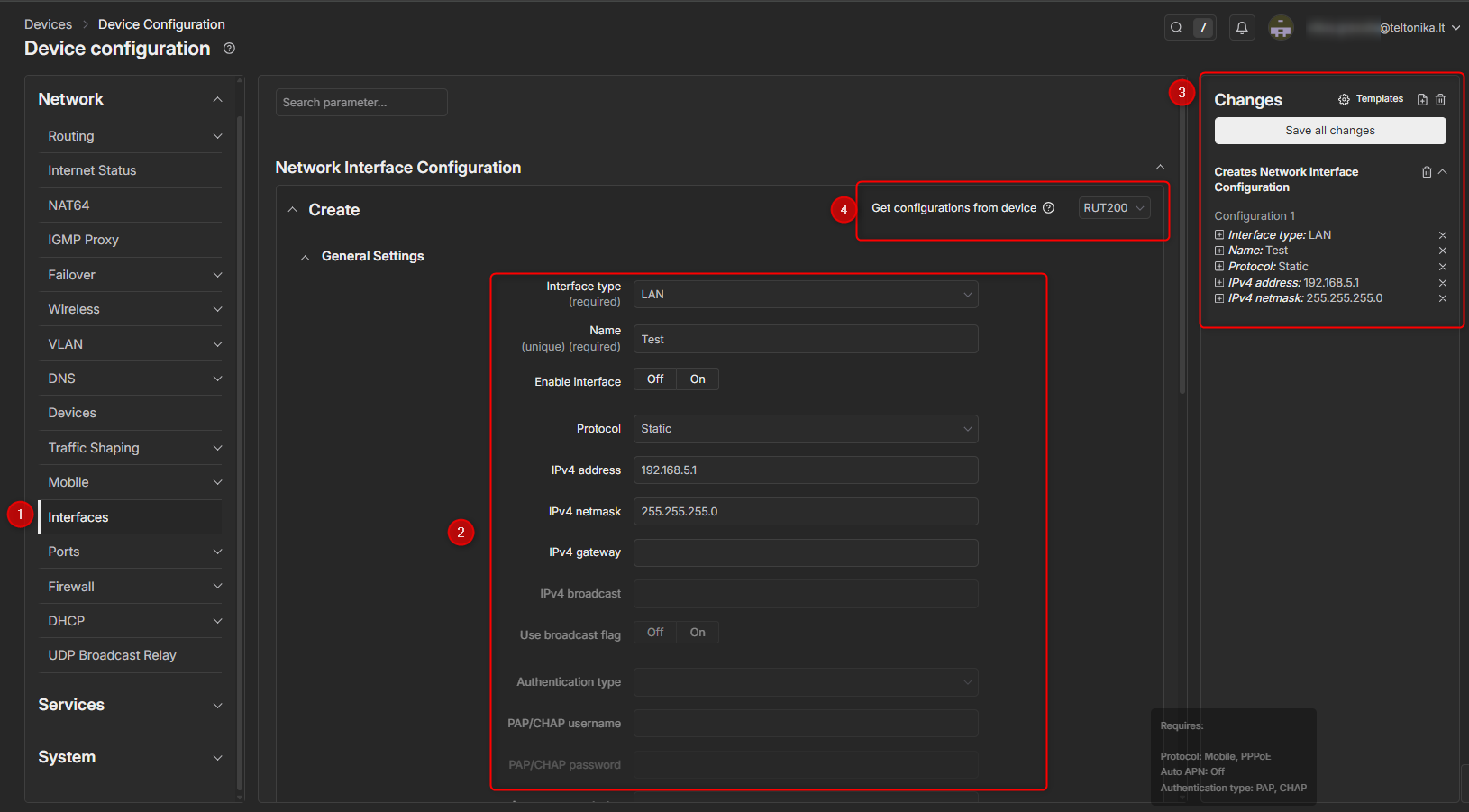
Then selecet Network → Interfaces in this menu, you will be able to Create / Update / Delete current configuration. For this example I am trying to create a new LAN interface.

  1. Select Network → Interfaces
  2. In this are you can configure interface’s settings.
  3. You will be able to see all of the changes that were made. If you want to edit any of the present changes, you can simply just click on a setting in that area, and you will taken to that field.
  4. This will allow you to choose a device on which configuration will be applied.

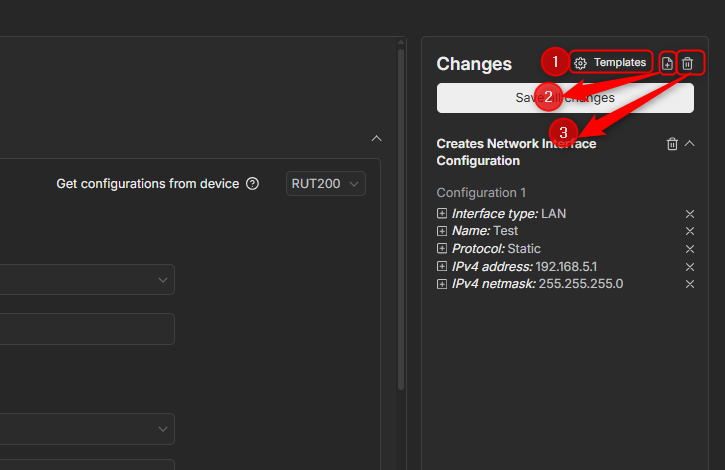
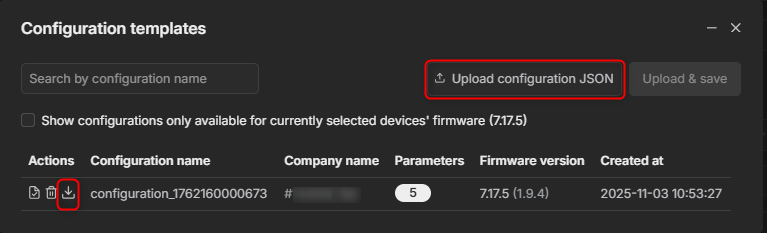
  1. By pressing on templates you can choose between the templates that you already saved and download export it as json file or upload a json format template.

  1. Allows you to save a template that you made and it will be available to download once pressed on “Templates button”

  2. Clears all of the changes.

For more information, you can refer to this wiki article:

I hope this answers your question,

Kind regards,
V.

Thank you for your answer. But, if I apply a template that configures the “lan” address to 192.168.5.1/24 to multiple routers, all those routers will have the same IP address on their “lan” address, right?

What I want to do is to have a fleet of devices with almost identical configuration, but

  • different IP addresses on the lan interface and
  • different certificates for the OpenVPN client.

Am I understanding your advice correctly that it is the recommended way to first apply the base template to all devices and then either

  • have device specific templates that just change the IP address and the certificate OR
  • configure those things manually via the WebUI?

Thanks again for helping.

Greetings, Marc Haber

Hello, Marc,

Thank you for your question,

Yes, if you apply a template that has LAN configuration set to e.g. 192.168.5.1/24 it will apply to all of the selected devices.

Yes you understood correctly, the templates will apply all of the setting that are provided in the template. The templates are used to set up static settings that applies to All of the devices. Dynamic settings like particular LAN IP must be changed manually, either using RMS or through WebUI.

I hope this answers your question,

Kind regards,
V.

Hello Vilius,

thanks for your patient answers.

Okay. I think I have understood now. This is now turning into a feature request. I know that this is not going to be implemented next week, but let me give some advice from an experienced sysadmin who has done configuration management for servers for quite some years.

In Linux configuration management, it is common that you have an “Inventory” which holds information about all your systems. In that inventory, you associate put nearly arbitrary variables to the server. In the RMS, What you see under Management => Devices is already pretty close to such an inventory. For example, you would have (yaml-like format).

---
- inventory
  - system
    - rutx08-01
      - network
        - interface
            name: lan
            vlan: 1
            address: 192.168.0.1
            netmask: 255.255.255.0
        - interface
            name: wan
            vlan: 2
            dhcp: yes

and then, in the actual configuration template, I can refer to that variable. So I could have a template that is valid for ALL my rutx08 devices and just say inside the variable “IP address for lan interface: {inventory.system.$HOSTNAME.interface.lan.address}

The system could offer additional functions like “return first/last address of network” (to automatically calculate gateway address from the device address” etc, but that is just gold plating.

That way, I have the device specific configuration (and JUST the parts that actuall ARE device specific) attached to the device and still just have ONE template for all similar systems.

I would be happy if you would hand this to your development team. They can google for my nickname “Zugschlus” and find my mail address if they want more explanation. I am also available here.

Thanks in advance.

Greetings, Marc Haber

Greetings, Marc,

Thank you for your follow-up message,

I will pass your suggestions to our R&D team for them to take it into consideration. In case you have any additional questions / suggestions, please let me know!

Kind regards,
V.

This topic was automatically closed 2 days after the last reply. New replies are no longer allowed.