I am trying to set up NameCheap DDNS on RUT956, but the DDNS IP is not updating. I tried dyn.com, and it works. Any clue ?
Create an A + Dynamic DNS Record for the exact hostname you want to update.
Enable Dynamic DNS in Namecheap and use the Dynamic DNS password, not the normal Namecheap account password.
On the RUT956, select namecheap.com as the DDNS provider and make sure the Domain/hostname matches the Namecheap DDNS record exactly. The RUT956 officially supports Namecheap.
Check the IP source on the RUT956. If the router is behind another router or carrier NAT, make sure you’re updating with the public IPv4, not the RUT956’s private WAN IP. Namecheap DDNS currently supports IPv4 only.
Test Namecheap manually: use Namecheap’s HTTPS update method. If that updates the IP successfully, the problem is likely the RUT956 DDNS configuration rather than Namecheap.
The first two things you should check: custom nameservers and whether the hostname is actually configured as an A + Dynamic DNS Record.
I am not behind the NAT. I am getting a dynamic public IP. And my dyn.com DDNS is working perfectly fine.
Yes, I do have an A + Dynamic DNS record. The issue is that whatever IP I put in the DDNS A+ entry, it shows up in the DDNS on the Teltonika, so kind of one-way sync, but Namecheap is not getting any update from the RUT956
Greetings,
Thank you for reaching out and apologies for the late response.
To help us isolate and troubleshoot the issue, please answer the following questions:
- Firmware Version: What firmware version is currently installed on your RUT956?
- Configuration: Could you share a screenshot of your Namecheap DDNS configuration on the router? (Please remember to blur out any sensitive information like passwords, hostnames, or domain names.)
- DDNS Password: Are you using your main Namecheap account password or the specific Dynamic DNS password generated in Namecheap’s Advanced DNS dashboard?
For reference, you may find the official Teltonika Wiki guide useful while checking these settings:
RUT956 Dynamic DNS - Teltonika Networks Wiki
Once we have these details, we can guide you toward getting this resolved.
Best regards,
Martyna
-
Firmware Version: What firmware version is currently installed on your RUT956? 7.23.4
-
Configuration: Could you share a screenshot of your Namecheap DDNS configuration on the router? (Please remember to blur out any sensitive information like passwords, hostnames, or domain names.)
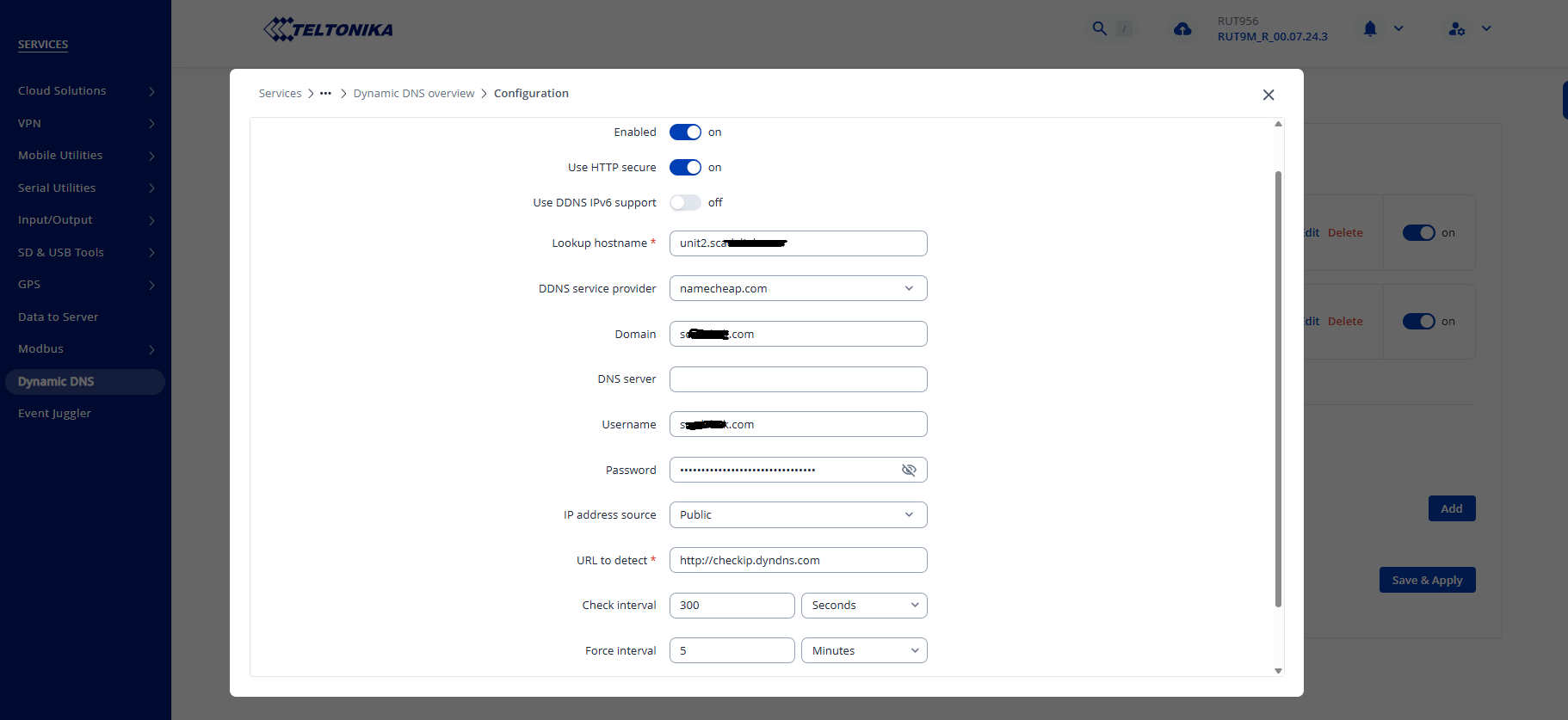
DDNS Password: Are you using your main Namecheap account password or the specific Dynamic DNS password generated in Namecheap’s Advanced DNS dashboard? i am using Dynamic DNS Password
Hi @shamsali222,
Thank you for sending over the screenshot!
First, it might be helpful to update your router’s firmware to make sure everything is running smoothly.
While checking that, I also noticed the Username field includes a .com address. Since Namecheap usually doesn’t allow .com endings for account usernames, it could be worth verifying if your account handle was entered instead of an email address.
If that is already correct and the issue persists, please let me know so we can help you troubleshoot further!
Best regards,
Martyna