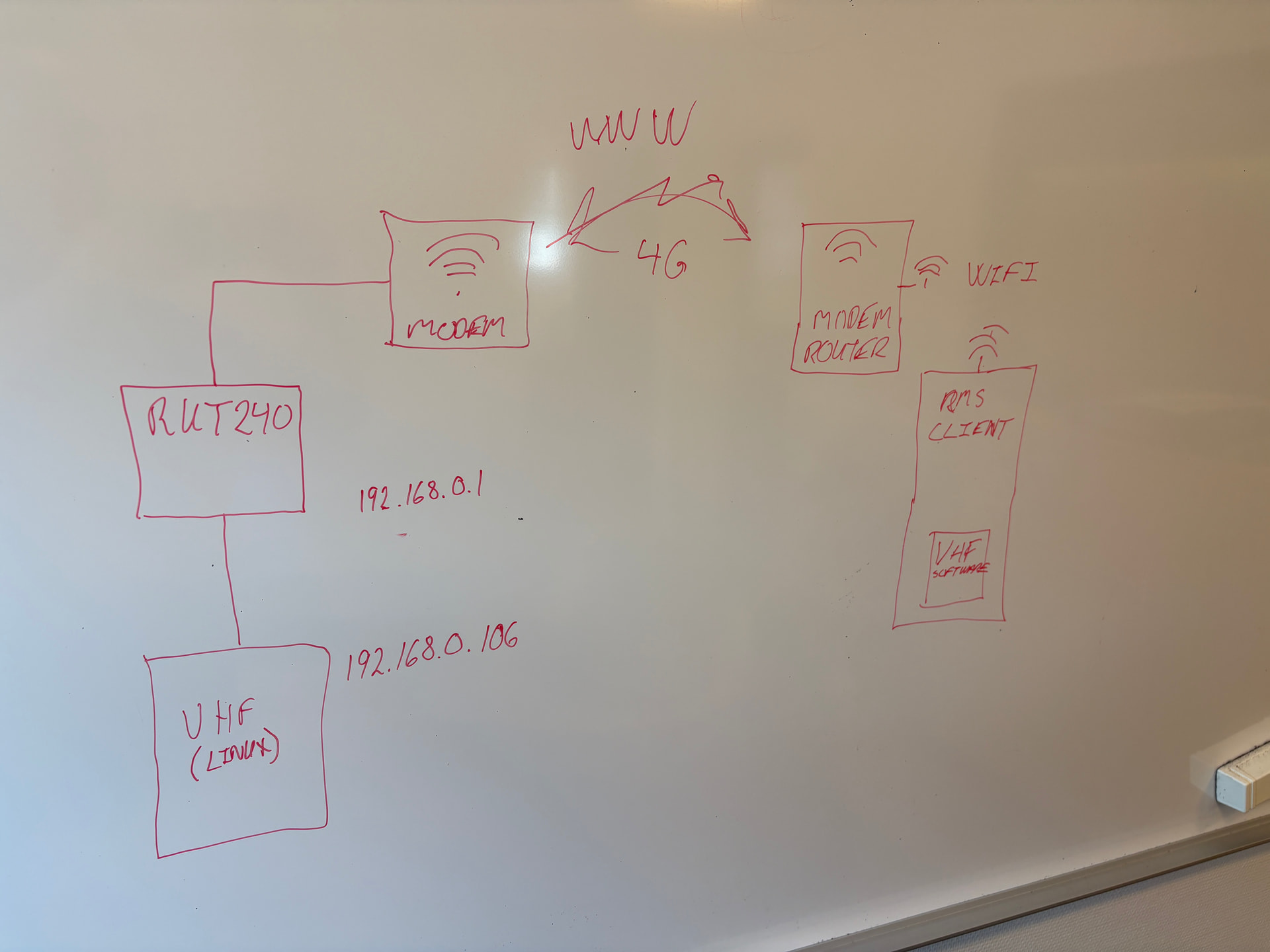
Hello, I want to create my VPN connection (picture attached). Is it possible with 1 RUT240 or do I need 1 more? Do I need other devices or software? The VHF is a ROIP and on the right side a laptop with Windows 11. Any step by step guide?
Hello!
To answer the question more accurately, could you please specify these details:
- Are you using the RMS VPN hub? If not, what kind of VPN are you planning to use?
- Is the end goal to reach the Linux VHF device (192.168.0.106) from the VHF software?
In case the answers to both questions are yes, you can find a detailed guide on how to achieve this configuration:
RMS VPN Hubs - Teltonika Networks Wiki
Let us know if that answers your question or if you require additional assistance.
Kind regards,
Laura
Hello Laura,
Thank you for your reply. I am not using RMS VPN hub because I want to use Open VPN.
Yes, my goal is to reach the VHF device from VHF software.
Hello,
Thank you for your response.
In that case, this is still entirely possible.
Here is a guide on how to achieve it:
OpenVPN configuration examples - Teltonika Networks Wiki
If you encounter any difficulties, do not hesitate to request additional support.
Kind regards,
Laura.
Hello,
Additionally, to answer your other questions:
Since your setup seems to include only 1 end device to reach, a single RUT device will suffice. It’s important to note that you’ll have to set up some kind of OpenVPN server, to which you should be able to connect as a client, as well as using the singular RUT240 that you have as a client, which will also connect to the server, which in turn, will connect all of the networks into one. The OpenVPN server, in this case, can be some kind of 3rd party provider for OpenVPN services, or, if you wish, another Teltonika device, if you have one. It is important to note, that for OpenVPN specifically, a Public IP address is required, at least on the server-side, more details on Public IPs here: Private and Public IP Addresses - Teltonika Networks Wiki
For the step-by-step guide, as mentioned in the previous reply, you may refer to our Wiki page, which explains the entire configuration quite in depth. If you have any other questions or run into issues, don’t hesitate to reply here and let us know what went wrong.
Finally, just for confirmation sake, though you did mention that you want to use OpenVPN, I can see that you have RMS Client mentioned in the provided topology. Would using RMS VPN Hub be an option for you? The setup overall is a lot simpler to do, and it doesn’t require you to set up any additional OpenVPN servers or have any Public IP addresses anywhere; it works with private IP addresses as well. You can read up more on it here: RMS VPN Hubs - Teltonika Networks Wiki
Regards,
Laura.
Hello Laura,
Thank you for your reply.
I just bought 2 RUT241 with 2 simcards (one with fixed IP).
Can you please tell me step by step how to config the connection?
First, the laptop or VHF side?
So, I have to create an RMS account to use your service as VPN.
Your RMS service is only valid for 24 hours. What to use when I need the connection for more than 24 hours?
Hello!
Please note that RMS is a paid platform for managing Teltonika devices; therefore, with purchased credits, it can last longer than it does currently.
For the record, 1 credit allows for 30 days of monitoring for one device, with an exception for RMS VPN and RMS Connect, for which you would need data - you can acquire it by exchanging your credits.
We simply recommend it due to its being far simpler to set up, manage, and troubleshoot.
You can learn more about RMS here: RMS Resources - Teltonika Networks Wiki
In regard to the setup, with the information we have provided you, the decision whether to set up RMS VPN or OpenVPN is entirely up to you, and we are here to help you through all of it.
The guides for both setups can be found here if you do wish to set it up by yourself:
RMS VPN Hubs - Teltonika Networks Wiki
OpenVPN configuration examples - Teltonika Networks Wiki
However, if the guides are too confusing, we can arrange for a remote session and help set up either directly.
If you wish to proceed with a remote session, we do ask that you prepare the necessary prerequisites so we can proceed without any disturbances.
If you wish to set up RMS VPN, here is what you will need:
- The devices you wish to connect.
- RMS credits and data.
For OpenVPN, you will need:
- A public static IP address (not a shared public IP)
- Working certificates (You can find a guide on how to generate them here: TLS Certificates - Teltonika Networks Wiki)
Neither the Public IP nor the certificates are needed if you wish to proceed with RMS VPN. Neither do you need an RMS account if you wish to set up only OpenVPN.
If the question refers to which side to start from, the answer is that it does not matter much; however, we do recommend starting from the server side.
If that is not what you meant by your inquiry, please do clarify, and we will be glad to answer it with more detail.
Let us know how you wish to proceed.
Kind regards,
Laura.
Hello Laura,
What is the price to get a remote session and what do you need of connection speed and hardware?
Hello!
As mentioned, you will require the devices mentioned in your topology.
In regards to speed, a specific speed is not needed, we simply ask that you have a stable internet connection.
The remote session does not cost anything. We simply ask for clarification on whether you wish to set up OpenVPN or RMS VPN in advance to the session.
To proceed, we will have to discuss sensitive information which should not be shared on a public forum.
To avoid leaking this information, we have sent you a form to fill out, which you will receive in your e-mail inbox that you have registered your account with in the forum. In the Ticket ID field of the form, please enter the ID of this thread, which is 19486.
Kind regards,
Laura.
Hello!
This is a summary of our remote session on 2026/06/12:
The user required an OpenVPN configuration between 2 RUT241 devices.
Upon connecting, we were able to set the configuration up according to our OpenVPN configuration example article: OpenVPN configuration examples - Teltonika Networks Wiki.
Some additional questions were asked at the end of the session regarding ROIP, which were answered.
Please do let us know if you have additional questions or require additional help.
Kind regards,
Laura.
Hello Laura,
Thank you for your help and support.
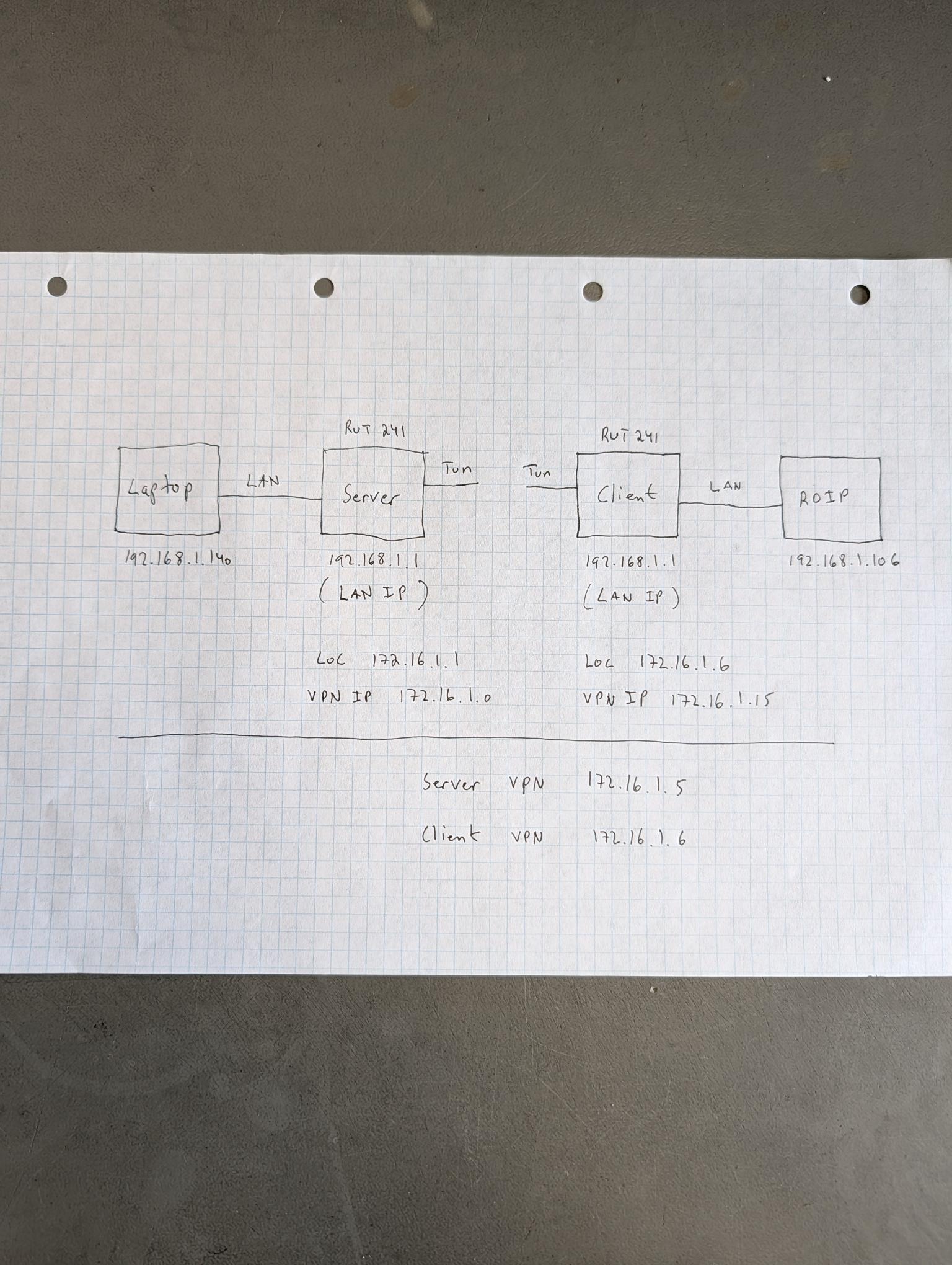
A block diagram of the setup attached.
Please correct it if something is wrong or missing.
I am not able to see/select the VPN IP in the ROIP software (laptop) only the laptop IP 192.168.1.140.
What is loc 172.16.1.1 and VPN IP 172.16.1.0 when you wrote in Notepad that my Server VPN IP is 172.16.1.5 and Client IP 172.16.1.6.
I can ping from my laptop the Client VPN IP 172.16.1.6.
How do I forward the traffic from the Client (RUT241) to my ROIP VHF?