“Modbus TCP Client” web page missing

Hi,

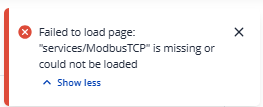
After installing the “Modbus” package, configuring the “Modbus TCP Client,” and restarting the router, the “Modbus TCP Client” web page is not accessible.

What is the procedure for accessing the “Modbus TCP client” configuration page?

Thank you in advance for your support.

Best regards

Cidrick

Hello,

Could you please specify which firmware version is currently installed on your device, from which version you updated, and whether you performed the update with or without the Keep settings option enabled?
Best regards,

Hi Marija,

The firmware version is “RUT9M_R_00.07.17.5”.

The “Keep settings option” is enabled.

But after an “Cold restart” on router only, the “Modbus TCP Client” web page is accessible again.

I ask me customer to switch “ON” and “OFF” the router. Without a client, it is no longer possible to restart the router correctly.

Best regards.

Cidrick

Hello,

Do I understand correctly that the router was rebooted and the issue is now resolved? Or are you still unable to access the page?

Best regards,

Hi Marija,

After an “Cold restart”, everything goes weel.

Best regards.

Cidrick

This topic was automatically closed 2 days after the last reply. New replies are no longer allowed.