Hello Teltonika and UniFi UCG users,
I am looking for some advice and assistance regarding a problem I’m having with configuring a proper “mobile passthrough” setup.
My current setup:
RUTM52 (this is the hardware available to me)
UniFi Cloud Gateway (UCG)-Fiber
A single Ethernet cable connecting them
The RUTM52 and the UCG are located in different rooms (physically separated)
The Objective / Problem Statement:
On the RUTM52:
- mob1s1a1 needs to operate in passthrough mode and be assigned to VLAN 11. The MAC address configured for the DHCP offer is the MAC address assigned to the UCG’s WAN1 port.
- mob2s1a1 should run in the default NAT mode (since a second passthrough instance isn’t possible) and be assigned to VLAN 12.
- A management network needs to be created on VLAN 254.
- The LAN1 port must be configured as a trunk port tagged for VLANs 11, 12, and 254.
On the UniFi UCG-Fiber:
- The WAN1 port needs to handle the traffic (including the DHCP request/offer) from VLAN 11 (mob1 passthrough) to obtain the public IP address provided by the carrier.
- The WAN1 port has been assigned a specific MAC address via ‚MAC Address Cloning’.
- WAN2 needs to be connected to VLAN 12, configured as either single or double NAT.
- The WAN ports are patched as untagged onto the corresponding native VLAN ports.
Troubleshooting Done So Far:
All attempts to get this setup up and running using various AI assistants have failed so far.
I have also tried powering off the RUTM52 for more than 10 minutes, and once it booted back up, I rebooted the UCG to ensure the DHCP request/offer cycle triggers correctly.
What puzzles me the most is that I am apparently not supposed to — or unable to — bridge the wwan0 or a mob1 interface of the RUTM to VLAN 11, and I haven’t found any documentation describing it this way.
Does anyone have any technical insights or relevant tips on how to resolve this?
Thank you very much!
Greetings, @Scoty0815 ,
Welcome to Teltonika Community!
Thanks for the detailed write-up - your intended topology is clear and the approach is sound. Before going further, a few questions that will help narrow down where things are actually going wrong:
On the RUTM52:
- When you set
mob1s1a1 to Passthrough, do you enter the UCG WAN1 MAC address in the MAC Address field, or are you leaving it blank?
- Is WAN failover disabled under Network → WAN?
- Have you created a separate LAN interface for VLAN 11 (bound to
eth0.11), or are you relying on the default br-lan for passthrough traffic?
- What does the UCG WAN1 port actually receive - a private LAN IP, a carrier public IP, or nothing at all?
On the UCG:
- Is WAN1 configured as a plain DHCP client?
- Is MAC cloning on WAN1 set to the same MAC you entered in the RUTM52 passthrough field?
General:
- Have you tested passthrough in a simple setup first - mob1s1a1 in passthrough with the UCG WAN1 plugged directly into LAN1 with no VLAN tagging - just to confirm passthrough itself works before adding the trunk complexity?
I look forward to your reply,
Best regards,
V.
Hi Vilius,
thanks for your reply. See my answers in your reply and questions:
General:
On the RUTM52:
-
When you set mob1s1a1 to Passthrough, do you enter the UCG WAN1 MAC address in the MAC Address field, or are you leaving it blank?
- A random generated MAC address is assigned, also at the UCG wan1 interface
-
Is WAN failover disabled under Network → WAN?
- as long as I remember yes. So far only one SIM is installed.
-
Have you created a separate LAN interface for VLAN 11 (bound to eth0.11), or are you relying on the default br-lan for passthrough traffic?
- I did all VLAN config using port based VLAN. And yes I’ve assigned also a LAN interface bound to eth0.11.
-
What does the UCG WAN1 port actually receive - a private LAN IP, a carrier public IP, or nothing at all?
On the UCG:
Here is a new observation - I tried the following setup without any success.
On the RUTM52:
- Port based VLAN
- LAN1 patched to port LAN2.
- LAN2 port: Assigned untagged VLAN 11 to LAN2 port; disabled all other VLANs on LAN2.
- LAN4 port: Configured all tagged VLANs 11, 12 & 254 to LAN4; Disabled default VLAN 1
On the UCG:
- the same as on the RUTM, leaving wan1 in its default configuration and patched it to a VLAN 11 native/untagged port. …
Kind regards and looking forward finding together a solution.
Henrik
Thanks for the detailed testing.
Please try: Switch from port-based to tag-based VLAN (Network → VLAN → Tag-Based). Tag-based VLANs create sub-interfaces (eth0.11, eth0.12) on br-lan rather than separate bridges, which keeps the passthrough traffic on the correct interface while still delivering tagged frames to the UCG.
If it still fails, run these via SSH immediately after mob1s1a1 connects and share the output:
- ip route show table all
- cat /tmp/dnsmasq.d/bridge
Kind regards,
V.
Hi Vilius,
thank you for being supportive.
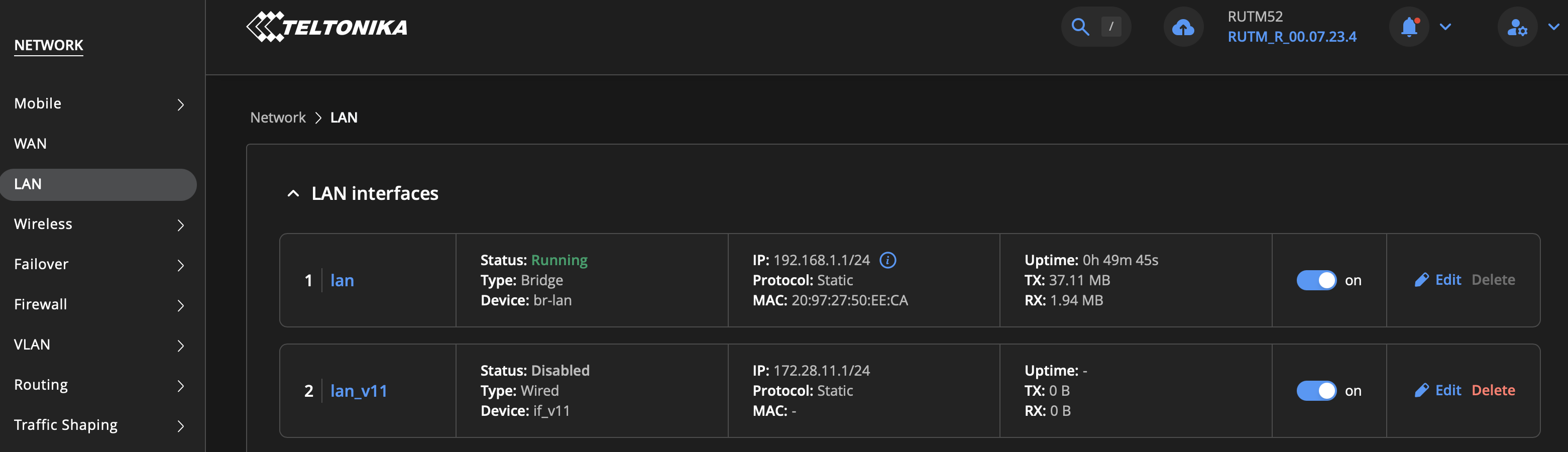
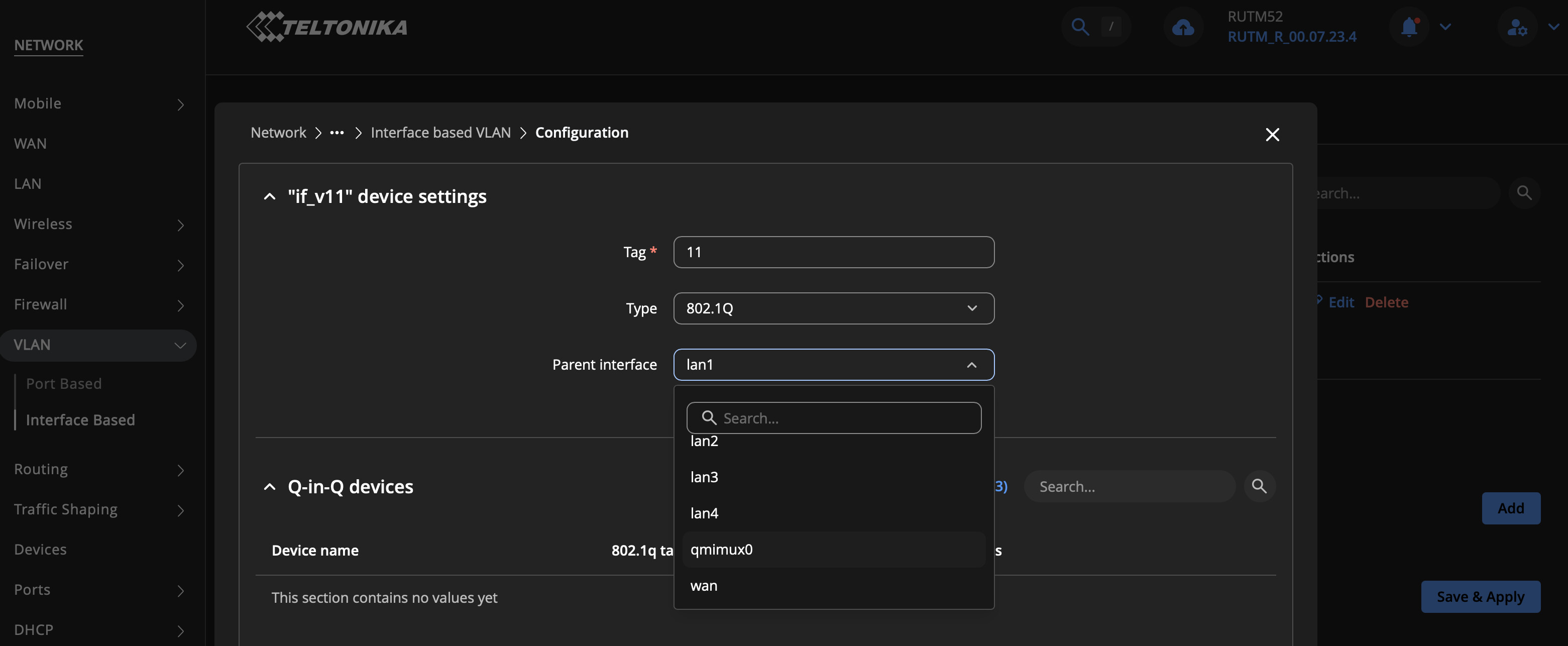
Sorry I can’t find the way to setup tag-based VLAN. Only Interface Based VLAN - see screen shot.
I just created one, like this
This is the result:
root@RUTM52:~# ip link
1: lo: <LOOPBACK,UP,LOWER_UP> mtu 65536 qdisc noqueue state UNKNOWN mode DEFAULT group default qlen 1000
link/loopback 00:00:00:00:00:00 brd 00:00:00:00:00:00

2: eth0: <BROADCAST,MULTICAST,UP,LOWER_UP> mtu 1504 qdisc mq state UP mode DEFAULT group default qlen 1000
link/ether 20:97:27:50:ee:ca brd ff:ff:ff:ff:ff:ff
…
…
29: if_v11@lan1: <NO-CARRIER,BROADCAST,MULTICAST,UP> mtu 1500 qdisc noqueue state LOWERLAYERDOWN mode DEFAULT group default qlen 1000
link/ether 20:97:27:50:ee:ca brd ff:ff:ff:ff:ff:ff
root@RUTM52:~# ip -d link show if_v11

16: if_v11@lan1: <NO-CARRIER,BROADCAST,MULTICAST,UP> mtu 1500 qdisc noqueue state LOWERLAYERDOWN mode DEFAULT group default qlen 1000

    link/ether 20:97:27:50:ee:ca brd ff:ff:ff:ff:ff:ff promiscuity 0 minmtu 0 maxmtu 65535

    vlan protocol 802.1Q id 11 <REORDER_HDR> addrgenmode eui64 numtxqueues 1 numrxqueues 1 gso_max_size 65536 gso_max_segs 65535 gro_max_size 65536
But I don’t understand, that the VLAN 11 is not listed here:
root@RUTM52:~# bridge v
port              vlan-id
lan1              1 PVID Egress Untagged
lan2              1 PVID Egress Untagged
lan3              1 PVID Egress Untagged
lan4              1 PVID Egress Untagged
br-lan            1 PVID Egress Untagged
wlan0-1           1 PVID Egress Untagged
wlan1-2           1 PVID Egress Untagged
So it looks like I do need more detailed how-to-setup instructions…
I think it would be easier to do the configuration in /etc/config/network
Kind regards
Henrik
Hi,
One more observation:
It looks like, that the ISP provider IP is assigned internally despite the fact, that the mob-interface is set to passthrough. See item 15 - br-lan, here is the provider IP 10.220.195.194/32 assigned.
Something is really strange! Can someone explain what is going on?
Kind regards,
Henrik
root@RUTM52:~# ip a

1: lo: <LOOPBACK,UP,LOWER_UP> mtu 65536 qdisc noqueue state UNKNOWN group default qlen 1000

    link/loopback 00:00:00:00:00:00 brd 00:00:00:00:00:00

    inet 127.0.0.1/8 scope host lo

       valid_lft forever preferred_lft forever

    inet6 ::1/128 scope host

       valid_lft forever preferred_lft forever

2: eth0: <BROADCAST,MULTICAST,UP,LOWER_UP> mtu 1504 qdisc mq state UP group default qlen 1000

    link/ether 20:97:27:50:ee:ca brd ff:ff:ff:ff:ff:ff

    inet6 fe80::2297:27ff:fe50:eeca/64 scope link

       valid_lft forever preferred_lft forever

…

…

15: br-lan: <BROADCAST,MULTICAST,UP,LOWER_UP> mtu 1500 qdisc noqueue state UP group default qlen 1000
    link/ether 20:97:27:50:ee:ca brd ff:ff:ff:ff:ff:ff
    inet 192.168.1.1/24 brd 192.168.1.255 scope global br-lan
       valid_lft forever preferred_lft forever
    inet 10.220.195.194/32 brd 255.255.255.255 scope global br-lan
       valid_lft forever preferred_lft forever
    inet6 2a01:599:941:1216::1/64 scope global noprefixroute
       valid_lft forever preferred_lft forever
    inet6 fd5a:1147:3f6::1/60 scope global noprefixroute
       valid_lft forever preferred_lft forever
    inet6 fe80::2297:27ff:fe50:eeca/64 scope link
       valid_lft forever preferred_lft forever
…
…
root@RUTM52:~# cat /etc/config/network

config interface 'loopback'

	option device 'lo'

	option proto 'static'

	option ipaddr '127.0.0.1'

	option netmask '255.0.0.0'

	option area_type 'lan'


config globals 'globals'

	option ula_prefix 'fd5a:1147:03f6::/48'


config port '_wan'

	option enabled '1'

	option autoneg 'on'

	option ifname 'wan'


config device '_wan_mtu'

	option name 'wan'


config port '_lan1'

	option enabled '1'

	option autoneg 'on'

	option ifname 'lan1'


config device '_lan1_mtu'

	option name 'lan1'


config port '_lan2'

	option enabled '1'

	option autoneg 'on'

	option ifname 'lan2'


config device '_lan2_mtu'

	option name 'lan2'


config port '_lan3'

	option enabled '1'

	option autoneg 'on'

	option ifname 'lan3'


config device '_lan3_mtu'

	option name 'lan3'


config port '_lan4'

	option enabled '1'

	option autoneg 'on'

	option ifname 'lan4'


config device '_lan4_mtu'

	option name 'lan4'


config interface 'lan'

	option device 'br-lan'

	option area_type 'lan'

	option proto 'static'

	option ipaddr '192.168.1.1'

	option netmask '255.255.255.0'

	option ip6assign '60'


config device 'br_lan'

	option name 'br-lan'

	option type 'bridge'

	list ports 'lan1'

	list ports 'lan2'

	list ports 'lan3'

	list ports 'lan4'


config interface 'wan'

	option device 'wan'

	option proto 'dhcp'

	option metric '1'

	option area_type 'wan'


config interface 'wan6'

	option device 'wan'

	option proto 'dhcpv6'

	option metric '2'

	option area_type 'wan'


config interface 'mob1s1a1'

	option proto 'wwan'

	option modem '2-1.1'

	option metric '3'

	option sim '1'

	option dhcpv6 '0'

	option pdptype 'ipv4v6'

	option area_type 'wan'

	option auto_apn '1'

	option apn 'internet.telekom'

	option username 'telekom'

	option password 'telekom'

	option auth 'pap'

	option pdp '1'

	option pref_apn '572'

	option reqprefix 'auto'

	option mac 'dc:a6:32:aa:01:01'

	option p2p '0'

	option method 'passthrough'


config interface 'mob1s2a1e1'

	option proto 'wwan'

	option modem '2-1.1'

	option metric '4'

	option sim '2'

	option dhcpv6 '0'

	option pdptype 'ipv4v6'

	option method 'nat'

	option auth 'none'

	option area_type 'wan'

	option auto_apn '1'


config interface 'mob2s1a1'

	option proto 'wwan'

	option modem '2-1.2'

	option metric '5'

	option sim '1'

	option dhcpv6 '0'

	option pdptype 'ipv4v6'

	option method 'nat'

	option auth 'none'

	option area_type 'wan'

	option auto_apn '1'


config interface 'mob2s2a1e1'

	option proto 'wwan'

	option modem '2-1.2'

	option metric '6'

	option sim '2'

	option dhcpv6 '0'

	option pdptype 'ipv4v6'

	option method 'nat'

	option auth 'none'

	option area_type 'wan'

	option auto_apn '1'


config device '1'

	option name 'vlan11'

	option ifname 'lan1'

	option type '8021q'

	option vid '11'


config interface 'lan1'

	option netmask '255.255.255.0'

	option proto 'static'

	option area_type 'lan'

	option ipaddr '172.28.11.1'

	option name 'lan1_v11'

	option device 'vlan11'