I need to forward mDNS across VLANs. I read that support for Avahi is in the roadmap but without any target release. Is there some other way to do this meanwhile? Install Avahi myself, use some other forwarder, etc. I cannot change the network setup to avoid this issue.
Greetings, @Aldebjer ,
Welcome to Teltonika Community!
Could you please clarify the following:
Network & VLAN Setup
- Which Teltonika device model and firmware version are you using?
- How many VLANs are involved, and what are their purposes (e.g., IoT, guest, office)?
- Are the VLANs currently isolated, or is there any routing/firewall between them?
Services & Devices
- Which devices or services need to be visible across VLANs (printers, AirPrint, Chromecast, smart home devices, etc.)?
- Are the services using mDNS/Bonjour specifically, or other discovery protocols?
- How many devices per VLAN need cross-VLAN visibility?
This information will help me to investigate further.
Warm regards,
V.
Hello,
I am using a RUTC50 (RUTC_R_00.07.19.4). This is a setup for my boat. There are only two VLANs. One is for general use, and the other is for my Garmin plotter and one or two other garmin instruments on the same network as the plotter. The reason I put my Garmin plotter and garmin instruments on a separate VLAN is that the plotter has a DHCP server that I cannot turn off. I thus want to isolate that DHCP server from my other non-garmin devices (it will hand out the wrong Gateway). The reason I want to connect to the Garmin at all is since there is a mobile app that can connect to the plotter. The discovery is trough mDNS, and there is also direct RTP from the plotter to the mobile app, and maybe some other communication as well.
Initially I put the garmin device on a separate subnet. When I couldn’t install Avahi I compiled and installed a much smaller program, GitHub - geekman/mdns-repeater: mDNS repeater . It would repeat mDNS traffic between the subnets. But the direct TCP and UDP traffic from the plotter to the app would not work (probably since the plotter doesn’t have a Gateway). I tried to use masquerading from my general network to the garmin network with limited success. It worked for some communication but not for the RTP. So then I tried to put all devices at the same subnet, but then the mens-repeater would no longer distribute the mdns messages to the other VLANs.
I am now looking into this mdns-repeater to see why the packages are not repeated when on the same subnet. Meanwhile if you have any hints or a better solution I would be very grateful.
Hello,
I’d like to inform you that mDNS is not supported on our devices. A suggestion I have, is that you disable DHCP on the Garmin VLAN that you’ve created on the RUTC50 (since you’ve mentioned that it has a server), of course, if you haven’t already.
One more suggestion after having created the new VLAN would be to look into creating a traffic rule that blocks Garmin’s DHCP ports. Now, to do this, you’ll have to edit your firewall zones a little to separate the VLAN from the default LAN:
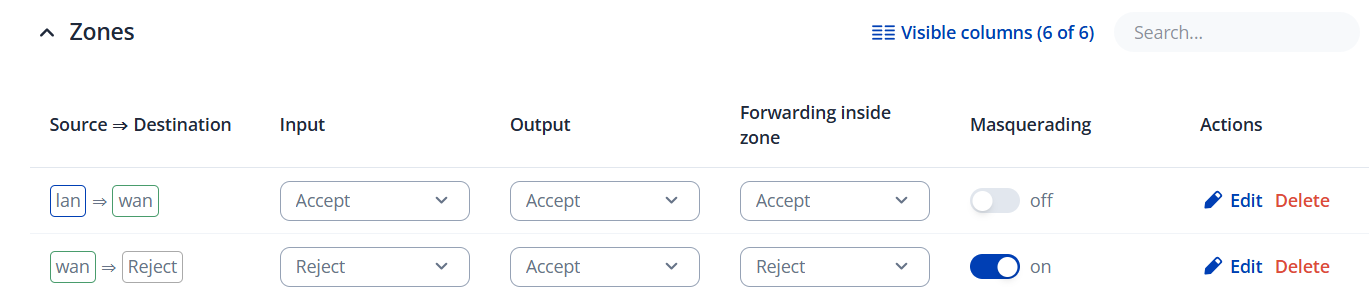

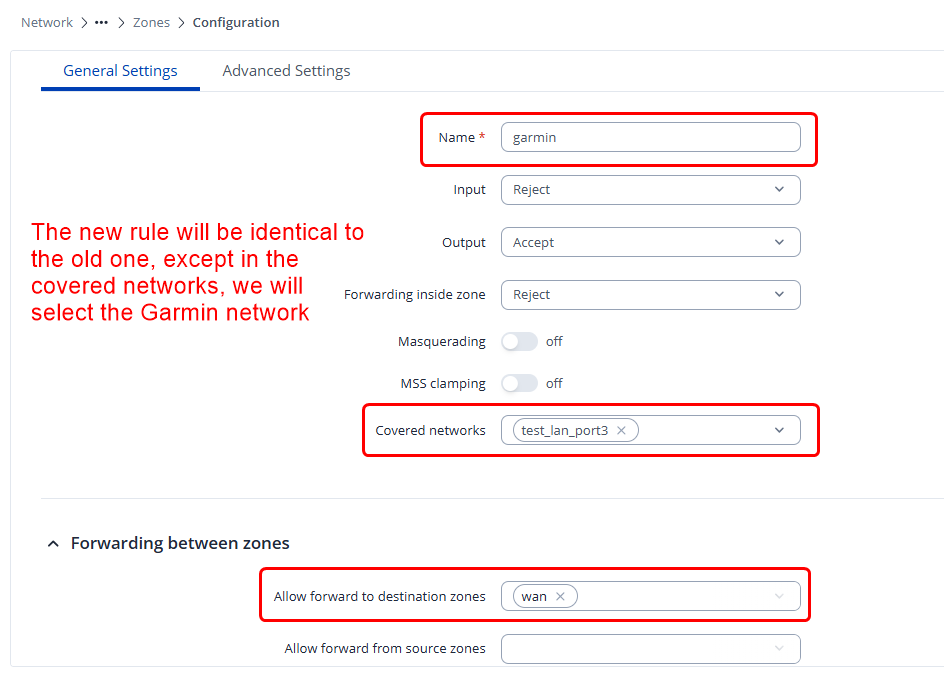
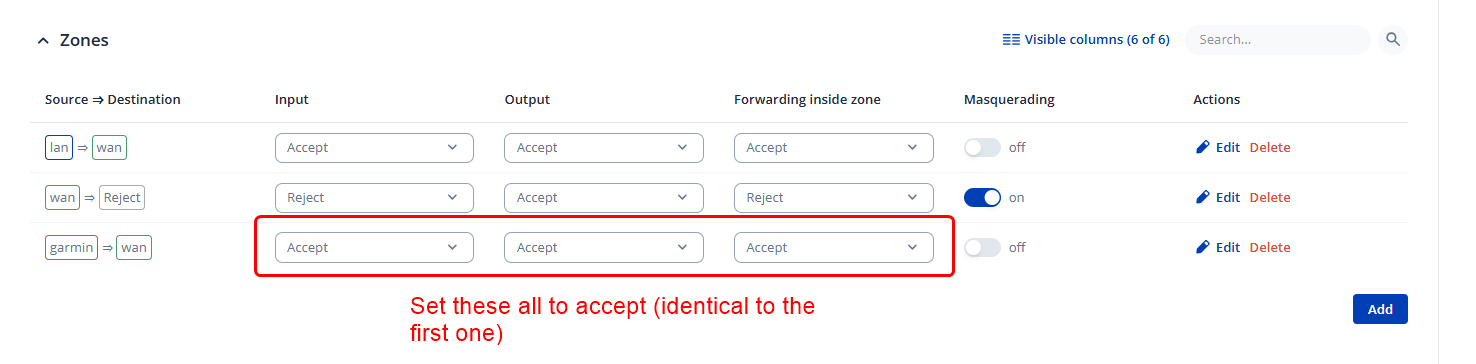
So now, you should have your zones looking like this:
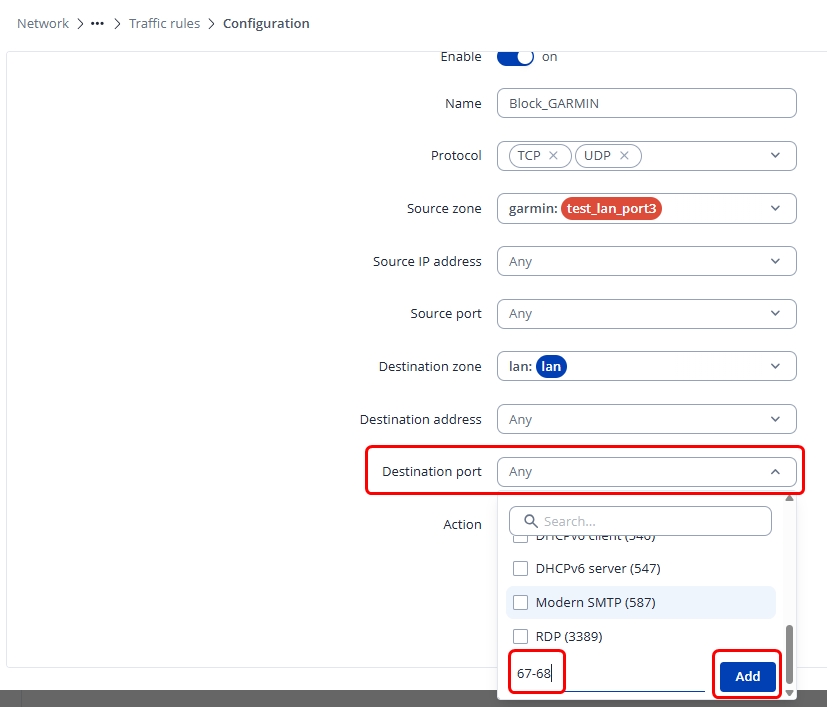
Now you head to Network → Firewall → Traffic rules, and add a new traffic rule like so:
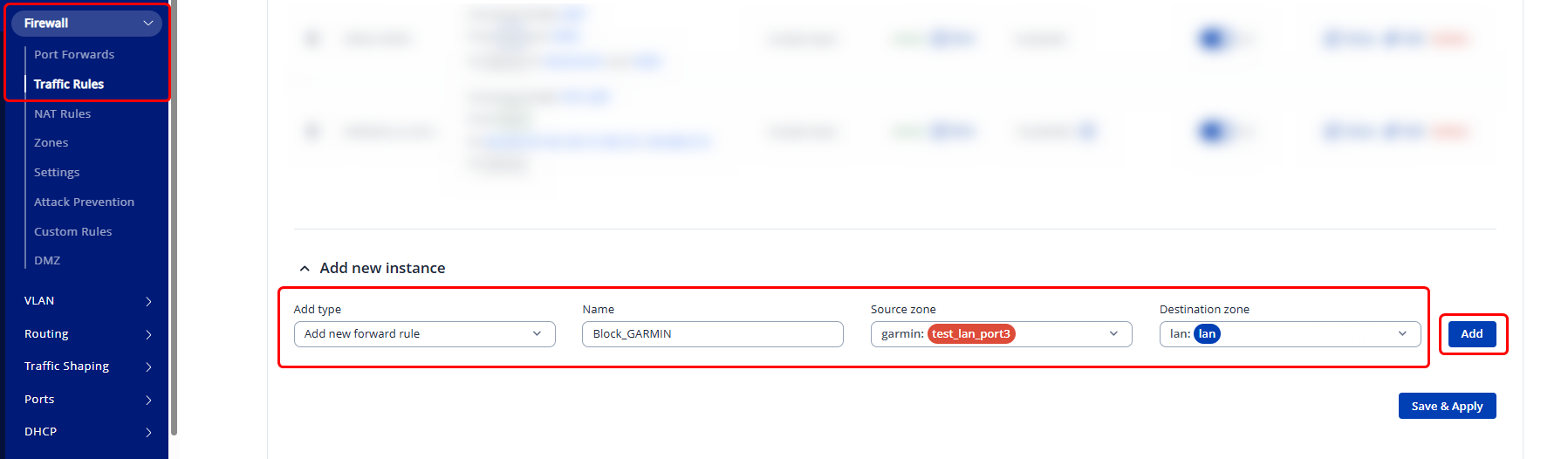
Lastly, for the action, select “Drop” and hit save & apply:
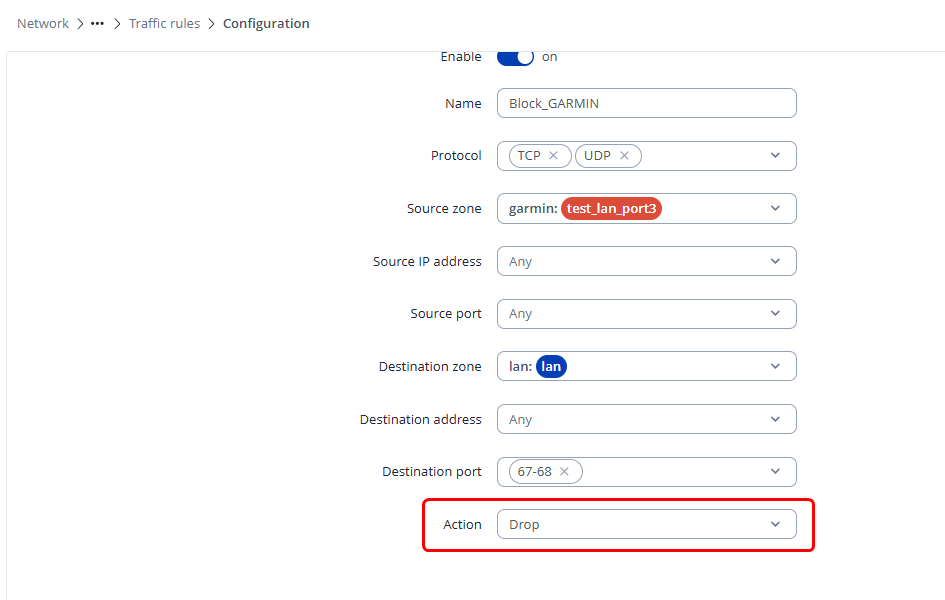
Make sure you’ve enabled the created traffic rule, and re-test whether this helps your situation. Worst case, if you want to go back, simply delete the traffic rule & the new zone you’ve created, and add back the Garmin LAN to the default zone, basically do everything in reverse.
I can’t promise that this will work for you, as we don’t have such devices to test with, but it’s worth a shot.
Regards,
M.
Same thing for me. I am using a RUT140 with RUT14X_R_00.07.15.2.
mDNS is required for some auto-discovery mechanisms.
Is mDNS also not available on this device?
See Matas’ reply
Will it be? Is there a roadmap?
Hi there,
From what I was able to find - there are plans of implementing this, but no further ETA has been provided.
Regards,
M.