Hi, i would like to clarify is there any best practices or hardening guideline for NTP001 NTP Server
Greetings,
You can find our general security guidelines here: Security Guidelines - Teltonika Networks Wiki
Since the NTP001 is only an NTP server, many of the recommendations in the guide (such as firmware management and Wi-Fi security) are not applicable. However, you can still follow the applicable best practices, such as restricting administrative access, changing the SSH authentication method, and implementing other basic security measures.
Here is the documentation on modifying access control: NTP001 Administration - Teltonika Networks Wiki
Best Regards,
Justinas
Hi Justinas,
Thank you for the response, can i trouble you to help to list down what is applicable for the NTP001?
Best regards
Greetings,
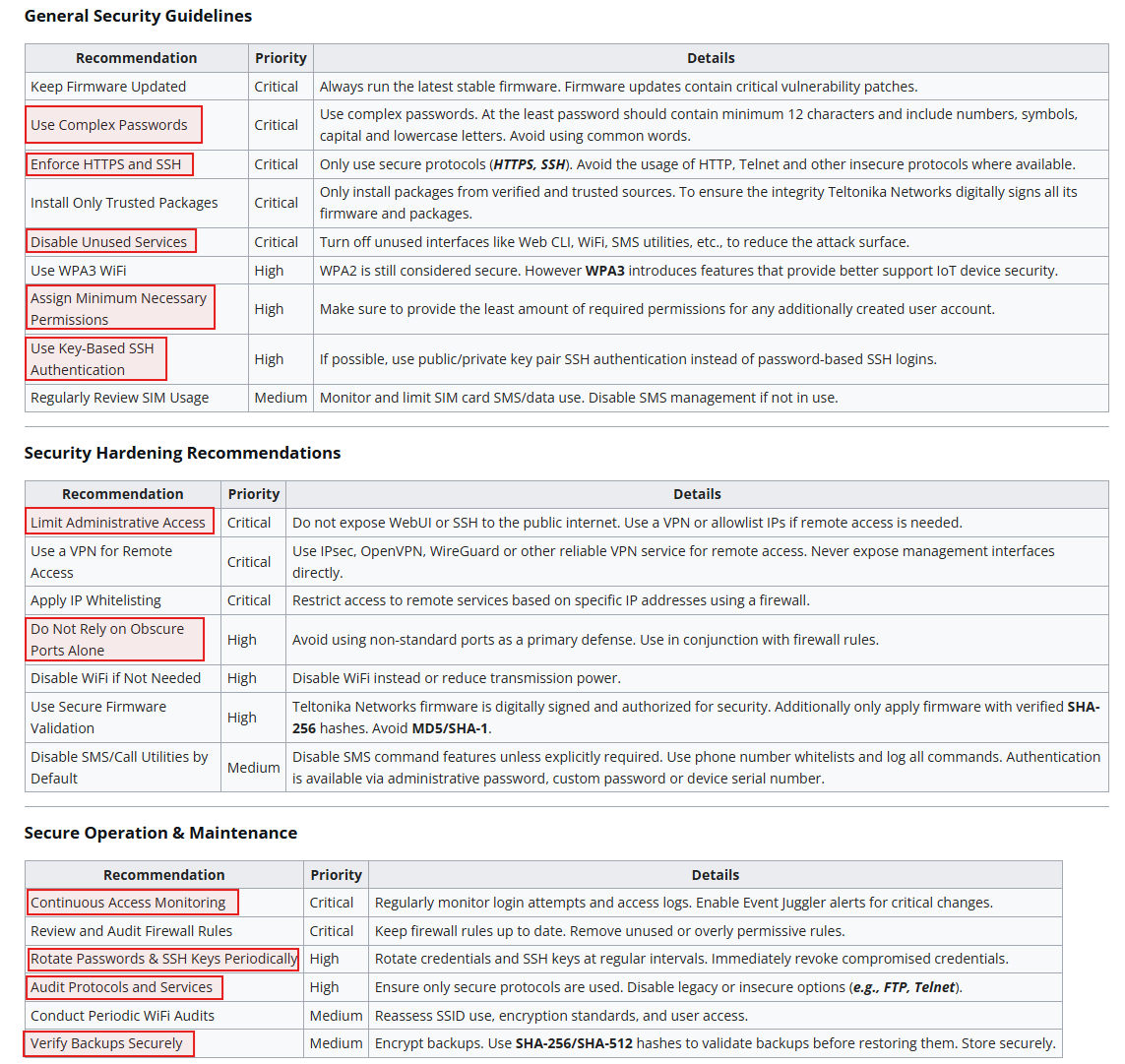
I have marked what is applicable directly on the NTP001
Use a VPN for Remote Access - The NTP001 does not natively run standard VPN client protocols (such as IPsec, OpenVPN, or WireGuard). However, if remote administrative access is required, you can route that traffic through an external gateway VPN.
Best Regards,
Justinas
Sorry to trouble you again, is there any step by step guide on how to implement those applicable items.
Hello @Youyi_support,
For configuring complex password requirements, you can adjust the password in the device’s WebUI under System → Administration → User Settings.
For more information, please refer to the following Wiki article:
For External system logging, you can review the device’s event logs under System → Maintenance → Troubleshoot → Logging Settings.
More information can be found here:
For Key-Based SSH Authentication, navigate to System → Administration → Access Control → SSH. Switch authentication from password-based to key-based authentication, and once key-based authentication has been confirmed to work correctly, disable password-based SSH login.
You can also change the default SSH port to a non-standard port from this section if required.
More information:
For managing user permissions, navigate to System → Administration → User Settings → System Users. Here, you can create users and groups and assign specific permissions to each group according to your requirements.
More information:
To disable unused services, navigate to Status → Services. From there, you can review the available services and disable any that are not required.
More information:
If required, you can also encrypt device configuration backups under System → Maintenance → Backup.
More information:
For additional information on the NTP001 and guidance, please refer to the following Wiki articles:
If you have any issues configuring a specific service or setting, please do not hesitate to contact us.
Best regards,
P.
Hi,
Thanks for the steps provided.
Can i also check is the NTP device running on a proprietary system and may not be able to do credential scanning through common VA tools?
Currently we in the progress of doing some VA scans
Greetings,
The NTP001 runs RutOS it is a Linux based operating system built on OpenWrt. It supports standard SSH access over port 22, so your vulnerability scanning tool should be able to establish an authenticated SSH session.
Best Regards,
Justinas