We have an application where our devices are connecting to another company’s server farm. The problem is our local instrumentation subnet is inside a subnet already in use.
For admin purposes, we connect to our site using GRE over IPSec, this works fine.
Let me five hard values. My local subnet is 192.168.68.120/29. The RUT951 Ethernet address is 192.168.68.121 our instrumentation is 192.168.68.122. The problem is the 102.168.68.0/24 subnet is already in use. This is a pure IPSec connection, no GRE tunnels involved so there has to be some sort of IPtables NAT involved.
In short we’d like to retain the addressing insdie the 192.168.68.120/29 subnet and have the entire subnet static NAT’d such that even to Strongswan the address is different so that the FW at the other end does not see overlapping addresses.
You can create a virtual subnet to represent your devices and then use 1:1 Network Mapping (NETMAP) to translate traffic between the real subnet and the virtual subnet.
Below is a configuration example that closely matches your use case. In the example, two RUT devices are configured, but you only need to make changes on your RUT951. The “server farm” should be configured to expect connections from your virtual subnet. Overlapping subnets with IPsec solution - Teltonika Networks Wiki
Ensure you use the /29 mask in your rules to match your network size.
Referencing the link, in my scenario, the RUT1 has no virtual IP, is have only its WAN IP and LAN IP. The only unit with the virtual IP is RUT2, the client. So can you confirm:
In this case, there would be no iptables rule required on RUT1,
the only iptables rule for RUT2 would be second line: iptables -t nat -I PREROUTING -s 192.168.3.0/24 -j NETMAP -to 192.168.1.0/24
At the moment, I don’t fully understand your setup. Could you please provide a topology diagram that includes the IP addresses? It would also be helpful to indicate which devices can currently reach each other, and which ones cannot but should be able to reach each other.
I have a FW, a fortigate I think, that is connected to some sites in the address range 192.168.60.0/24.
I have a second, completely independent system that is connect to a RUT951 and the 951’s address range is 192.168.60.0/29.
The fortigate FW needs to connect to this RUT951 that has the 1902.168.60.0/8 address range but if we do so normally, it will clobber the current connection that he fortigate has to the existing 192.168.68.0/24 subnet it has.
I need to do NAT inside the IPSec tunnel ONLY on the RUT951 side. Nothing on the fortigate side should be touched. For example, I would like the fortigate to see a destination network of the RUT951 of 192.168.71.8/29 and static NAT this to 192.168.68.0/29. But the adjustments should be done ONLY on the RUT951, not on the fortigate side.
Your example is over complicated as it assumes NAT is required at both ends. Mine I only need it at the RUT951…the IPSec initiator.
Could you please instead provide a drawn topology, with IP Addresses included? Don’t include Public IP addresses or any sensitive data (passwords, mac addresses, etc) in the drawing.
Configuring IPSec on our devices should be quite simple as there aren’t as many options to change as, for example, OpenVPN, so there’s not much to go wrong with. From what i’ve read, some settings for you seem to differ a little, could you please confirm that you have at least the latest stable firmware installed before we proceed with the setup?
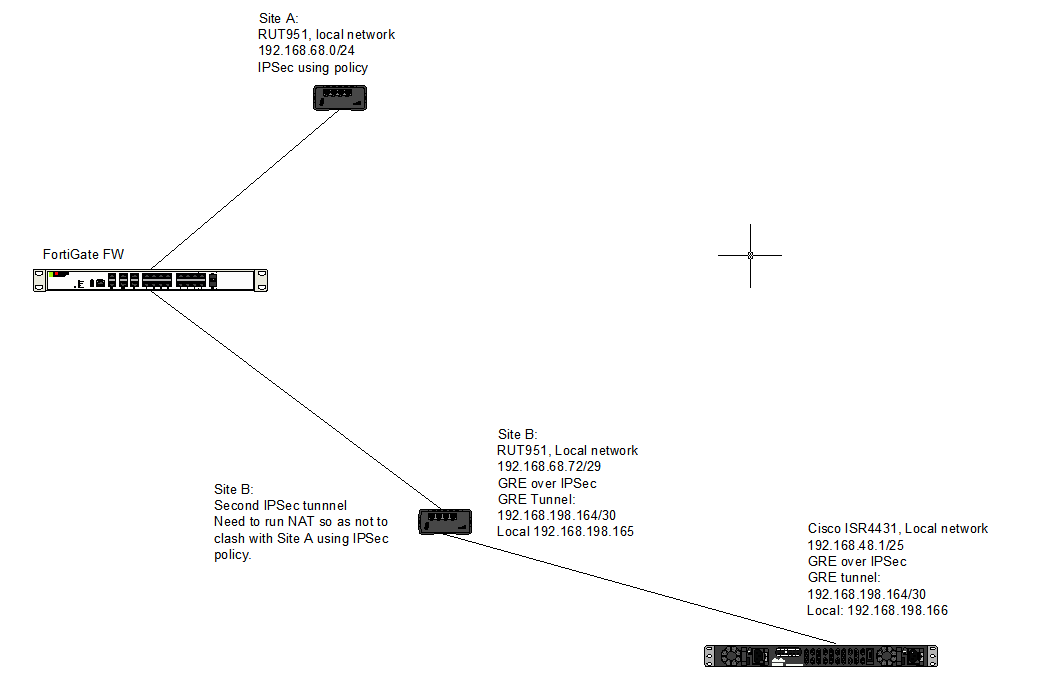
Site A is connecting to the Fortigate using IPSec policy and working fine. As you can see it is using a local network of 192.168.68.0/24. This is working and we want it to remain so.
We want to connect Site B to the fortigate using IPsec policy. The problem is Site B is already connected to the Cisco ISR4431 using GRE over IPsec with a local network of 192.168.68.72/29. As you can see the current addressing is inside site A’s addressing which will mess up things in the Fortigate.
We want to run NAT on Site B to change its addressing so that we can maintain its 192.168.68.72/29 network while connecting to the forgitgate. Say, we’d like to use 192.168.20.0/29 as the addressing the fortigate sees and uses for site B and we’d like to statically NAT that to the 192.168.68.72/29 that is already on site B. So, from the perspective of Site B we want the NAT to happen BEFORE IPSec so that the Fortigate sees only the 192.168.20.0/29 network.
Site B is ok with the internal addressing of the Fortigate which is 192.168.18.0/24 so site B’s IPSec policy is ok with setting 192.168.18.0/24 as the destination policy encryption.
So the current addressing on Site B is 192.168.68.72/29 but I don’t want to Fortigate to see that. I want to one-to-one map 192.168.68.72/29 to 192.168.88.0/29. That is, the destination network in the Fortigate’s IPSec policy would be 192.168.88.0/29 and the TTNK at site B will translate 192.168.88.0/29 to 192.168.68.72/29 after decryption.