I use one of my Teltonika routers as a certificate authority. And discovered over time some problems with it. (Maybe it’s also only related to modern browsers)
First issue is, if you are making a certificate request that explicitly defines subjectAltNames, it would be nice in the sign dialog, that the fields are prefilled out:
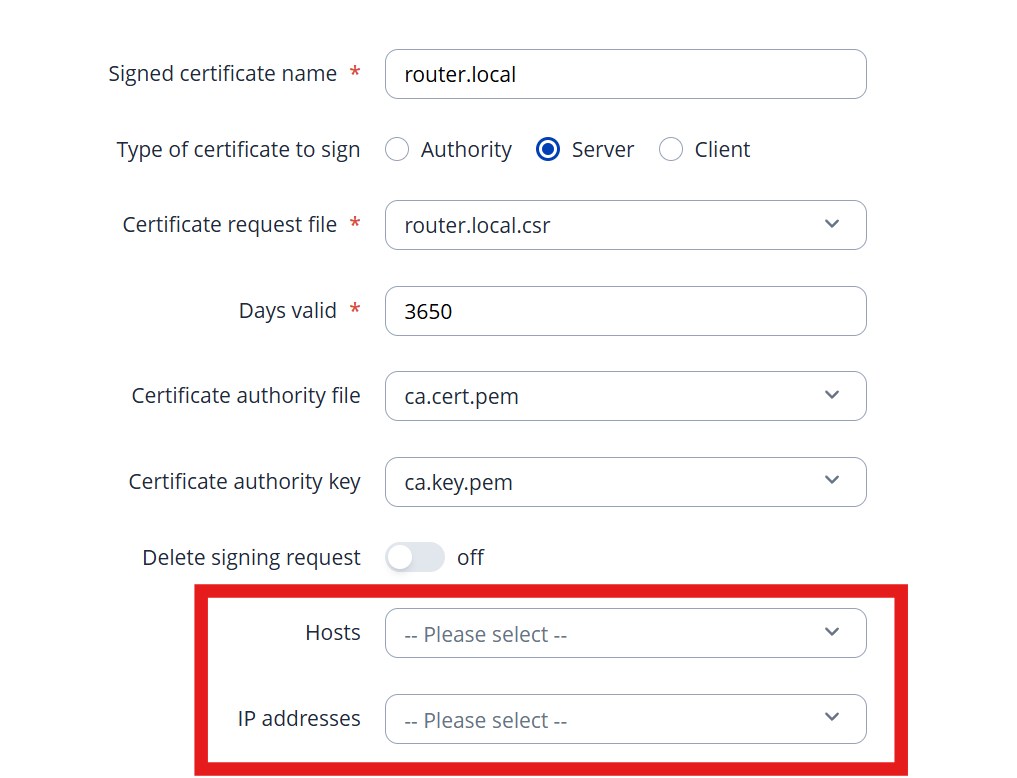
Because it’s a common issue to forget this.
Next thing is, if you select `Server` (what in my understanding is a WebServer certificate, which is mainly used for SSL verification) in the “Create Certificate“ Dialog, it should use the following extensions for OpenSSL:
keyUsage = digitalSignature, keyEncipherment
extendedKeyUsage = serverAuth
basicConstraints = CA:FALSE
(Maybe it would be nice to add a field to add key-value pairs for the definition of extension data)
Another thing that should be done is, in the signing process, to choose which algorithm is to be used for signing. At least on my side, the default “RSASSA-PSS“ for my browsers always causes issues.
So I would like the option in the signing dialog to choose the algorithm. (and the best would be if it is prefilled with the algorithm that was requested in the CSR)
My current way to create certificates connected to my Teltonika CSR is now mostly over CLI (sadly):
- Create manully a csr.txt file like:
[ req ]
default_bits       = 2048
prompt             = no
default_md         = sha256
distinguished_name = dn
req_extensions     = req_ext

[ dn ]
CN = name.local

[ req_ext ]
subjectAltName = @alt_names
keyUsage = digitalSignature, keyEncipherment
extendedKeyUsage = serverAuth
basicConstraints = CA:FALSE

[ alt_names ]
DNS.1 = name.local
DNS.2 = name.mytailnet.ts.net
- Create a csr:
openssl req -new -key .\name.local.key.pem -out name.local.csr -config .\name.local.csr.txt - Sign:
openssl x509 -req -in name.local.csr -CA ca.cert.pem -CAkey ca.key.pem -CAcreateserial -out name.local.cert.pem -days 3650 -sha256 -extfile name.local.csr.txt -extensions req_ext
That works but requires a lot of side work like:
- downloading the CA files form the router
- create all these files
- import them into the router to be able to run a renew in a year to ten